Task Automation Software: Pricing, Limits & Tool Comparison
Compare five task automation platforms using an illustrative lead workflow. See how pricing, usage limits and failure recovery affect tool choice.

In this article · 22 sections +
- What is task automation software?
- A small practical example
- How it works, and which types exist
- Which platform fits your workload?
- How much does task automation software cost?
- What does the lead workflow cost?
- How should you read this table?
- How many leads does each plan cover?
- Zapier tasks
- n8n executions
- Make credits
- Power Automate and UiPath
- What do AI steps cost?
- What happens when a run fails or a limit runs out?
- Why do retries create duplicates?
- How does each platform recover?
- How do you prevent duplicates?
- When the meter runs out
- How do you test a platform before you commit?
- What are the platform security risks?
- Can you move automations between platforms?
- FAQs
Automation looks cheap until a failed run duplicates a lead or a plan limit pauses everything. We follow one lead from form submission through billing, failure, and recovery, and compare Zapier, Make, n8n, Power Automate, and UiPath as of 23 November 2026. We ran no hands-on tests, and the lead workflow is an illustrative example. Every figure comes from vendor documentation and pricing pages, except the Make Core price, which a third party reported (details in the last section). The article covers business workflow and RPA tools, not personal shortcut apps.
What is task automation software?
Task automation software runs repetitive tasks for you, either when an event happens or at a set time, and usually follows rules you define. It reaches apps through APIs, webhooks or screen-based interactions.
A small practical example
A small agency has a “Contact us” form. Without automation, someone copies each lead into a spreadsheet and messages the sales team by hand. With automation, each submission starts a trigger and four actions:
- Trigger: a visitor submits the form.
- Action one: the software adds a row to the lead spreadsheet.
- Action two: it creates or updates the lead in the CRM.
- Action three: it posts a Slack message to the sales channel.
- Action four: it emails the visitor a confirmation.
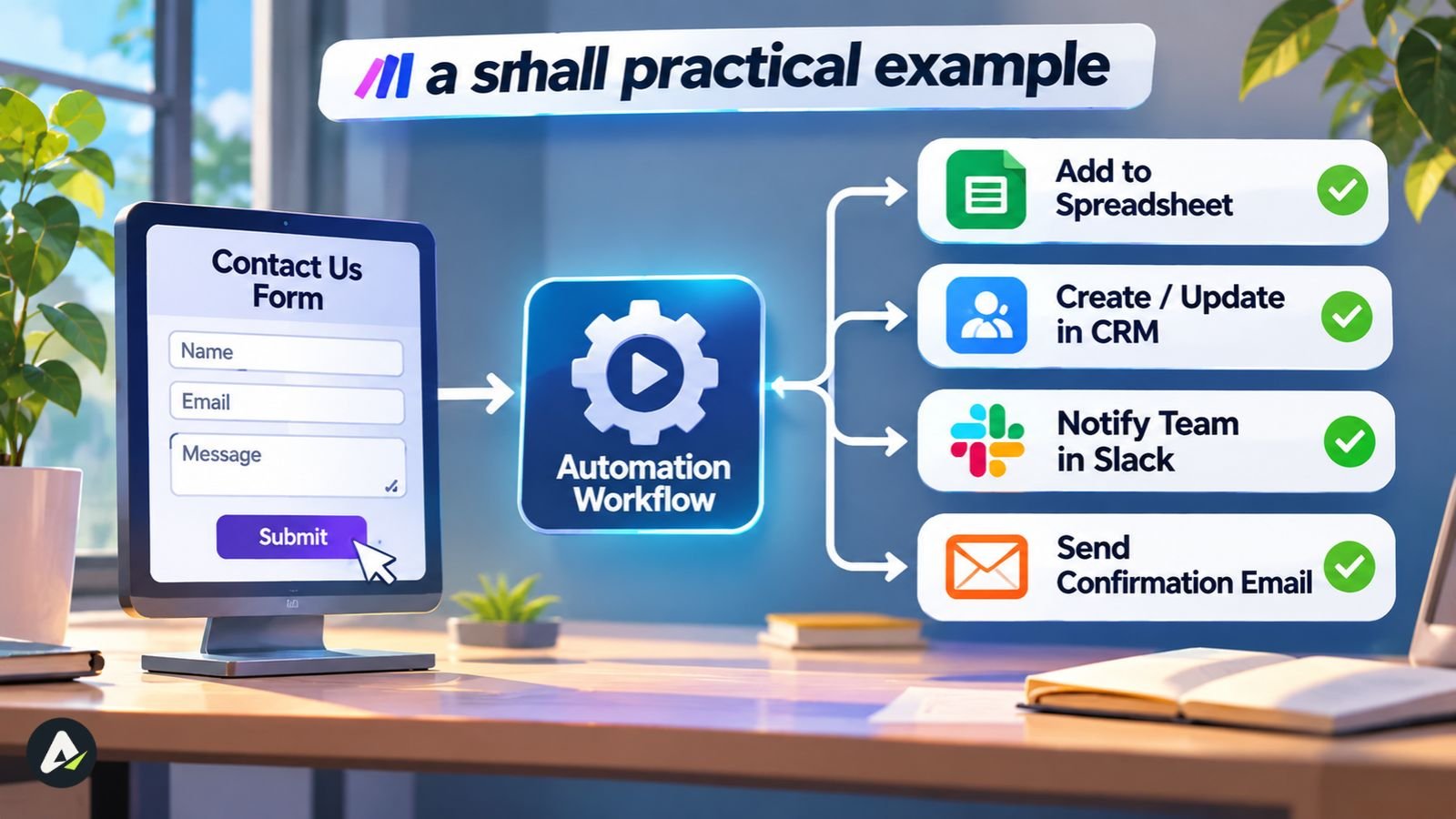
After the agency builds this once, every later lead follows the same path. The agency is made up, not a real customer.
How it works, and which types exist
A workflow starts with a trigger, passes through optional conditions and ends with one or more actions. Tools connect to apps through prebuilt connectors, or through webhooks and APIs when no connector exists, and they record which steps succeeded in each run. Instead of automating everything, automate repeatable steps that have clear inputs, and route ambiguous or high-impact exceptions to a person.
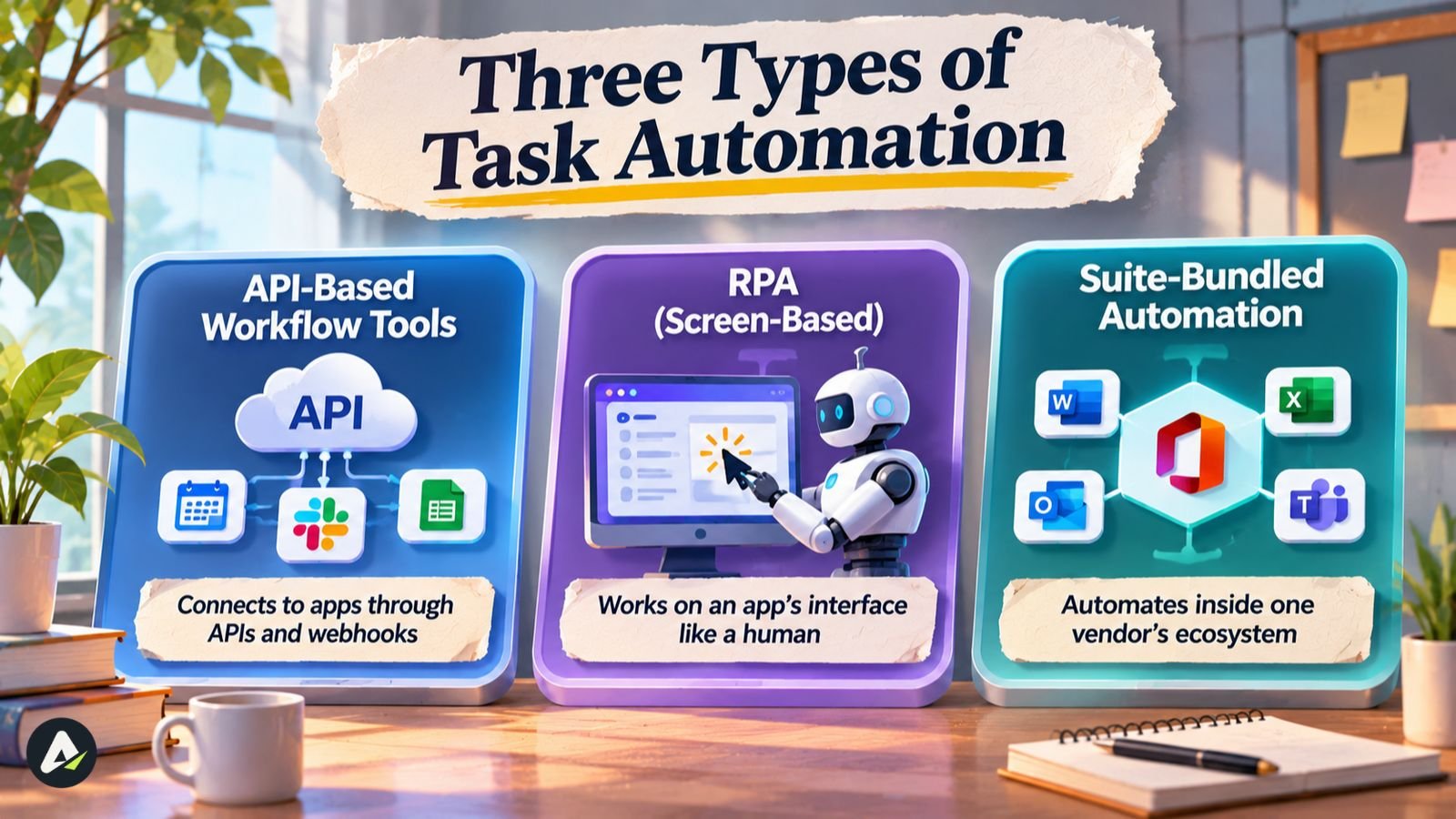
Three overlapping types exist, and one workflow can mix them:
| Type | How it works | Main trade-off | Examples |
| API-based workflow tools | Send structured requests to app APIs through connectors or webhooks | Needs an app with an API or connector | Zapier, Make, n8n |
| RPA (screen-based) | Operates an app’s interface, clicking, typing and reading like a person | Breaks when the interface changes | UiPath, Power Automate desktop flows |
| Suite-bundled automation | Automates inside one vendor’s ecosystem | Premium connectors cost extra | Power Automate with Microsoft 365 |
Which platform fits your workload?
The right tool depends on your apps, your technical skill and your volume. The table below is a documentation-based shortlist, not a tested ranking. First, list your must-have apps, then confirm that each platform supports the exact trigger and action you need.
| If you are… | Consider | Main limitation |
| A non-technical team automating cloud apps | Zapier | Every successful action uses a task, and Free allows only two-step Zaps |
| A visual builder wanting step-level control | Make | Trigger runs use credits, and the webhook queue has a limit |
| A developer-led team that wants to self-host | n8n | Self-hosting makes your team responsible for patching, and Cloud plans include a fixed execution quota |
| A Microsoft 365 company | Power Automate | Premium connectors need the right license for the flow type |
| An enterprise automating legacy screens | UiPath | Screen-based bots break when the interface changes |
Do you need a separate platform at all? A project-management tool’s built-in automation usually covers workflows that stay inside that one tool, such as changing a status, assigning an owner and notifying the team. A platform like Zapier or Make starts to pay off once a workflow crosses several apps, needs branching, or needs failure recovery and usage tracking you control. Before you decide, compare the built-in tool’s run limits and available actions with your volume. Other business automation tools suit different team sizes and budgets.
How much does task automation software cost?
Each vendor meters a different unit, so the same workflow lands on very different plans. Prices below are list prices in USD unless noted.
| Tool | What gets metered | Free option | Entry paid price |
| Zapier | Successful tasks. Triggers, Filter, Paths and Formatter steps don’t count. | 100 tasks a month, two-step Zaps only | Professional from USD 19.99 a month billed annually, 750 tasks |
| Make | Credits. Most non-AI operations cost 1, and trigger modules cost 1 per run. | 1,000 credits a month | Core from USD 12 a month billed annually (USD 16 monthly), 10,000 credits, in the US price view |
| n8n | Production workflow executions on paid plans | Self-hosted Community Edition; no free cloud plan | Cloud Starter from EUR 20 a month billed annually, 2,500 executions |
What does the lead workflow cost?
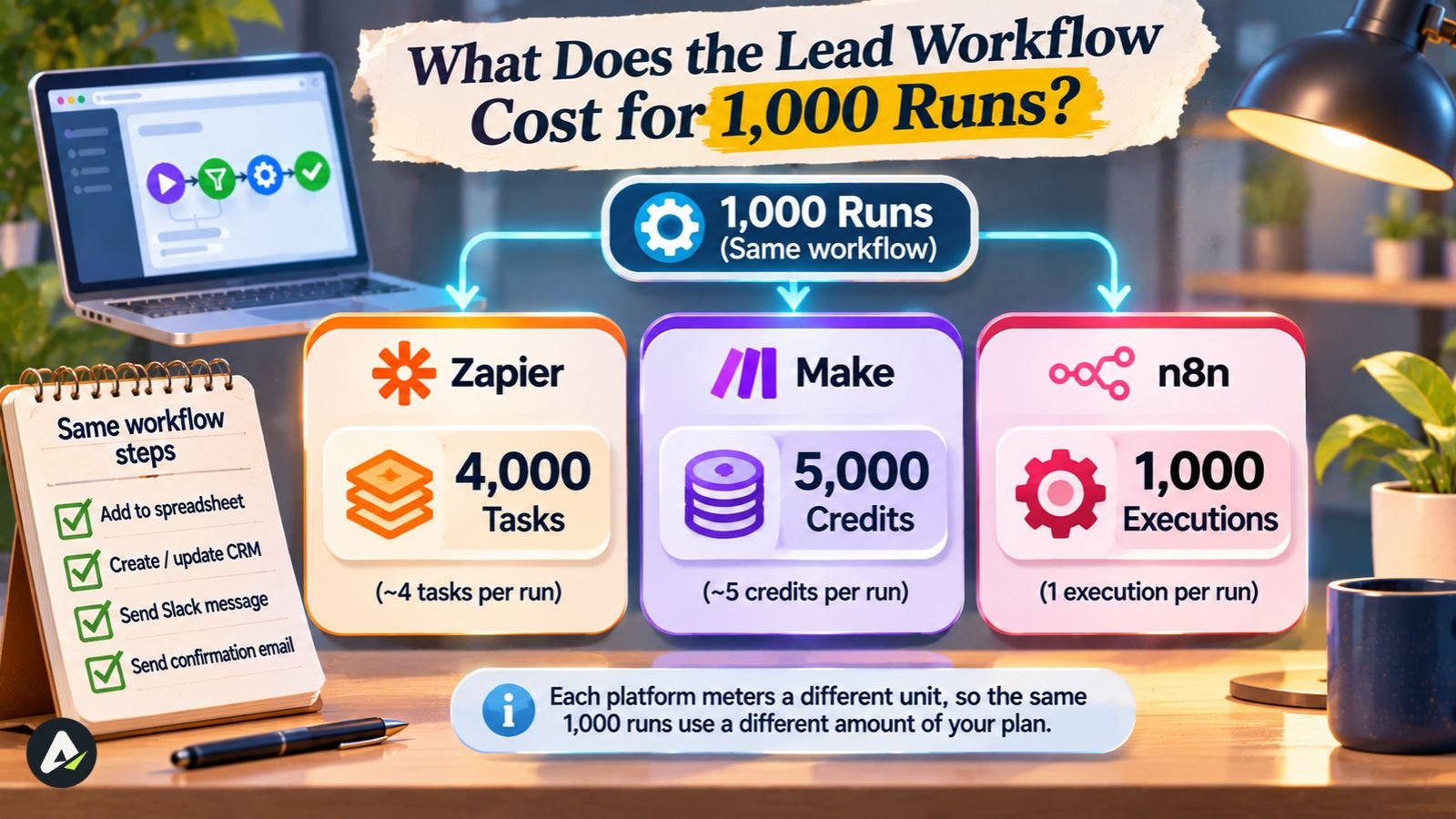
This calculation comes from published billing rules, not from a measured result. We assume one trigger and four standard actions, run 1,000 times a month. Each run starts from an instant or webhook trigger and handles one item, so polling checks, filters, iterators, retries and AI steps add no usage. The Zapier figure assumes Classic Zaps, where each successful action counts as one task and the trigger is free. Zapier says Next Gen Zaps and its SDK begin using tasks on 1 December 2026, so check those rules if you use them.
| Platform | Monthly usage | Listed plan that includes it | List price |
| Zapier | 4,000 tasks; the trigger doesn’t count | Professional, 5,000-task tier, the smallest listed tier that includes 4,000 | USD 89 a month annually; USD 133.50 monthly |
| Make | 5,000 credits: 4,000 for actions, 1,000 for triggers | Core, 10,000 credits included | USD 12 a month annually |
| n8n | 1,000 executions | Cloud Starter, 2,500 executions included | EUR 20 a month annually |
| Power Automate, scenario A | 1,000 automated cloud runs using a premium connector | Premium license held by the flow owner | USD 15 per user a month, billed annually |
| Power Automate, scenario B | 1,000 chargeable premium cloud-flow runs in a pay-as-you-go environment | Pay-as-you-go meter (labeled preview by Microsoft) | USD 600 (1,000 runs at USD 0.60) |
| UiPath | Not priced here | The example uses cloud app actions, not desktop RPA | Per UiPath’s pricing page |
How should you read this table?
The table demonstrates the meters rather than ranking the tools, since each row uses a different unit. Scenario B applies only when the environment links to Azure billing and no license entitlement already covers the runs, and it replaces scenario A rather than adding to it. Real costs run higher once you add polling, retries, AI steps, self-hosting and maintenance time.
How many leads does each plan cover?
The same assumptions give a quick capacity check. 5,000 Zapier tasks cover 1,250 leads, 10,000 Make credits cover 2,000 webhook-triggered leads, and n8n Starter’s 2,500 executions cover 2,500 leads, provided nothing else uses the allowance. However, these are arithmetic ceilings, not benchmarks or guarantees.
Zapier tasks
Zapier’s pricing reference lists Professional from USD 19.99 a month for 750 tasks up to USD 129 for 10,000, billed annually, with higher monthly prices.
Also, pay-per-task billing isn’t available on Free. On paid plans, the overage rate depends on your plan and billing cycle, so confirm your rate in Billing settings. However, even with pay-per-task on, usage stops at three times your included tasks until the next cycle.
n8n executions
n8n Cloud bills one execution per full workflow run, however many steps it has. Its documentation says a sub-workflow counts only as its parent execution, and that error-workflow runs, manual executions and polls that return no data don’t count. In contrast, self-hosted Community Edition has no n8n-metered limit and uses the Sustainable Use License, which isn’t OSI-approved and is meant for internal use. n8n’s pricing page lists plans in euros, offers a form for dollar-denominated annual Business contracts, and marks Business as self-hosted only.
Make credits
Each operation in a non-AI module costs 1 credit, whatever the data size, and trigger modules use 1 credit per run whether or not they return data. For example, a 15-minute polling schedule checks 96 times a day, which burns 2,880 credits over 30 days before any action runs.
Power Automate and UiPath
Microsoft’s pricing page lists Premium at USD 15 per user per month and the Process plan at USD 150 per bot per month, both billed annually. Separately, the pay-as-you-go meters charge USD 0.60 per premium cloud flow run and USD 3 per unattended desktop flow run, and they exclude flows that use only standard connectors. Under Microsoft’s licensing FAQ, automated or scheduled premium flows need Premium only for the owner, while instant flows need every running user licensed unless the flow has a Process license.
UiPath’s Community plan is free, and a paid Basic plan starts at USD 25 a month, hosted in UiPath’s European region. UiPath says Basic is evolving and an updated plan offering is coming soon, so check the pricing page before you buy. Enterprise pricing depends on execution mode, robot capacity and licensing.
What do AI steps cost?
AI steps add cost on top of standard actions. On paid plans, new AI by Zapier steps default to Premium, which uses 5 tasks per run before tool calls. Standard uses 1, Advanced uses 3, and Bring Your Own Key uses 1. Tools need Advanced or Premium models, including on Bring Your Own Key. With Zapier-provided models, each tool call adds the same tier rate, so a Premium step with two tool calls uses 5 × (1 + 2) = 15 tasks. Make’s AI modules consume credits based on tokens and operations. Because a predictable flow like the lead workflow runs fine on fixed rules, ask whether you need an agent before you pay for AI steps.
What happens when a run fails or a limit runs out?
Why do retries create duplicates?
A run can fail after finishing some actions, and a retry may repeat them. For example, in the lead workflow, the sheet row and the CRM update succeed, then the Slack post fails. If the whole workflow starts again, an append-only spreadsheet gets a second row, and the CRM gets a duplicate when the action creates a record instead of updating one by a unique submission ID. Retrying only the Slack step can still post twice if Slack accepted the first request before the workflow timed out.
How does each platform recover?
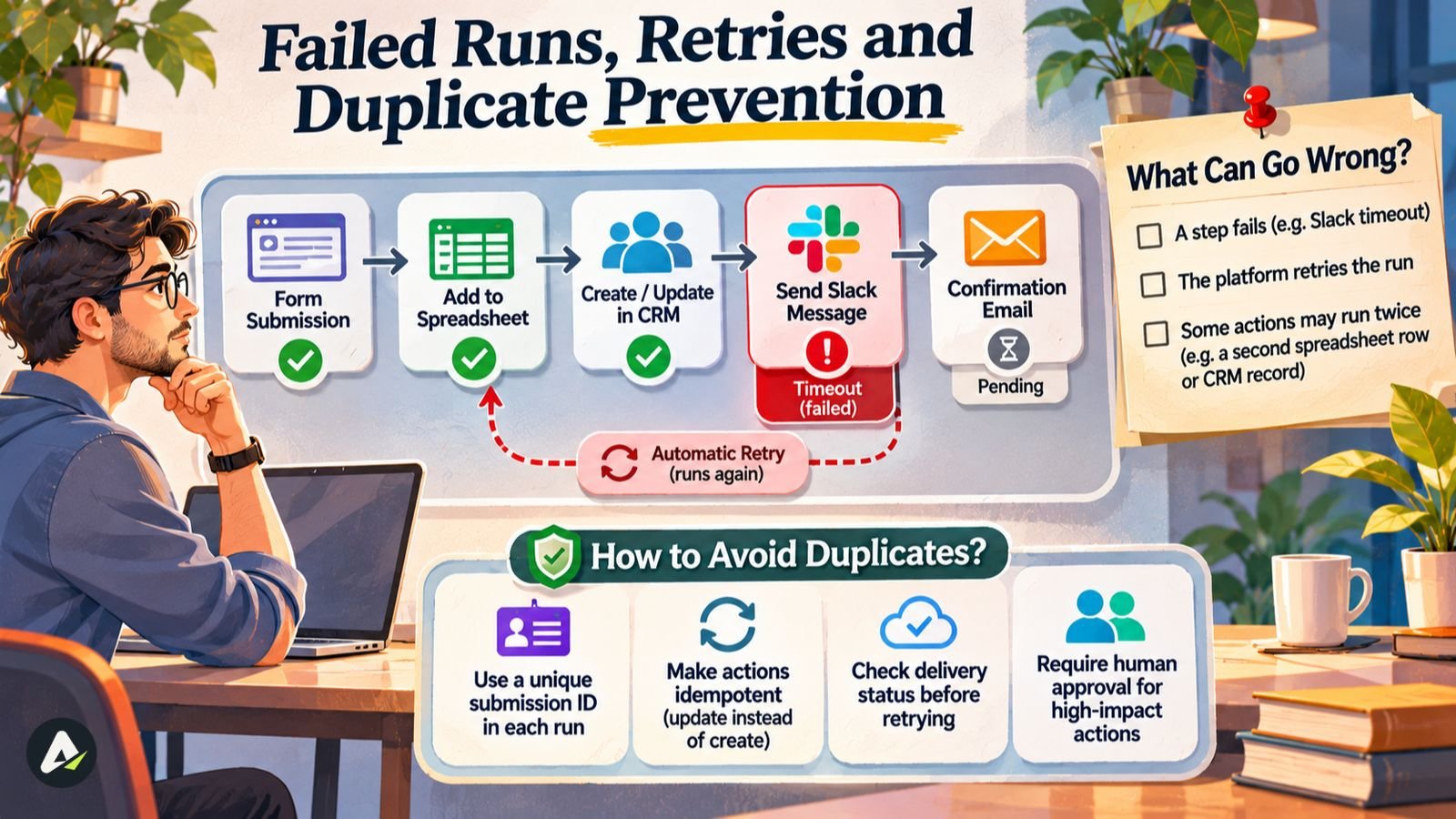
Each platform recovers differently:
- Zapier: replaying errored steps retries only the steps that stopped. Replaying an entire run reruns the trigger and the successful actions too, which can duplicate them, and those steps count toward task usage again. Autoreplay retries a step up to 5 times and sends error emails only after the last attempt fails.
- Make: with incomplete executions enabled, Make stores the failed run, and a retry starts from the module that failed. Make retries certain connection, rate-limit and module-timeout errors automatically, and the Retry error handler adds configurable attempts.
- n8n: an error workflow starts with an Error Trigger node and can alert a team by email or Slack. When you retry a failed execution, completed nodes keep their saved results, but retrying both the failure and its failed retry can repeat work.
- Power Automate and UiPath: Power Automate stops a flow on failure by default, routes failures through Run after settings, offers fixed or exponential retry policies and lets you resubmit failed runs. UiPath retries a queue transaction that fails with an Application Exception when Auto Retry is on for the queue.
How do you prevent duplicates?
However, none of the pages we reviewed say how a retry treats an outside action that only partly finished, such as a request that timed out after the destination accepted it. Plan for repeated work:
- Use a unique key. Key each record on the form submission ID, and upsert or enforce uniqueness in the destination. A lookup followed by an insert can still race when two runs overlap.
- Track each side effect. Handle the Slack post and the confirmation email separately. Where the destination supports an idempotency key, reuse the same key for that submission and action on every retry. Otherwise, check the destination’s delivery or activity log before resending, because a local “sent” flag can’t show whether the destination accepted a request before the workflow wrote the flag.
- Cap retries and alert. Limit automatic retries so a broken step can’t loop, and send failures to a named person.
When the meter runs out
Platforms handle an exhausted allowance in three ways: they hold runs, queue them up to a limit, or reject them.
- Zapier: with pay-per-task off, usage stops at your task limit and new runs are held until the cycle resets. You can upgrade or turn on pay-per-task, then replay the held runs.
- Make: scenarios pause when credits run out. Incoming webhooks wait in a queue, and Make allows 667 queued items per webhook for every 10,000 credits, up to a ceiling of 10,000. A full queue rejects new requests with HTTP 400.
- n8n Cloud: n8n’s support page says executions at the limit are not queued, paused or retried automatically. They fail immediately with an “Execution limit reached” error on Trial, Starter and Pro, and workflows stay active, so triggers keep firing and failing until the month resets or you upgrade. On Business and Enterprise, n8n’s pricing FAQ says workflows keep running and overage charges may apply.

After any pause, compare submission counts against created records.
How do you test a platform before you commit?
We haven’t run this test, so run it yourself on a plan that can run all four actions. First, build the lead workflow with dummy submissions and test destinations. Then submit the same ID twice, force one delivery failure, and replay it. You pass when each submission leaves one record, no unwanted repeat messages, and an alert that someone acts on.
What are the platform security risks?
Automation platforms hold credentials and API access, so a flaw can expose every system they connect to. Also, use least-privilege permissions and rotate any credential you suspect has leaked. Before you buy, ask who can connect production credentials and who can read lead data in run histories.

An AI agent inside the workflow raises the stakes. Governing AI agents means giving each one a named account, limited permissions, and an approval step for irreversible actions. Agents that read outside content can also follow hidden instructions in that content, so narrow permissions matter even more there. A short workflow readiness check can tell you whether a workflow suits an agent at all.
For example, two n8n advisories show how fast a critical flaw can reach an automation platform. On Cloud, the vendor patches, while on self-hosted n8n, your team does. We didn’t audit other platforms’ security histories, so none of this ranks vendors. Run a current supported release rather than the historical fixed versions below.
- CVE-2026-21858 (“Ni8mare”) needs no login. The GitHub advisory describes unauthenticated file access through improper webhook request handling, rated 10.0 and fixed in 1.121.0.
- CVE-2026-21877 requires a logged-in attacker. Its advisory describes remote code execution through arbitrary file writes in the Git node, fixed in 1.121.3, and it also affected n8n Cloud.
Can you move automations between platforms?
Automations move easily within one platform but poorly between platforms. n8n exports workflows as JSON, and Make exports scenarios as blueprints, but you must recreate Make’s app connections after importing. Plan a rebuild when you switch.
FAQs
Q.1 Can a free plan run the lead workflow?
Mostly no. Zapier Free allows only two-step Zaps, and Make’s 1,000 free credits cover about 200 leads. Self-hosted n8n has no n8n-metered limit, but your team handles patching.
Q.2 How often do automation prices change?
Often enough to matter. Zapier updated its AI model tiers on 19 November 2026, so confirm rates on the vendor’s page before you commit.
Related: Lendflow AI Agents: How Lending Automation Works in 2026
| Disclaimer: This article is for informational purposes only. Pricing, features, and usage limits may change. Comparisons are based on published documentation, not hands-on testing. We are not affiliated with or endorsed by the platforms mentioned. Verify current details on official vendor websites before purchasing. |

Sebastian Vale
As AI becomes part of the software people use every day, understanding how these systems perform outside controlled demonstrations is becoming increasingly important. Sebastian Vale is a technology writer covering artificial intelligence, automation, and emerging software. His work focuses on AI agents and the systems that support them, examining their capabilities, practical applications, and limitations as they move into real-world workflows.
More from Sebastian Vale →