Beam AI Review 2026: From Email Triage to AI-Powered Workflows
BeamAI turns repetitive business processes into AI-powered workflows that can read emails and documents, make decisions, and take action across business tools. This hands-on review covers its features, templates, pricing, security, limitations, and what to test before deploying it.


In this article · 18 sections +
- What Is Beam AI?
- How Beam AI Works
- What I Observed vs What Beam Claims
- What I Found Inside the Dashboard
- The Chat Assistant
- Skills
- Agent Templates
- The Flow Builder
- Beam AI Agent OS and Self-Learning
- Beam AI Templates for Finance, HR, Support and Beyond
- Pricing and Free Access
- Data Security and Compliance
- Beam AI vs Traditional Automation
- What Works Well and What Doesn’t
- What to Test Before Deploying Beam AI
- Who Is Beam AI For?
- Final Verdict on BeamAI
- Frequently Asked Questions
Most companies don’t have an AI problem. They have a “someone still copies invoices from Gmail into a folder” problem. Beam AI is built around that kind of operational work: agents that read messages and documents, make a decision, and take action across business systems.
I went through Beam’s dashboard, Skills area, agent templates, and flow builder to separate what the product shows from what its marketing pages claim. This review covers features, templates, pricing, security, limits, and what to test before you commit.
Searching “Beam AI” also returns a construction takeoff tool and other unrelated products. This article covers the agent platform at beam.ai.
What Is Beam AI?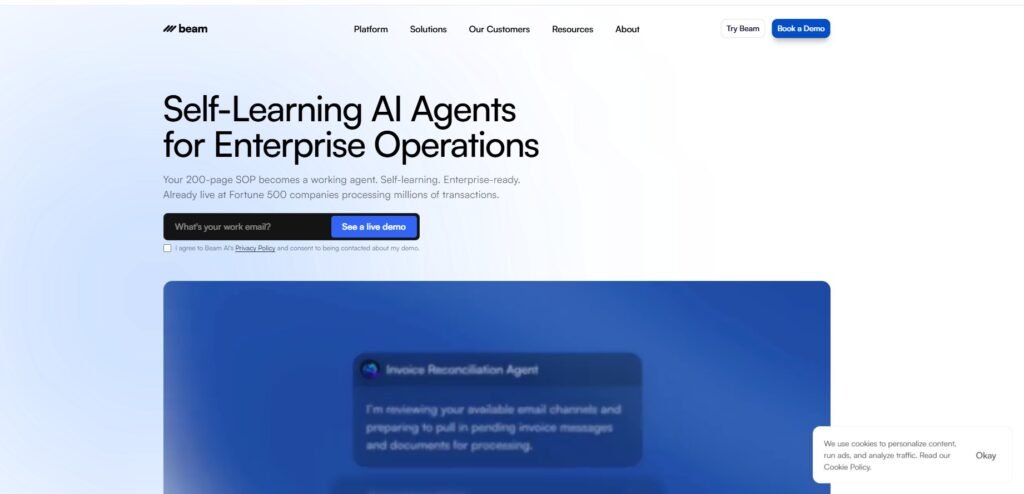
Beam AI is an agentic process automation platform for building AI agents that carry out repeatable business workflows. It combines templates, integrations, tools and a visual flow builder for tasks like email triage, invoice processing, customer support, and candidate screening.
Beam’s about page says it serves mid-market and enterprise teams moving from AI experiments to dependable automation, with offices in Berlin, Abu Dhabi, New York, and Karachi. Jonas Diezun is co-founder and CEO. He previously co-founded Razor Group and helped build Konux. Aqib Ansari is listed as co-founder and CTO.
How Beam AI Works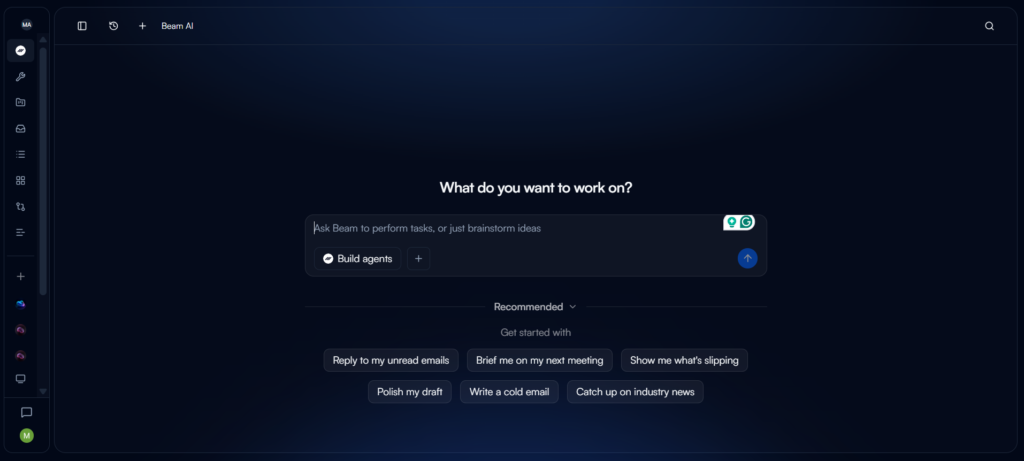
Beam AI works by combining fixed workflow steps with AI reasoning, so an agent follows a defined process but can interpret messy inputs like emails, PDFs, and resumes. You start from a template, a skill, or a chat request. Then you connect your tools, test the flow, and publish it.
Beam’s own pages describe the platform as more than a drag-and-drop builder. They mention tools, integrations, memory, human review, and agents that improve over time. I could see the workflow layer directly. I could not verify the learning claims from the screenshots, and that split runs through this whole review.
What I Observed vs What Beam Claims
An “observed vs claimed” comparison separates what I found while testing BeamAI through its free trial/demo from what the vendor says publicly. It helps distinguish features I could verify directly from claims that are worth checking in your own demo before you commit.
| Topic | What I observed in the dashboard | What Beam says publicly |
|---|---|---|
| Templates | Email, ticketing, finance, HR, and support templates | 200+ production-ready templates (verify current count) |
| Skills | 11 product and people skills, no descriptions shown | A broader skills catalog across HR, support, sales, operations, and more |
| Free access | A three-agent limit with an Upgrade to Pro prompt | Public pricing starts at $499/month; free access isn’t clearly documented |
| Flow builder | Draft status, Test mode toggle, Publish button, Manage access | Agentic workflows that mix fixed steps and AI reasoning |
| Learning | Not visible from the screens | Agents that learn and improve over time |
| Integrations | Gmail, Outlook, Slack, Jira, Linear | Large integration library; counts vary by page |
What I Found Inside the Dashboard
The Chat Assistant
The chat assistant is a side panel where you describe a task in plain language, and Beam tries to handle it. It’s labeled Beta and greets you with “Describe a task. Beam handles it.” A Templates shortcut sits above the input box.
Skills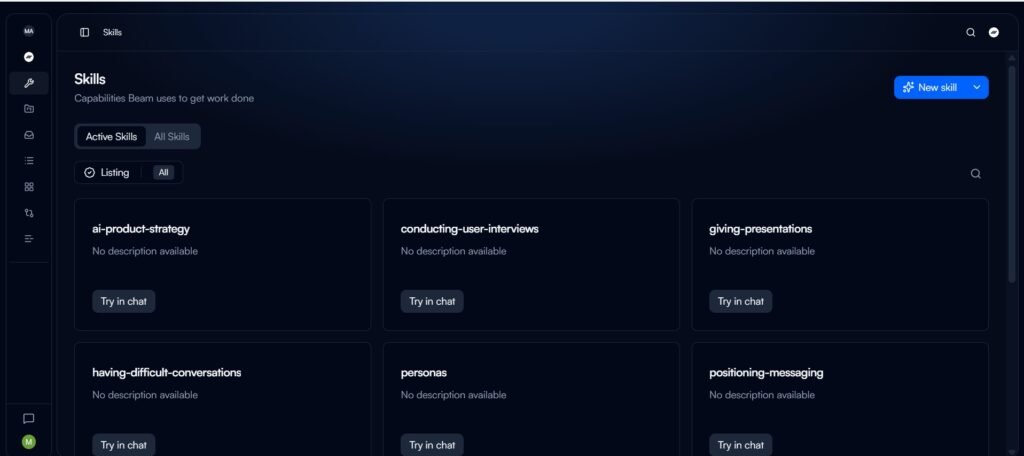
Skills are reusable instruction sets that tell Beam how to approach a type of work. The page has Active Skills and All Skills tabs plus a New skill button. In my account, the visible skills were: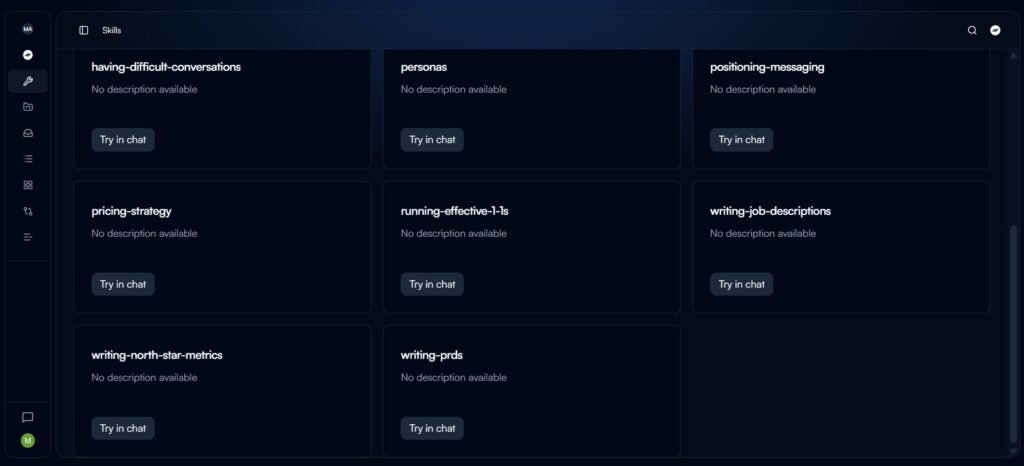
- ai-product-strategy, personas, positioning-messaging
- pricing-strategy, writing-north-star-metrics, writing-prds
- conducting-user-interviews, giving-presentations
- having-difficult-conversations, running-effective-1-1s, writing-job-descriptions
Every card said “No description available” with a Try in chat button. That’s a small usability gap. Don’t assume this list represents the whole catalog, because Beam’s public skills page looks broader than what my account showed.
Agent Templates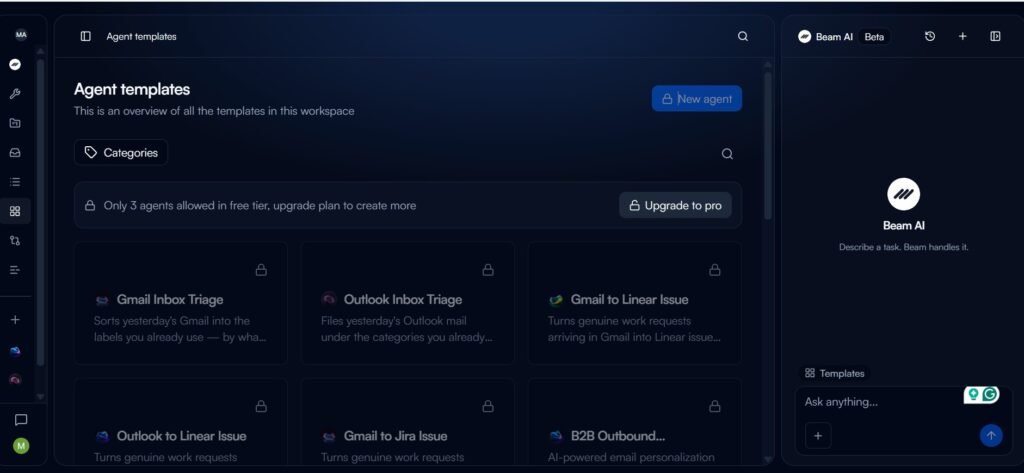
Agent templates are ready-made agents for common jobs that you adapt instead of building from scratch. My library was heavy on email and ticketing: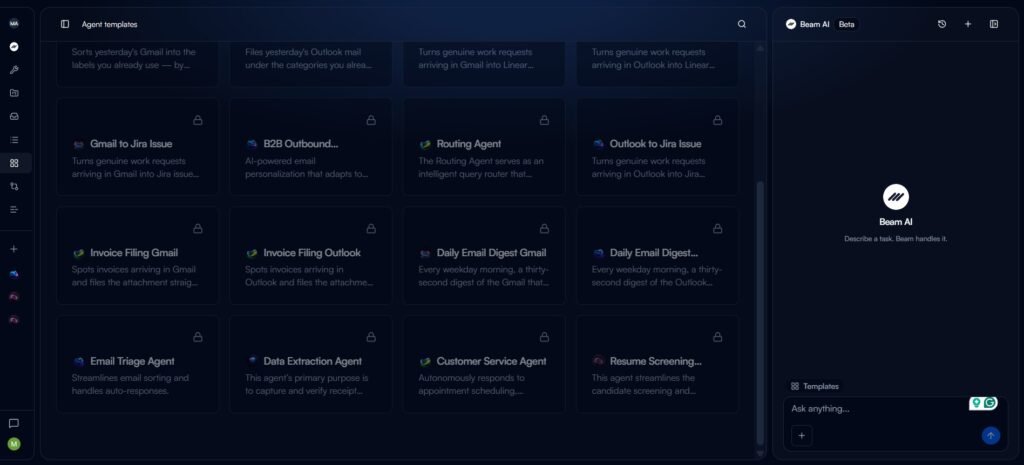
- Inbox: Gmail and Outlook Inbox Triage, Email Triage Agent
- Tickets: Gmail or Outlook to Linear Issue, Gmail or Outlook to Jira Issue
- Finance: Invoice Filing (Gmail and Outlook)
- Digests: Daily Email Digest (Gmail and Outlook)
- Sales and ops: B2B Outbound, Routing Agent, Data Extraction Agent
- Support and HR: Customer Service Agent, Resume Screening Agent
Most templates come in Gmail and Outlook versions, which suits teams split across both.
The Flow Builder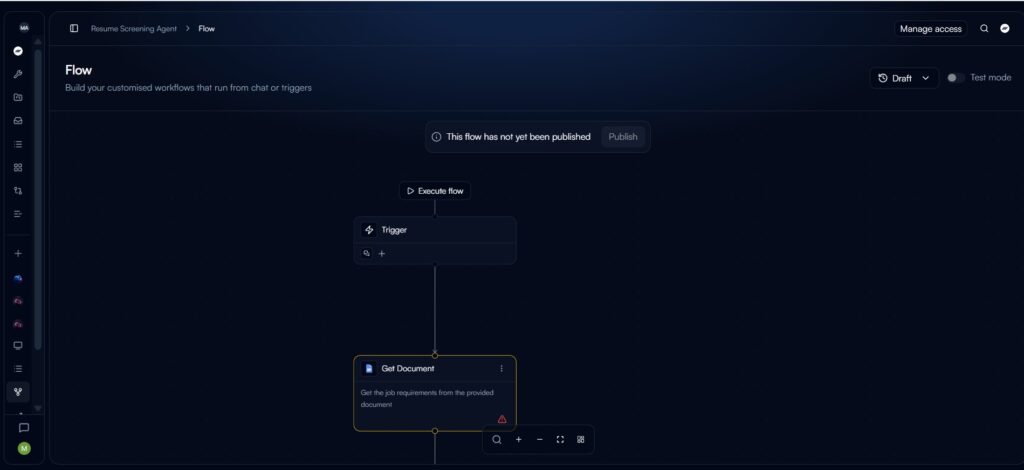
The flow builder is a visual canvas where you chain a trigger, AI steps, conditions, and actions. The Resume Screening Agent shows it well: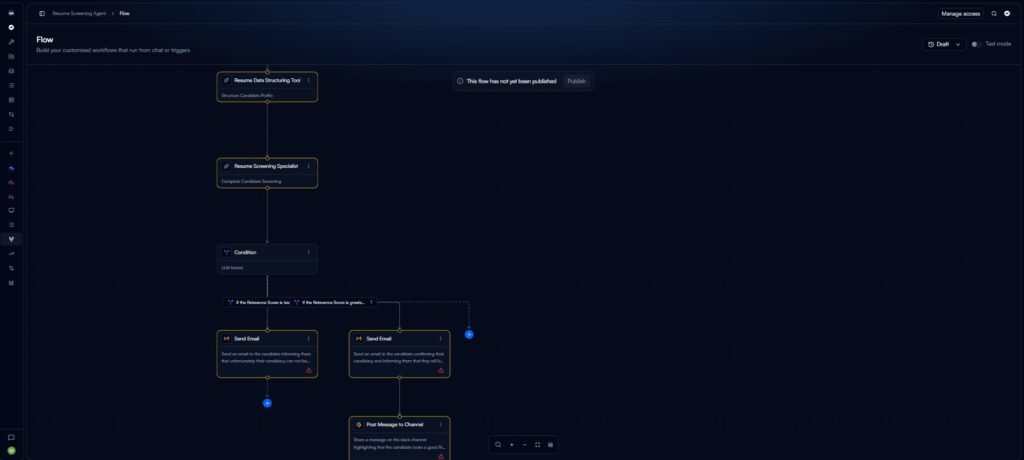
- Trigger starts the flow.
- Get Document pulls job requirements.
- Resume Data Structuring Tool builds a candidate profile.
- Resume Screening Specialist scores the candidate.
- An LLM-based Condition checks the relevance score.
- One Send Email node rejects; another confirms the candidacy.
- Post Message to Channel alerts Slack about strong fits.
Two things stood out. The flow sat in Draft, and several nodes showed red warning icons, which appear to mean the setup was unfinished. There’s also a Manage access button for permissions. The pattern is sensible: AI reads and scores, a rule picks the path, and a person gets a Slack heads-up.
Beam AI Agent OS and Self-Learning
Agent OS is Beam’s name for the layer that runs agents, mixing fixed workflow steps, AI reasoning, tools, memory, and multi-agent coordination. Beam says agents improve through use and that the platform offers a very large library of actions.
Here is how I’d separate the pieces:
- Fixed steps keep the process predictable.
- AI reasoning handles judgment calls, like whether a resume matches a role.
- Tools and integrations let agents act in your apps.
- Memory lets agents keep context.
- Human review catches edge cases.
I saw the first, second, third, and fifth in the dashboard. I did not see evidence of learning over time. Ask for a demo showing an agent’s accuracy before and after feedback on your own data.
Beam AI Templates for Finance, HR, Support and Beyond
Enterprise agent use cases go beyond inbox tidying into regulated, high-volume work like invoices, orders, onboarding, and verification. Beam’s public case studies point to several:
- Finance: invoice filing and finance-team automation
- Order processing: Beam’s order page claims over 98% automation for that task and support for emails, PDFs, CSVs, and calls
- Banking: a European neo-bank case study cites 95.7% accuracy on address verification
- HR and recruiting: a candidate-screening case study cites a 70% cut in screening time
- Hospitality and support: a guest-interaction case study cites 5,750+ monthly interactions across six agents
These are vendor-published results, and each applies to a specific task and dataset rather than representing a platform-wide accuracy rate. That distinction matters because BeamAI is designed to do more than automate a single fixed action—it uses AI to interpret inputs, make decisions, and trigger the next step in a workflow. That broader approach is part of what separates AI agents from simpler AI tools.
Pricing and Free Access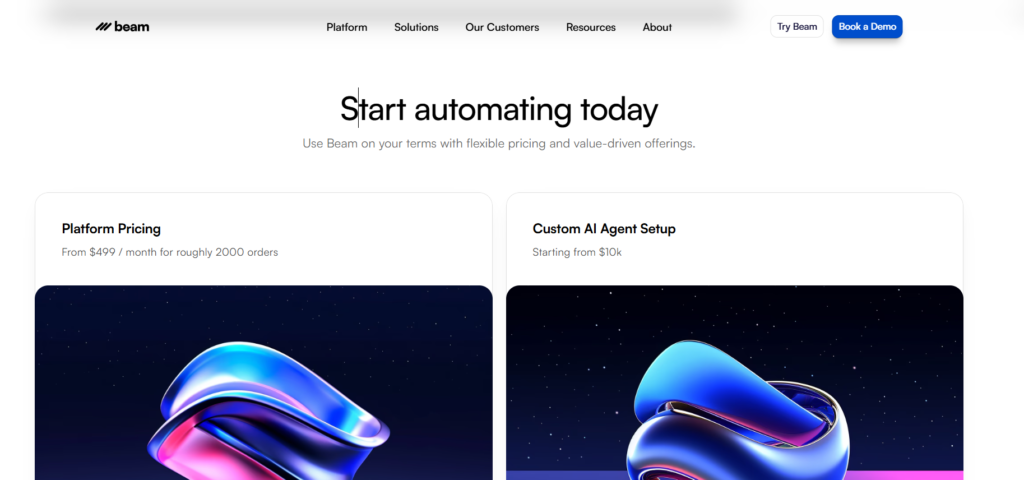
Beam lists platform pricing from $499 per month for roughly 2,000 orders, with custom AI agent setup starting from $10,000. Those are two separate costs: a subscription and a one-time build. Enterprise contracts vary with volume, integrations, and custom work, so treat these as starting points, not a quote.
On free access, I need to be careful. My template screen showed a three-agent limit and an Upgrade to Pro prompt. But Beam’s public pricing doesn’t clearly document a free plan, and some third-party listings say no free version exists. Treat the three-agent limit as something I saw in one account, not a universal rule. Confirm it in your own workspace.
Ask sales for a written breakdown of subscription volume, overage rules, setup scope, and integration costs.
Data Security and Compliance
Data security for AI agents means controlling what an agent can read, where data is stored, who can access it, and how actions are logged. It matters here because these agents touch invoices, resumes, and email.
Beam’s security pages state that it is GDPR-compliant and SOC 2 Type II certified. They also state:
- AES-256 encryption at rest and TLS in transit
- Region-restricted data handling and audit logging
- Automatic backups kept for 30 days
- Annual security training for employees
- A public Trust Center for documentation
Two cautions. Certifications don’t cover how you configure agents, so the risk from over-permissioned accounts stays with you. And Beam’s own page tells buyers to enquire about certification details, so request the report under NDA. If an agent can send email and post to Slack, its permissions should be as tightly scoped as a human employee’s. That makes AI agent identity and access control an important part of deployment, especially when agents can access sensitive business data or take actions on a user’s behalf.
Beam AI vs Traditional Automation
Agentic automation differs from rule-based automation because the agent interprets unstructured input and chooses among actions instead of only following fixed triggers. Here’s how Beam’s features compare with a typical trigger-and-action tool:
| Factor | Typical rule-based tool | Beam AI |
|---|---|---|
| Unstructured input (email, PDF, resume) | Limited without extra parsing | Core use case |
| Starting point | Blank workflow or recipe | Templates, skills, chat |
| Decision logic | If-then rules | LLM conditions plus fixed steps |
| Human review | Add-on | Built into flows (e.g., Slack alerts) |
| Monitoring and access | Varies | Draft/publish states, Test mode, Manage access |
| Setup effort | Low for simple jobs | Higher; needs a clear process |
| Pricing model | Per task or plan | Platform subscription plus custom setup |
What Works Well and What Doesn’t
Strengths
- Templates map to real back-office tasks.
- Flows are visible node by node, which makes them easier to audit.
- Test mode and draft/publish states support safer rollout.
- Public pricing gives buyers a starting point.
Limits
- The chat assistant is still in beta.
- Skills lacked descriptions in my account.
- Flows need setup before they run.
- Performance claims are task-specific and vendor-published.
- Custom setup starts at $10,000, which excludes casual users.
What to Test Before Deploying Beam AI
A pre-deployment test is a short trial on your own data that shows whether an agent is accurate and safe enough to trust.
- Pick one process that repeats weekly and can be documented in a day.
- Run 20–30 real examples in Test mode.
- Keep a person on borderline decisions, especially hiring. Automated candidate screening carries fairness and legal risk in many regions.
- Check permissions before publishing anything that sends email.
- Define success up front: hours saved, tickets created, or errors reduced.
- Request the SOC 2 report and data-residency details.
Who Is Beam AI For?
Beam AI suits organizations automating recurring operational work at volume, not individuals looking for a personal assistant. Its enterprise positioning and pricing point to finance, HR, support, and operations teams.
A solo user may find it more platform than needed. A team whose process changes weekly should stabilize the process first.
Final Verdict on BeamAI
BeamAI looks strongest where work is repetitive, document-heavy, and easy to describe. Here’s what to take away:
- The dashboard shows practical templates and a clear flow builder.
- Pricing starts at $499/month plus $10,000 for custom setup, and I need to confirm the three-agent limit I saw.
- Beam makes the learning, accuracy, and integration-count claims, so verify them in a demo.
- Security credentials look solid on paper. Ask for the reports.
- Keep humans in the loop for sensitive decisions.
Your next step: pick one workflow, run it in Test mode on real data, and compare the result to what Beam promises.
Information current as of September 2026. Features, limits, and pricing may change.
Frequently Asked Questions
Q. Who is the CEO of Beam AI?
Jonas Diezun is the co-founder and CEO. Aqib Ansari is listed as co-founder and CTO.
Q. How much does Beam AI cost?
Beam lists platform pricing from $499 per month for roughly 2,000 orders and custom agent setup from $10,000. Enterprise contracts vary.
Q. Does Beam AI offer a free plan?
Beam’s public pricing doesn’t clearly document one. My dashboard showed a three-agent limit with an upgrade prompt, so check your own account.
Q. Is Beam AI an RPA tool?
Not in the classic sense. RPA follows fixed scripted steps. Beam mixes fixed steps with AI reasoning so agents can handle unstructured input like emails and PDFs.
Q. Does Beam AI require coding?
No. It’s positioned as no-code, with a visual flow builder, templates, and a chat assistant.
Q. How many templates does Beam AI have?
Beam advertises 200+ production-ready templates. My account showed a smaller set, mostly email, ticketing, finance, and HR.
Q. What integrations does Beam AI support?
My screens showed Gmail, Outlook, Slack, Jira, and Linear. Beam says it supports a much larger library, with counts that vary by page.
Q. What is Beam AI Agent OS?
It’s Beam’s layer for running agents, combining workflow steps, AI reasoning, tools, memory, and human review.
Q. Is Beam AI secure?
Beam states it is SOC 2 Type II certified and GDPR-compliant, with AES-256 and TLS encryption. Request the report and confirm data residency before deploying.
Related: What Is Crew AI? How It Works, Pricing, Features & Best Alternatives (2026)
| Disclaimer: This BeamAI review is based on my hands-on testing and publicly available information as of September 2026. I’m not affiliated with BeamAI, and features, pricing, limits, and performance claims may change. |

Maliha
AI is moving steadily from experimental technology into the products and workflows people rely on every day. Maliha Irfan is a technology writer covering artificial intelligence, automation, and emerging software. Her work focuses on the practical side of AI agents, exploring how these systems are being used, what they can realistically accomplish, and the limitations that matter when businesses and individuals adopt them.
More from Maliha →