What Is Crew AI? How It Works, Pricing, Features & Best Alternatives (2026)
CrewAI is an open-source Python framework for building multi-agent AI workflows. Developers define agents with roles, goals, and tools, then assign tasks with explicit expected outputs. Next, they group agents into crews for autonomous collaboration and add flows…

In this article · 24 sections +
- What Is Crew AI?
- Core Architecture: Agents, Tasks, Crews, and Flows
- Code Examples
- Agents, tasks, and a sequential crew
- A stateful flow with a human checkpoint
- Memory in CrewAI
- Crew AI Pricing : Is It Really Free? Plans, Limits & Costs
- Crew AI vs. Lang Graph vs. Auto Gen vs. Other Frameworks
- How Each Framework Approaches Control
- Side-by-Side Comparison
- Mixing Frameworks in the Same Pipeline
- Do You Need Crew AI? A Decision Framework
- Common Crew AI Use Cases
- Building a Crew AI Workflow: Step by Step
- Inside Crew AI Studio: A No-Code Walkthrough
- Describing a Workflow to the Studio Assistant
- From Plan to Running Flow
- Reading a Real Execution Trace
- Deployment Tabs and AMP’s Feature Set
- Controlling Cost and Runaway Execution
- Crew AI Limitations
- Common Mistakes When Building With Crew AI
- What Changed in Crew AI in 2026
- Frequently Asked Questions
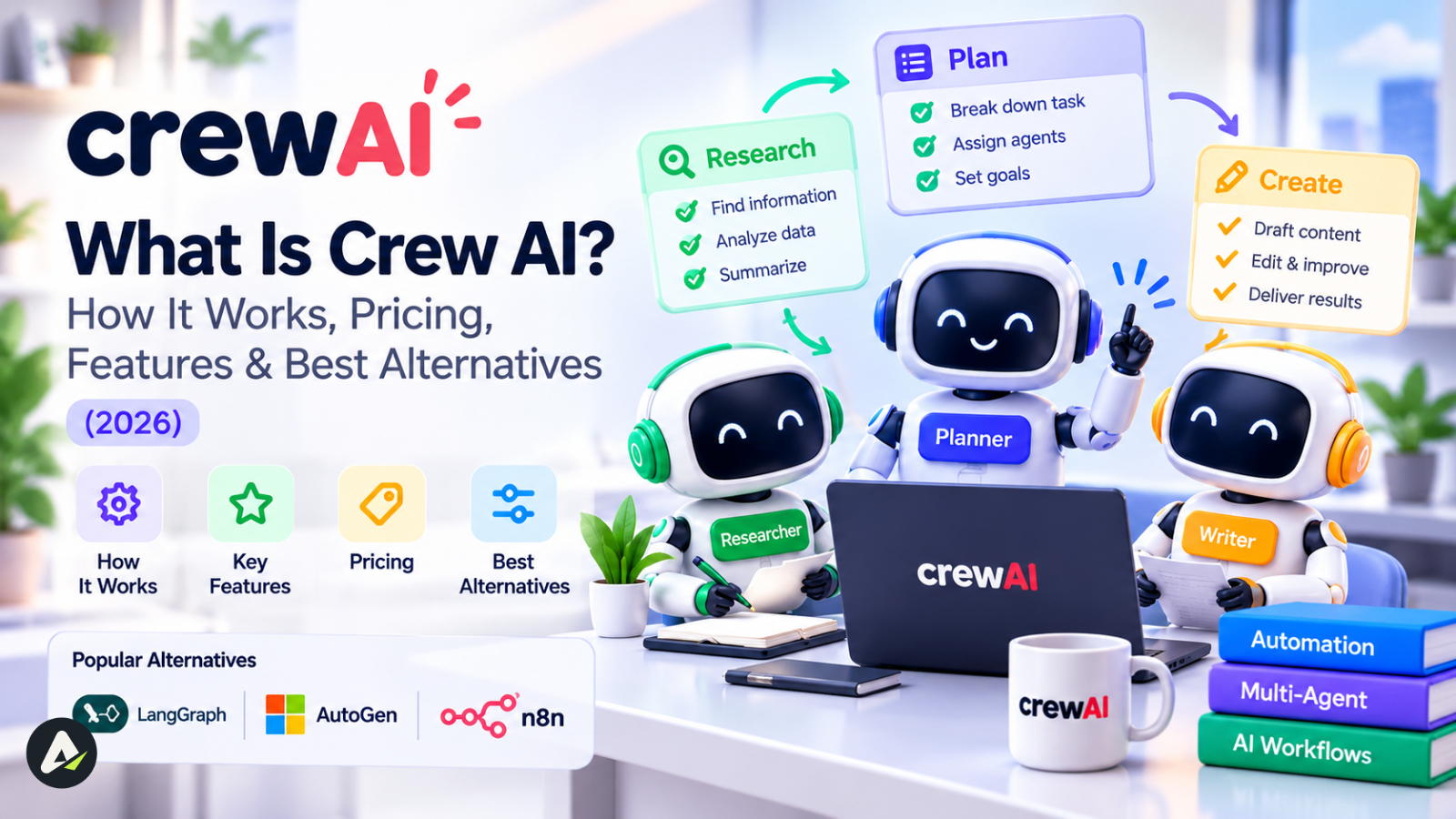
CrewAI is an open-source Python framework for building multi-agent AI workflows. Developers define agents with roles, goals, and tools, then assign tasks with explicit expected outputs. Next, they group agents into crews for autonomous collaboration and add flows when a workflow needs deterministic state, branching, or human approval. It fits work that divides naturally into specialized roles — research, writing, review. Instead, a single well-prompted agent, LangGraph, or LangChain generally serves single-agent tasks, high-precision state control, and broad LLM-tooling needs better.
What Is Crew AI?
Crew AI orchestrates multiple AI agents that collaborate on a shared workflow. A developer configures each agent with a role, a goal, a backstory, and tool access, then assigns tasks and coordinates the group through crews and flows. The core framework is MIT-licensed, self-hostable, and free. Its creator, João Moura, founded crew AI Inc. in 2023 to build a commercial layer — AMP — on top of the same open-source core. As of this guide’s most recent check, the crewAIInc/crewAI repository had surpassed 58,000 GitHub stars. Confirm the current count directly on GitHub, since it changes continuously.
Core Architecture: Agents, Tasks, Crews, and Flows
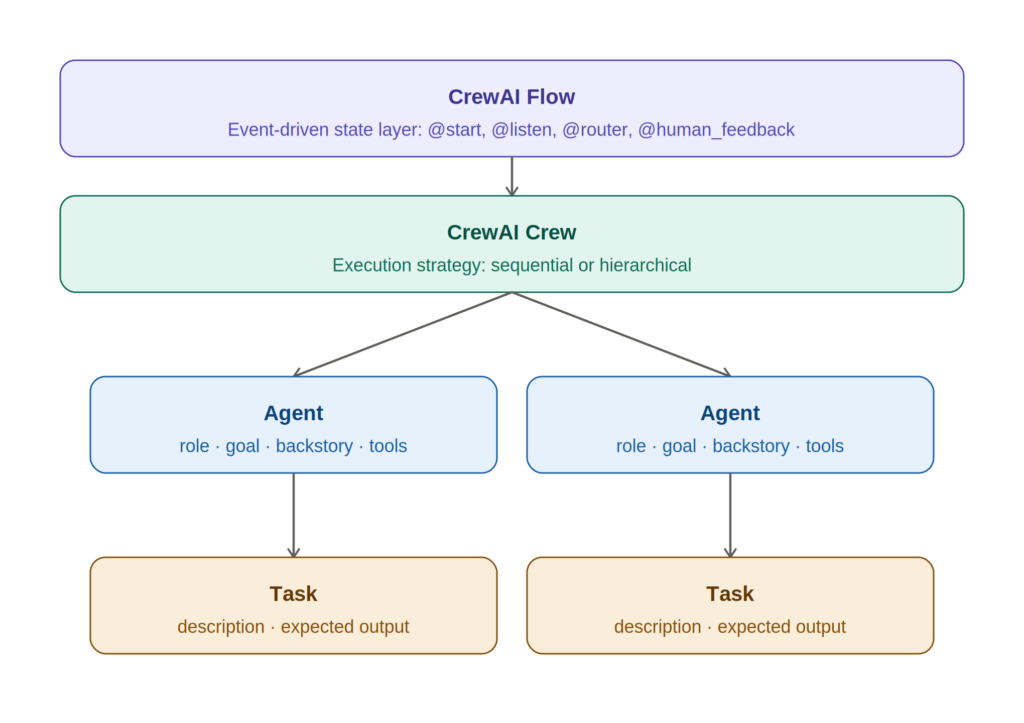
Agents carry a role, a goal, a backstory that shapes behavior, and access to tools such as web search or code execution. A narrow, well-defined role produces more focused output than a general-purpose prompt handling the same task. “Senior technical editor who flags factual inconsistencies” is one example.
Tasks define the work for one or more agents, complete with an expected output format and clear responsibilities. A task without a defined output format is the most common source of inconsistent crew results, so it’s worth getting right before anything else.
Crews group agents and tasks and manage coordination between them. A crew runs its tasks in one of two process modes. In sequential mode, each agent builds on the previous agent’s output; in hierarchical mode, a manager agent delegates work and reviews what the others produce.
Flows form CrewAI’s event-driven, stateful execution layer. Python decorators drive the mechanics: @start() marks an entry point, @listen() chains a method to run after another completes, and @router() branches execution conditionally. Two more decorators handle persistence and people: @persist() saves state across runs, while @human_feedback pauses execution to collect a person’s review before continuing. A crew handles autonomous collaboration between agents; a flow wraps that collaboration in explicit, code-defined control. In fact, CrewAI’s 1.0 release describes Crew and Flow as stable, versioned APIs intended for long-term use.
Code Examples
Agents, tasks, and a sequential crew
from crewai import Agent, Task, Crew, Process

researcher = Agent(
    role="Research Analyst",
    goal="Find accurate, current information on the given topic",
    backstory="An experienced analyst who verifies claims against primary sources.",
)

writer = Agent(
    role="Content Writer",
    goal="Turn research into a clear, well-structured summary",
    backstory="A writer who translates technical findings into readable prose.",
)

research_task = Task(
    description="Research the current state of {topic}",
    expected_output="A bulleted list of five verified facts with sources",
    agent=researcher,
)

writing_task = Task(
    description="Write a 200-word summary based on the research findings",
    expected_output="A 200-word summary in plain English",
    agent=writer,
)

crew = Crew(
    agents=[researcher, writer],
    tasks=[research_task, writing_task],
    process=Process.sequential,
    max_rpm=30,  # rate-limit guardrail, see "Controlling cost" below
)

result = crew.kickoff(inputs={"topic": "multi-agent AI frameworks"})
A stateful flow with a human checkpoint
from crewai.flow.flow import Flow, start, listen, human_feedback
from pydantic import BaseModel

class ResearchState(BaseModel):
    topic: str = ""
    summary: str = ""

class ResearchFlow(Flow[ResearchState]):

    @start()
    def set_topic(self):
        self.state.topic = "multi-agent AI frameworks"

    @listen(set_topic)
    def run_research_crew(self):
        result = crew.kickoff(inputs={"topic": self.state.topic})
        self.state.summary = result.raw
        return self.state.summary

    @human_feedback(message="Approve this summary before publishing?", emit=["approved", "revise"])
    @listen(run_research_crew)
    def review_summary(self):
        return self.state.summary

flow = ResearchFlow()
flow.kickoff()
The agent/task code and the flow code above reflect CrewAI’s documented syntax as of its 2026 release cycle. Confirm exact method signatures against the current CrewAI documentation before deploying, since framework APIs change between versions.
Memory in CrewAI
CrewAI’s memory system changed materially in 2026. Earlier versions split memory into four components: short-term (session context), long-term (cross-session results), and entity (structured facts about people, places, and concepts). A fourth type, contextual memory, blended the first three. The current documentation replaces all four with a single, unified Memory class. It scores what an agent recalls using three weighted signals: semantic similarity, recency decay, and an importance score set at encoding time. LanceDB backs it by default as the local vector store:
python
from crewai import Crew, Memory

memory = Memory(
    recency_weight=0.3,      # exponential decay; recency_half_life_days defaults to 30
    semantic_weight=0.5,     # vector similarity to the current query
    importance_weight=0.2,   # LLM-assigned significance at encoding time
)

crew = Crew(
    agents=[researcher, writer],
    tasks=[research_task, writing_task],
    memory=memory,
)
Setting memory=True on a crew enables this scoring with its documented defaults, without manual tuning. Individual agents can also receive a private memory scope isolated from the rest of the crew. Similarly, a custom storage backend can replace LanceDB by implementing CrewAI’s StorageBackend protocol.
Crew AI Pricing : Is It Really Free? Plans, Limits & Costs
CrewAI pricing has two separate components. The open-source framework itself is MIT-licensed and free to run, with no usage limits or license fee. It’s the entire orchestration stack, self-hosted, with unlimited use. CrewAI, however, prices its hosted commercial platform, AMP, separately from the framework:
| Tier | Price | What’s included |
|---|---|---|
| Open-source framework | Free | Full agent orchestration stack, self-hosted, unlimited use |
| AMP Basic | Free | Visual Crew Studio builder, AI copilot, GitHub integration, roughly 50 workflow executions/month, 2 automations, community support |
| AMP Enterprise | Custom quote | Everything in Basic, plus SSO, RBAC, workload identity, PII redaction, flexible deployment (CrewAI cloud, VPC, or customer infrastructure), and dedicated onboarding/support |
The official pricing page currently lists only these two published tiers. Several third-party sites describe additional mid-tier paid plans instead, commonly citing a $99–$1,000/month range for higher execution volumes. However, figures and tier names vary across those listings, and CrewAI’s own materials don’t confirm them as of this guide’s most recent check. For that reason, treat the official pricing page as the authoritative source for anything beyond the free Basic plan, and confirm current numbers before budgeting.
Open AI, Anthropic, Google, or another model provider always bills LLM API usage separately, regardless of which Crew AI tier you use.
Crew AI vs. Lang Graph vs. Auto Gen vs. Other Frameworks
How Each Framework Approaches Control
Crew AI, Lang Graph, Auto Gen, and similar frameworks all orchestrate multi-agent workflows, but they optimize for different control models. Role-based agent teams are CrewAI’s structure of choice, which makes it faster to model work that maps naturally onto specialized roles. By contrast, Lang Graph takes the opposite path: an explicit directed graph of nodes and edges, giving finer control over state transitions, cyclic execution, retries, and checkpointing. AutoGen centers on conversational agent-to-agent dialogue rather than a fixed role/task structure. The OpenAI Agents SDK and Pydantic AI, meanwhile, take narrower, more opinionated approaches. One is tuned for teams standardized on Open AI models; the other is built for strict, schema-first input/output validation.
Side-by-Side Comparison
| Dimension | Crew AI | Lang Graph | Auto Gen | Open AI Agents SDK |
|---|---|---|---|---|
| Primary abstraction | Role-based agent teams + flows | Stateful directed graphs | Conversational agent dialogues | Direct LLM function handoffs |
| State management | Pydantic flow state, optional @persist() |
Native checkpointer-based state (SQLite/Postgres) | Session-based message state | Native thread/session API |
| Human-in-the-loop | human_input=True at the task level; @human_feedback at the flow level |
Node-level interruption and state editing | User-proxy conversation hooks | Human-approval function callbacks |
| Learning curve | Lower — role/task metaphor | Higher — requires graph-based thinking | Moderate — conversational framing | Lower, but OpenAI-specific |
| Observability | AMP dashboard; OpenTelemetry export | Native LangSmith integration | Third-party/OpenTelemetry | Native OpenAI tracing |
| Best fit | Rapid multi-agent prototyping, role-divided workflows | Long-running production systems needing precise state recovery | Agent-to-agent negotiation and dialogue-driven systems | Teams standardized entirely on OpenAI’s stack |
Mixing Frameworks in the Same Pipeline
These frameworks are not mutually exclusive. Crew AI can call Lang Chain tools directly. In practice, some teams use Crew AI’s role-based orchestration for agent logic while relying on LangGraph-style explicit state management for pipeline parts that need guaranteed recovery behavior. Two further alternatives are worth knowing.
Lang Chain is a broader LLM application toolkit covering chains, retrieval, and tool wrappers, with Lang Graph as its own multi-agent layer.
Pydantic AI, meanwhile, is a typed, schema-first framework for developers who want strict validation across every agent call. Verify current feature sets for each directly with the respective project before choosing, since this category updates frequently.
Do You Need Crew AI? A Decision Framework
| If your workflow is… | Consider |
|---|---|
| A single prompt with a single expected answer | A single LLM call, no framework |
| One agent using external tools | A lightweight single-agent framework, not multi-agent orchestration |
| Naturally divided into specialist roles (research, write, review) | Crew AI |
| A complex state machine with retries, branching, and recovery requirements | Lang Graph |
| A broad LLM application beyond agents — RAG, chains, tool integrations | Lang Chain |
| Conversational agent-to-agent interaction as the central design | Auto Gen |
Common Crew AI Use Cases
- Content creation — a research agent gathers sources, a writer agent drafts, and a reviewer agent checks the output against the brief. Each role runs as a separate task in a sequential crew.
- Software development — one agent generates code, a second reviews logic and flags issues, and a third validates output against test cases.
- Market research — for example, agents split scraping, trend identification, and report synthesis into separate roles instead of one model handling the entire pipeline in a single pass.
Building a Crew AI Workflow: Step by Step
- Install Crew AI with
pip install crew ai(requires Python 3.10 or newer). - Configure an LLM provider — Open AI, Anthropic, Google Gemini, AWS Bedrock, Azure, or another supported backend via the
LLMclass. Providers such as Ollama, Hugging Face, Mistral, and Groq are reachable through Lite LLM. - Define agents with a role, goal, backstory, and any tools each one needs.
- Define tasks with an explicit expected output for each one.
- Assemble a crew, choosing sequential or hierarchical process depending on whether tasks need a managing agent.
- Wrap the crew in a flow when the workflow needs branching, persistence, or human approval steps rather than pure agent autonomy.
- Run with
crew. kick off()orflow. kick off(), then confirm output against each task’s expected format.
Inside Crew AI Studio: A No-Code Walkthrough
Describing a Workflow to the Studio Assistant
Crew Studio is AMP’s visual builder: describe a workflow in plain language to the Studio Assistant chat, and it drafts a plan before writing any code. Typing a request for an SEO content workflow prompts the assistant to lay out a numbered sequence and ask, “Does this look correct?” before generating anything. A “Yes, this is correct” / “No, needs changes” pair then keeps a person in the loop from the first step.
For a two-agent research-and-write pipeline, that plan reads:
- Start: Receive topic — the flow triggers on demand with a topic supplied as input.
- Research Agent — searches the web and collects key information about the given topic.
- Writer Agent — takes the research findings and turns them into a polished article or report.
From Plan to Running Flow
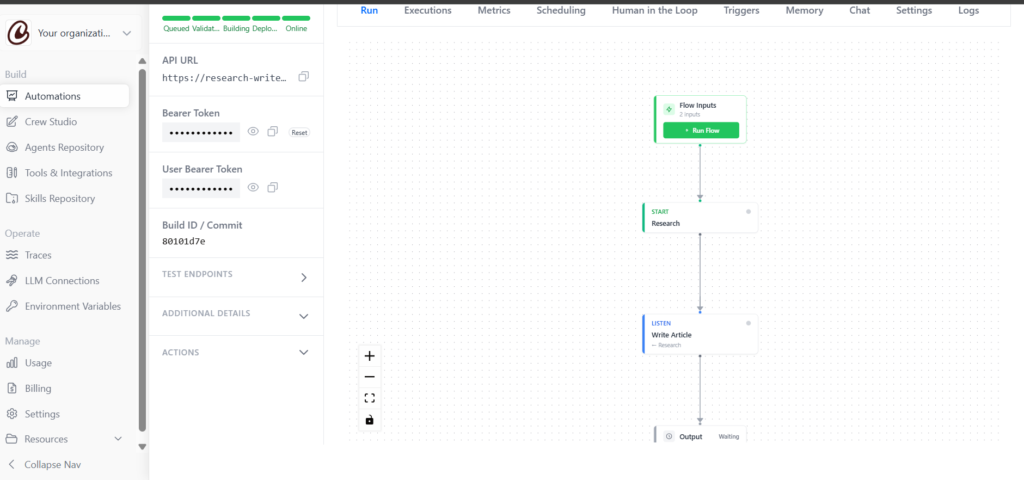
Confirming it produces a working “Research Writer Flow” on the canvas. A Flow Inputs node feeds a START: Research step. A LISTEN: Write Article step then picks up from there, and the chain ends at an Output node. Behind that canvas sit the same roles the Python API exposes directly. A Senior Research Analyst agent handles the research task, and a Professional Blog Writer agent handles write article. In other words, it’s the identical Agent/Task/Crew structure this guide covers earlier, just authored visually instead of in code.
Reading a Real Execution Trace
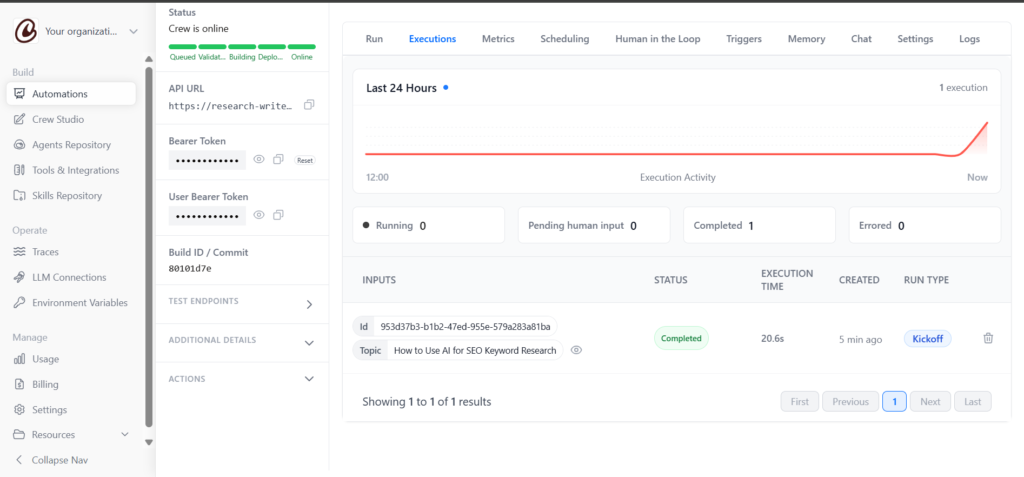
Running the flow opens a parameters modal matching its declared inputs — a single required topic string here, with an optional second parameter collapsed until needed. Submitting “How to Use AI for SEO Keyword Research” kicks off an execution that AMP traces step by step. First, the Research Analyst calls gpt-4o-mini and invokes a web search tool; it then hands the findings to the Blog Writer for drafting. One logged run of this exact flow finished in about 20 seconds, across 3 LLM requests and roughly 42,600 tokens, at a reported cost of $0.0074. That’s a real data point, not a published benchmark. Token counts and cost scale with topic complexity, tool calls, and model choice, so treat any single run as illustrative, not a fixed rate.
Deployment Tabs and AMP’s Feature Set
A deployed flow gets its own management page, with Run, Executions, Metrics, Scheduling, Human in the Loop, Triggers, Memory, Chat, Settings, and Logs tabs. It also comes with a live API URL and bearer token for calling it from outside Crew AI. The Executions tab tracks completed, running, pending-human-input, and errored runs over time. That visibility is exactly what the cost guardrails below aim to keep in check.
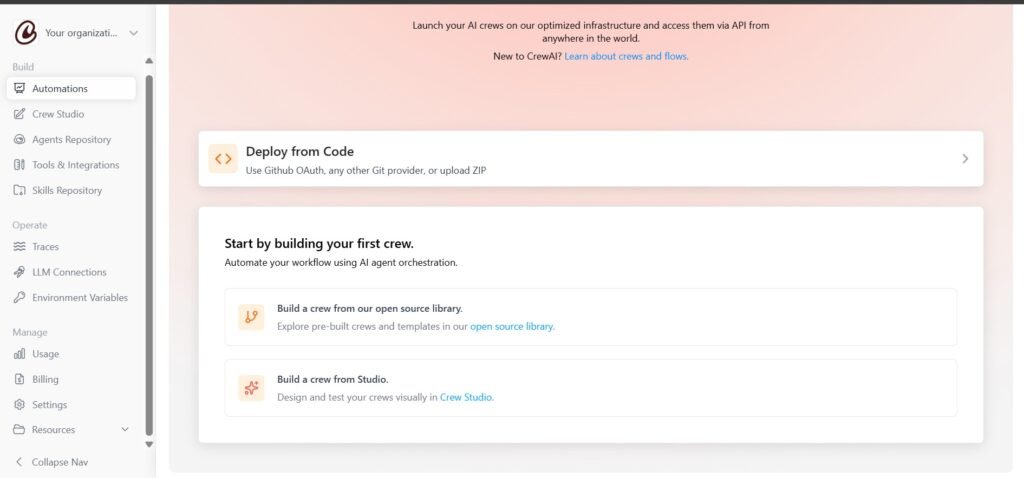
Crew AI’s Automations landing page frames the build choice the same way this guide does. Options include designing a crew visually in Crew Studio, or deploying one you already wrote in code via GitHub OAuth, another Git provider, or a ZIP upload. A third path starts from Crew AI’s open-source library of pre-built crews. AMP advertises a short list of platform capabilities alongside that choice: control and govern, deploy from open source, build with no code, monitor and evaluate, manage costs, and use pre-built agents. Overall, this lines up closely with the pricing table above. Anyone comparing CrewAI Studio against other no-code AI automation platforms will recognize the pattern: a chat-driven builder up front, a code-equivalent structure underneath.
Controlling Cost and Runaway Execution
Multi-agent workflows call an LLM multiple times per run, which multiplies token cost compared with a single-model prompt. On top of that, a hierarchical crew with a manager agent adds another layer of calls. Crew AI exposes several guardrails for this:
agent = Agent
    role="Code Auditor",
    goal="Review Python scripts for security issues.",
    backstory="An automated security reviewer.",
    max_iter=10,             # stop the agent's internal loop after 10 retries
    max_execution_time=300,  # hard timeout in seconds
    max_rpm=30,               # requests-per-minute cap for this agent
Setting max rpm at the Crew level overrides any individual agent’s own max_rpm. Set these limits explicitly during development, and test with a lower-cost model such as GPT-4o-mini or Claude Haiku before switching to a production-grade one. Doing so keeps early iteration costs predictable.
Crew AI Limitations
CrewAI is not the strongest choice for every workflow. Multi-agent systems add LLM calls, token cost, and latency compared with a single-agent approach. If a single well-prompted agent already handles a task cleanly, splitting it across a crew rarely helps. Hierarchical processes add a manager-agent layer that can loop on delegation if task boundaries are unclear. As a result, debugging a multi-agent chain takes more effort than debugging one model’s output. For workflows that require guaranteed state recovery, fine-grained interruption at any execution point, or deep checkpointing, LangGraph’s explicit graph model generally works better. CrewAI also depends entirely on external LLM providers for the underlying model calls. There’s no bundled model, so provider outages or rate limits affect every tier equally.
Common Mistakes When Building With Crew AI
- Vague agent roles. “Assistant” produces vague output; “senior technical editor who flags factual inconsistencies” produces something usable.
- Undefined task output formats. Tasks without a stated expected output are the most common cause of inconsistent crew results.
- Defaulting to hierarchical process for linear pipelines. Hierarchical crews add a manager-agent layer and extra token cost; reserve them for workflows that genuinely need review and delegation.
- Skipping
max_rpmduring testing. For instance, uncapped crews can multiply API calls quickly, especially with hierarchical processes or agents that retry on their own. - Confusing crews with flows. Crews handle autonomous agent collaboration; flows handle deterministic control. Forcing complex conditional logic into a crew instead of a flow produces unreliable behavior.
What Changed in Crew AI in 2026
The Flow system gained the @human_feedback decorator, which pauses a flow at a defined point to collect a person’s review before continuing. It can even route on the outcome: an emit list lets an LLM interpret the response. Memory moved from four separate types to the single, unified Memory class covered above. Lance DB now backs it, replacing the earlier ChromaDB/SQLite combination. Crew AI also reached OSS 1.0 general availability in 2026. The project describes this as locking the Crew and Flow APIs as stable, versioned interfaces for long-term use, alongside native tracing and a unified CLI. Separately, AMP’s Crew Studio visual builder became available on the free Basic tier rather than requiring a paid plan.
Frequently Asked Questions
Q. What is Crew AI used for?
Building systems where multiple specialized AI agents collaborate on a task — content pipelines, code generation and review, and market research workflows that combine data collection with analysis.
Q. Is Crew AI free?
The core framework is open source, MIT-licensed, and free with no usage caps. Crew AI’s AMP Basic tier is also free, with roughly 50 hosted executions per month. LLM provider costs are always separate from Crew AI’s own pricing.
Q. Is Crew AI good for production?
For workflows built around specialized roles with moderate state complexity, yes. For workflows requiring fine-grained state recovery, deep checkpointing, or complex conditional branching, Lang Graph is generally the stronger production fit.
Q. Does Crew AI require an API key?
Yes. Crew AI orchestrates agents but does not supply its own model — every deployment, free or paid, requires an API key from an LLM provider such as OpenAI, Anthropic, or Google.
Q. What are Crew AI’s limitations?
Higher token cost and latency than a single-agent approach, added debugging complexity across multiple agents, potential delegation loops in hierarchical processes, and full dependence on external LLM providers.
Q. Is Crew AI better than Lang Graph?
Neither is universally better. Crew AI is faster to prototype with and easier to reason about for role-divided workflows. Lang Graph gives more precise control over state, retries, and recovery, which matters more for complex production systems.
Q. Can Crew AI work with models other than Open AI?
Yes. Crew AI natively supports Open AI, Anthropic, Google Gemini, AWS Bedrock, and Azure, plus additional providers such as Ollama, Hugging Face, Mistral, and Groq through LiteLLM.
Q. What is Crew AI Studio?
A visual, drag-and-drop interface for building and testing agent workflows without writing Python directly, part of Crew AI’s AMP platform and available on its free Basic tier.
Q. Who owns Crew AI?
CrewAI was created by João Moura and is owned and developed by crewAI Inc., founded in 2023. The framework is developed in the open on GitHub.
For more, visit: Agent Intellect
| Disclaimer: Crew AI features, pricing, APIs, and GitHub metrics can change quickly. Details in this guide reflect the latest information checked at publication and may differ from the current release. Always verify pricing, documentation, and limits on Crew AI’s official sources before making technical or purchasing decisions. |

Maliha
AI is moving steadily from experimental technology into the products and workflows people rely on every day. Maliha Irfan is a technology writer covering artificial intelligence, automation, and emerging software. Her work focuses on the practical side of AI agents, exploring how these systems are being used, what they can realistically accomplish, and the limitations that matter when businesses and individuals adopt them.
More from Maliha →