Moxo Review 2026: Is It Really Worth $5,000 a Year?
Moxo is a human-AI workflow platform that helps businesses run processes involving clients, vendors, and internal teams in one place. AI agents prepare and check the work, and people make the final calls. Think about how client onboarding…

In this article · 26 sections +
- What Is Moxo? Definition and Company Background
- Founder and leadership
- Moxo at a glance
- How Moxo Software Works: Key Features Explained
- The Moxo workflow, step by step
- Moxo AI and Agent Foundry
- Branded client portals
- Integrations and security
- Moxo Use Cases by Industry
- Example walkthrough: a small accounting firm’s tax season
- Moxo Pricing in 2026: What It Actually Costs
- Why you’ll see different Moxo prices online
- Moxo Reviews: Pros and Cons From Real Users
- What users like
- What users dislike
- Read price complaints by date
- Where Moxo Falls Short
- Moxo Alternatives by Use Case
- A quick rule of thumb
- Is Moxo Right for You? A Simple PACE Fit Test
- Common mistakes when adopting Moxo
- Pre-demo checklist
- What Is the MOXO Test? A Different MOXO Entirely
- AI Workflow Trends Shaping Moxo in 2026
- Conclusion
- Frequently Asked Questions
Moxo is a human-AI workflow platform that helps businesses run processes involving clients, vendors, and internal teams in one place. AI agents prepare and check the work, and people make the final calls.
Think about how client onboarding usually goes: forms sent by email, documents lost in threads, and someone chasing signatures for weeks. Moxo turns that mess into a single guided process.
This guide covers what Moxo is, how its AI agents work, what it costs in 2026, what users say, where it falls short, and which alternatives fit different needs. You’ll also get a quick fit test to see if it suits your process, plus a short note on MOXO, the ADHD test with the same name.
What Is Moxo? Definition and Company Background
Moxo is a process orchestration platform that runs multi-step business workflows between internal staff, external clients or vendors, and AI agents, inside secure branded portals. Put simply, it’s where a process lives from the first form to the final signature.
Moxo launched in 2012 as Moxtra, a mobile collaboration app. In 2013, it raised a $10 million first round led by Cisco and KDDI.
Over the next decade, it moved into client portals, then AI workflow automation, and rebranded as Moxo.
Founder and leadership
Subrah Iyar is Moxo’s co-founder and CEO. He previously co-founded WebEx, which Cisco bought for $3.2 billion in 2007.
That background shows in Moxo’s strengths: messaging, meetings, and client-facing workspaces.
Moxo at a glance
| Detail | Answer |
|---|---|
| Company | Moxo, Inc. (formerly Moxtra) |
| Headquarters | Cupertino, California |
| Founded | 2012 |
| Co-founder and CEO | Subrah Iyar |
| Category | Human-AI process orchestration, client portal, workflow automation |
| Core workflows | Client onboarding, service delivery, account management, vendor onboarding |
| Security | SOC 2 Type II, GDPR, SAML SSO |
| Apps | Web, iPhone, iPad, Android |
How Moxo Software Works: Key Features Explained
Moxo software works by turning a business process into a “flow”: a series of steps shared between people and AI agents, each routed to the right person by portal, email link, or mobile app. Nobody hunts through inboxes to find out what’s next.
The Moxo workflow, step by step
- Describe or pick a process. Type a plain-language description, and the AI copilot drafts the flow, or start from the template gallery.
- Assign roles. Map each step to internal staff, external clients or vendors, or an AI agent.
- Add human actions. Drop in approvals, forms, eSignatures, file requests, payments, checklists, questionnaires or time booking.
- Invite outsiders with magic links. External users get an email link when it’s their turn. No account setup, no password.
- Let agents do the grunt work. AI extracts data from uploads, drafts documents, and chases overdue items.
- Track and audit. A reporting dashboard shows open, overdue, and upcoming work, and higher plans add a full audit log.
Moxo AI and Agent Foundry
Agent Foundry is Moxo’s builder for AI agents that each hold a defined role inside a workflow, such as preparing, reviewing, or advising, while a named person signs off on the outcome. If the concept is new to you, this primer on what AI agents are covers the basics.
The named agent types on the Scale plan are:
- Prepare Agent: assembles documents and fills in data before a human sees the step
- Review Agent: checks submissions for errors, gaps, or anomalies
- Advise Agent: recommends a next action or decision
- Automation Agent: completes routine steps on its own
Enterprise adds supervisor agents, model choice, and the option to bring your own agent. That’s useful for teams already working with agentic AI frameworks.
The Digital Project Manager also reports that one agent can check another’s output and escalate anything outside its scope.
Moxo includes simpler AI utilities too, such as extract, summarize, and translate. These act more like tools than agents, and that difference between AI tools and AI agents matters: Team includes the utilities, while the named agents start on Scale.
Branded client portals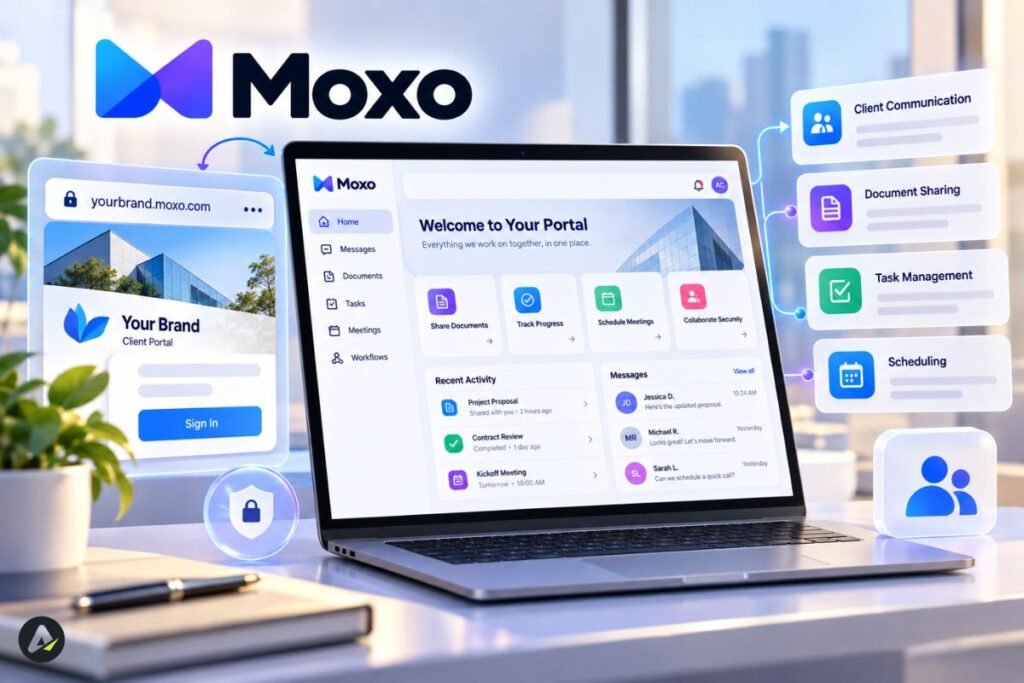
A Moxo client portal is a secure, company-branded workspace where external users see their tasks, files, messages, and announcements in one place. Scale-tier portals add a flow catalog, resources, quick links, an AI chat assistant, and a custom domain.
Integrations and security
Moxo syncs data to CRMs and other systems, runs third-party actions inside flows, and supports custom connections through webhooks, APIs, or Zapier. Commonly listed apps include HubSpot, Salesforce, DocuSign, and Slack.
SSO, webhooks, REST APIs, and MCP start on the Scale plan.
For compliance, Moxo lists SOC 2 Type II and GDPR. Because agents act inside flows, also ask how the vendor keeps AI agent identity separate from human identity in permissions and audit logs.
Moxo Use Cases by Industry
Moxo fits repeatable processes where people outside your company must submit, sign or approve something, such as client onboarding, document collection, vendor compliance, and ongoing account servicing. If a process stays inside your own team, a project management tool is usually enough.
Moxo serves professional services, accounting, legal, healthcare, finance, logistics, manufacturing and real estate. Here’s how that maps to real work:
| Industry | Typical workflow | Where the AI helps |
|---|---|---|
| Accounting | Tax document collection, engagement letters | Extracts data from uploads, chases missing files |
| Financial services and wealth management | Account opening, KYC checks | Prepares forms, reviews submissions for gaps |
| Legal | Client intake, matter updates | Summarizes documents, routes approvals |
| Healthcare | Partner or patient onboarding | Handles forms and acknowledgements |
| Logistics and manufacturing | Vendor onboarding, order fulfillment | Checks compliance documents, flags exceptions |
| Professional services | Service delivery, account management | Drafts status updates, tracks milestones |
Published customer stories lean toward banks such as Citibank, Scotiabank, and BNP Paribas, plus smaller accounting, legal, and healthcare practices. Headline results focus on speed, such as a visa processor cutting processing time from days to hours.
Example walkthrough: a small accounting firm’s tax season
Illustrative scenario, not a published customer story.
Picture a 12-person firm with 300 returns to prepare. Staff email checklists, clients send blurry photos, and someone spends March chasing W-2s.
With a Moxo flow, the process might run like this:
- The client gets a magic link and uploads documents to a file request.
- An extract utility pulls key figures, and a Review Agent flags that one 1099 is missing.
- The flow nudges the client automatically, instead of a staff member.
- An accountant reviews the prepared package and approves it.
- The client signs the engagement letter and pays inside the same portal.
What should the firm measure? Days from invite to complete file, follow-up emails per client, and files completed on the first pass.
Moxo Pricing in 2026: What It Actually Costs
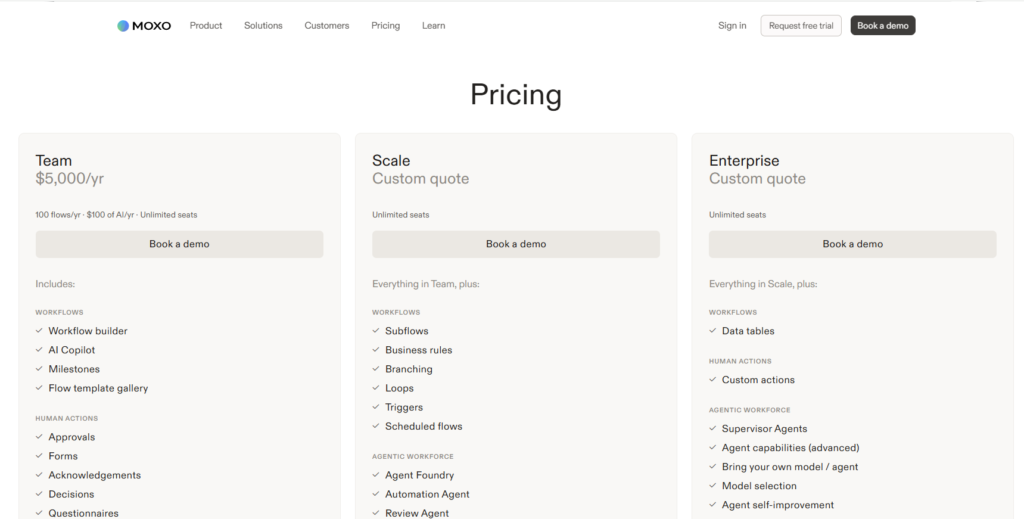
As of September 2026, Moxo sells three plans with unlimited seats: Team at $5,000 per year, and Scale and Enterprise on custom quotes. Team works out to about $417 a month if you spread the annual fee evenly.
| Plan | Price | Limits | What it adds |
|---|---|---|---|
| Team | $5,000/yr | 100 flows/yr, $100 of AI usage/yr | Workflow builder, AI copilot, human actions, magic links, SMS and email alerts, third-party integrations, reporting |
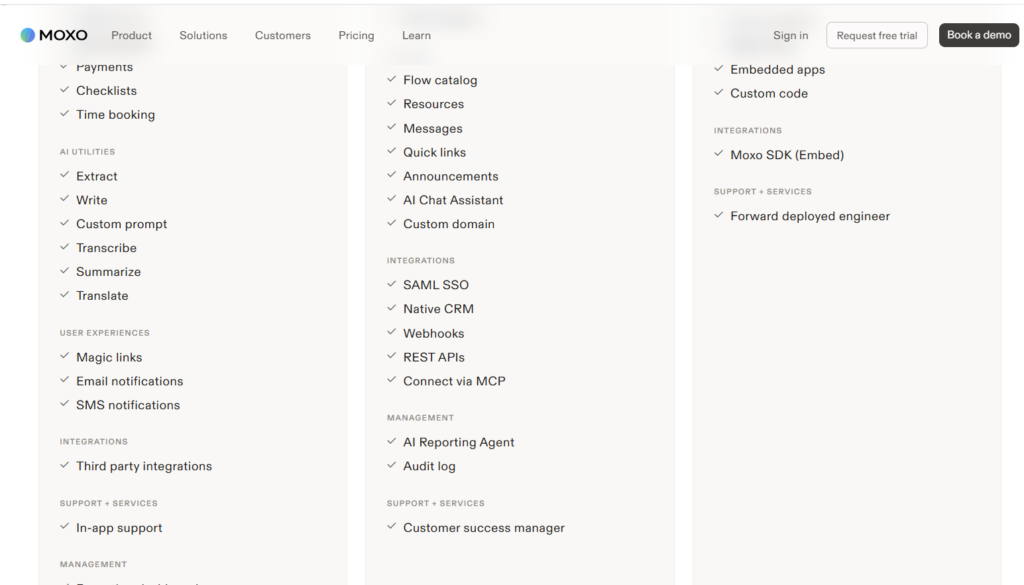
| Scale | Custom quote | Unlimited seats | Branching, loops, triggers, Agent Foundry and four agent types, full portals, SAML SSO, APIs, MCP, audit log, customer success manager |
| Enterprise | Custom quote | Unlimited seats | Supervisor agents, bring-your-own model, custom pages and code, Moxo SDK, forward-deployed engineer |
Why you’ll see different Moxo prices online
Most third-party pages describe older packaging. In March 2026, some still listed a $450 monthly starting price or a $200-a-month Business plan.
Even Moxo’s own August 2026 blog mentions a free plan and an $80 monthly price.
Plan allowances vary too. One September 2026 review reports 250 flows and 25,000 AI credits on Team, while the live page lists 100 flows and $100 of AI. When sources conflict, trust the live page and confirm allowances with sales.
The bigger shift is the pricing model. Moxo now meters flows (process runs), not seats. Here’s what that means in numbers:
- Using the live page’s figures, $5,000 divided by 100 flows = $50 per included flow, if you use the full allowance
- Unlimited seats means adding clients, vendors, or staff doesn’t raise the base price
- If you expect to run well beyond 100 flows a year, you’ll need to evaluate Scale pricing and any overage terms
Fewer than 100 flows a year may fit within Team, but check your AI usage and the features in the plan table above first.
Moxo Reviews: Pros and Cons From Real Users
Moxo users tend to praise its support team, customization, and onboarding results, while the most common complaints are price, a learning curve for less technical clients, and occasional lag.
On G2, Moxo rates 4.5/5 from 194 reviews. On Capterra, it rates 4.0/5 from 24 reviews as of August 2026, and 84% of those reviewers are small businesses.
What users like
- Support: reviewers single out a responsive, helpful support team.
- Customization: teams can tailor forms and notifications to each client.
- Onboarding results: several reviewers describe moving scattered documents into one trackable process.
- Signing and security: eSignature, data security, and multi-party signing are all built in.
What users dislike
- Learning curve for clients: less tech-savvy clients need time, and those already living in Microsoft Teams resist another platform.
- Plan limits: some reviewers mention a 90-day chat history limit on lower tiers, plus lag and freezing.
- Price: many call it expensive for small or new firms.
- Billing friction: a few reviews report payment discrepancies.
Read price complaints by date
Some older price complaints may reflect Moxo’s previous per-plan packaging. Before comparing those comments with the September 2026 pricing, check when each review was written.
Where Moxo Falls Short
Moxo’s main limitations are metered usage, features locked to higher tiers, and a flow-based design that doesn’t replace project management. The client learning curve is covered in the reviews above.
- Flow and AI limits. You pay for process runs and AI usage, so forecast both before you buy.
- Tier gaps. Team doesn’t include Agent Foundry, full portals, SSO, or audit logs, so many buyers will need a Scale quote.
- Not a project management tool. Moxo has no Gantt-style planning view, which makes long, changing implementations harder, as Customer Onboarding Tools points out.
- Possibly more than you need. For a simple file-sharing portal or basic app automation, a lighter tool may cost less.
Moxo Alternatives by Use Case
Moxo alternatives fall into four groups: client portals, workflow automation tools, enterprise integration and BPM platforms, and customer onboarding platforms. Which group matters depends on the problem you’re solving.
| If you mainly need… | Consider | Where it may be a better fit | Where Moxo may have an advantage |
|---|---|---|---|
| Budget all-in-one portal with CRM and invoicing | SuiteDash | From $19/mo with no per-user fees | Workflow depth, AI agents |
| Modern branded client portal | Assembly (formerly Copilot) | Simpler, portal-first setup | Multi-party process coordination |
| Portal plus team collaboration | FuseBase | Lower entry price, from $32/mo | Document collaboration depth, per G2 reviewers |
| App-to-app automation | Zapier or Make | Fast SaaS connections, visual logic | External participants, human approvals |
| Developer-controlled automation | n8n | Custom code, self-hosting | Business-user ownership |
| Enterprise integration | Workato | Large API and data environments | Stakeholder-facing workflows |
| BPMN process modeling | Camunda | Deeply engineered, governed processes | Lighter setup for business teams |
| B2B SaaS customer onboarding | Valuecase or Dock | Collaborative, multi-week onboarding projects | High-volume, compliance-heavy intake |
Tool details come from G2, OneSuite, Moxo’s own alternatives guide, and Customer Onboarding Tools, as of August–September 2026.
A quick rule of thumb
- Moxo becomes more relevant when a process crosses several parties and needs structured approvals, coordination, and an audit trail.
- A portal tool may suit you better when you mainly share files, messages, and invoices.
- An automation tool may suit you better when the work is mostly system-to-system, with few human steps.
Is Moxo Right for You? A Simple PACE Fit Test
My PACE fit test is a simple four-question way to assess whether Moxo fits a particular process: Parties, Accountability, Cadence, and Evidence. It’s an editorial heuristic, not an official Moxo method. Answer each question yes or no for the one process you’d automate first.
| Letter | Question | Why it matters |
|---|---|---|
| P, Parties | Does the process involve three or more parties, including people outside your company? | Moxo’s edge is coordinating outsiders without accounts |
| A, Accountability | Must a named human approve or sign at key steps? | Sign-off steps are built into every flow |
| C, Cadence | Does it repeat at least monthly, following the same steps? | Flows are metered, so repeatable work gives the best value |
| E, Evidence | Do you need an audit trail for regulators, clients, or insurers? | Audit logs and SOC 2 matter here |
How to score it:
- 3–4 yes: Moxo is worth evaluating against your workflow and budget.
- 1–2 yes: a lighter portal or automation tool may cover your needs for less.
- 0 yes: a shared inbox and a checklist may be enough for now.
Then do a volume check. Count how many times the process runs per year and compare that with the flow allowance in your quote.
Common mistakes when adopting Moxo
- Automating a broken process. Most AI projects fail because the workflow underneath is already broken, according to Bain research cited by Moxo. Map the process first.
- Budgeting from old numbers. Use the live pricing page and your written quote, and forecast yearly flows so you don’t run out.
- Skipping client onboarding. A short welcome video or one-page guide helps less technical clients.
- Letting agents close high-stakes steps. Keep legal and financial sign-offs with a named reviewer.
- Forgetting existing tools. If clients live in Teams or Slack, plan the integration before launch.
- Underestimating setup time. Moxo says most teams launch a pilot within days. That’s a vendor claim; plan longer for integrations, SSO or several flows.
Pre-demo checklist
- Pick one process and write its steps on one page
- Count yearly runs of that process
- List every party who touches it, inside and outside
- Note which steps need a human signature or approval
- List the tools it must connect to (CRM, eSign, accounting)
- Ask sales about trial length, AI credit top-ups, and overage costs
- Ask for a reference customer in your industry
What Is the MOXO Test? A Different MOXO Entirely
The MOXO test is a computerized continuous performance test (CPT) from Israel-based Neurotech Solutions that clinicians use to measure attention, timing, impulsivity, and hyperactivity under visual and auditory distractions. It has no connection to Moxo, the software company.
The test supports an ADHD assessment but doesn’t diagnose on its own; clinicians combine it with interviews and rating scales, as noted in The Carlat Report’s review of a 2017 validation study. Free online “ADHD quizzes” aren’t the MOXO test. If attention problems affect your daily life, a licensed clinician is the right place to start.
AI Workflow Trends Shaping Moxo in 2026
Agentic workflow automation is the shift from single trigger-and-action automations toward agents that prepare, check, and route work across an entire process. Four trends stand out:
- Agents inside governed workflows. Moxo cites a 2026 survey in which 60% of U.S. companies plan to deploy AI agents. It’s a vendor-cited figure, but the direction is clear.
- MCP as a common connector. The Model Context Protocol, an open standard from Anthropic, gives agents a shared way to reach other apps. Moxo lists it on Scale.
- Bring your own model. Enterprise buyers want to pick the AI model, and Moxo’s top tier allows it.
- Usage-based pricing. Paying per flow instead of per seat reflects a wider move toward paying for work done.
One honest caution: vendor roadmaps change. Re-check features during your demo.
Conclusion
Moxo has grown from a 2012 mobile collaboration app into a process orchestration platform with its own AI agent builder. Four points stand out:
- It’s built for processes that cross company lines, not internal task lists.
- Live pricing starts at $5,000 a year with unlimited seats; many third-party quotes are out of date.
- The named AI agents and full portals start on custom-quoted tiers, so Team may not cover everything you need.
- Reviews praise support, while critics point to cost and a client learning curve.
Your next step: run the PACE test on one real process. Then compare Moxo’s flow limits, AI allowance, and required features with at least one alternative from the table above. The right choice depends less on company size than on process complexity, volume, and how much human coordination is involved.
Frequently Asked Questions
Q. What is Moxo used for?
Moxo is used to run multi-step business processes involving clients, vendors, and internal teams, such as client onboarding, document collection, vendor compliance, and account servicing. AI agents prepare and check the work, and people approve it.
Q. Who is the CEO of Moxo?
Subrah Iyar is Moxo’s co-founder and CEO. He previously co-founded WebEx, which Cisco acquired for $3.2 billion in 2007.
Q. How much does Moxo cost per month?
As of September 2026, the Team plan costs $5,000 per year, or roughly $417 per month when spread across 12 months. It includes 100 flows and unlimited seats. Scale and Enterprise plans are custom-quoted.
Q. Is Moxo a good company?
Moxo has operated since 2012 under WebEx co-founder Subrah Iyar. As of August 2026, it holds a 4.5/5 rating from 194 G2 reviews and 4.0/5 from 24 Capterra reviews. Users often praise support; common criticisms concern price, tier-gated features, and a learning curve for some clients.
Q. Does Moxo have a free plan or trial?
Moxo’s live pricing page doesn’t list a free plan. The site offers a free trial on request and a personalized demo, but trial length isn’t published.
Q. How do I log in to Moxo?
Go to moxo.com and select “Sign in.” You’ll see two options: Moxo Classic for older accounts and Moxo AI for the current platform. External users usually just click the magic link in their email.
Q. What is the MOXO ADHD test?
The MOXO test is a clinician-administered continuous performance test from Neurotech Solutions that measures attention, timing, impulsivity, and hyperactivity under distraction. It supports an ADHD diagnosis but doesn’t make one on its own, and it’s unrelated to Moxo software.
Related: How Lindy AI Agents Think, Work & Automate Tasks
| Disclaimer: Moxo’s pricing, features, and AI capabilities can change quickly. This review reflects information and product details checked in September 2026, including the current pricing page and available user reviews. Always confirm the latest terms with Moxo before making a buying decision. |

Maliha
AI is moving steadily from experimental technology into the products and workflows people rely on every day. Maliha Irfan is a technology writer covering artificial intelligence, automation, and emerging software. Her work focuses on the practical side of AI agents, exploring how these systems are being used, what they can realistically accomplish, and the limitations that matter when businesses and individuals adopt them.
More from Maliha →