OpenHands Review 2026: Pricing, Setup & Alternatives
Is OpenHands worth using in 2026? Explore its Agent Canvas, free plan, installation options, security risks, and how it compares with OpenCode and Claude Code. Plus, learn how to test its coding performance before trusting it with real projects.

In this article · 27 sections +
- What Is OpenHands?
- How OpenHands Works
- Example: the overnight red build (hypothetical)
- The OpenHands Stack in Late 2026
- Canvas or your editor?
- The enterprise layer
- How to Install OpenHands
- Option 1: npm (easiest)
- Option 2: OpenHands Docker
- Option 3: the CLI
- First-day checklist
- OpenHands Cloud and Pricing
- Why cheap models can cost more
- The costs nobody puts on the pricing page
- Is OpenHands Safe? Sandboxing and Security
- The 2026 git diff flaw
- Habits that help
- OpenHands vs OpenCode vs Claude Code
- Which one fits you?
- Which Tickets Should You Hand Over? A Delegation Scorecard
- Reading the total
- A One-Week OpenHands Trial You Can Run
- Limitations and Common Mistakes
- Where it falls short
- Mistakes that waste time and money
- Final Verdict on OpenHands
- FAQs
In spring 2024, Cognition put out a video of Devin fixing bugs on its own. Developers were impressed. They also couldn’t use it. Within weeks, a handful of researchers had an open version on GitHub, and that scrappy side project grew into OpenHands.
Popularity doesn’t ship clean pull requests, though. The question most teams actually care about is simpler: can you hand OpenHands a ticket on Monday and get back code you’d merge?
Sometimes, yes. Other times it chews through tokens for an hour and returns something confidently wrong. Across user reports and the docs, the gap usually traces back to three things: how the ticket is written, which model runs it, and what checks sit between the change and your main branch.
This review covers what OpenHands looks like after its 2026 shake-up, how to install it, what Cloud really costs, and how it stacks up against OpenCode and Claude Code. You’ll also get a scorecard for picking safe first tickets and a one-week trial to try on your own codebase.
What Is OpenHands?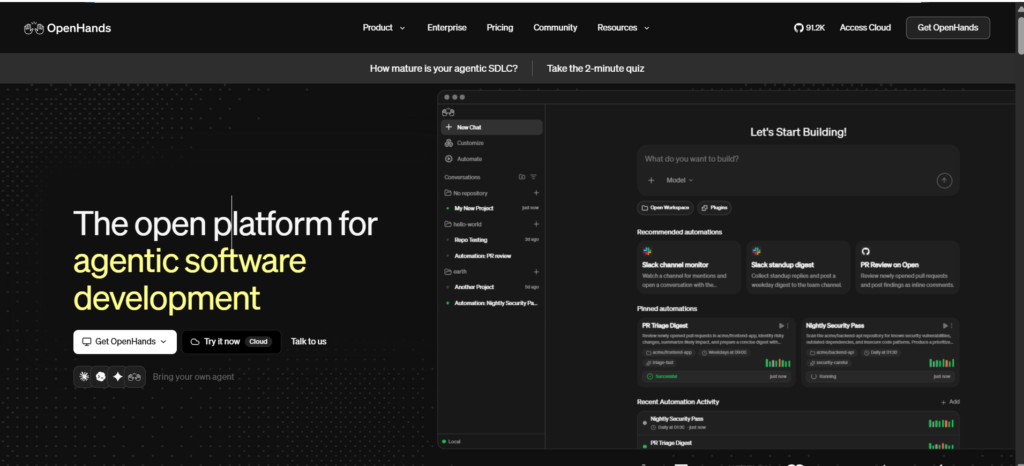
OpenHands is an open-source platform for AI coding agents. You give it a task, and it reads your repo, runs commands, edits files, and checks test output until it can hand back a working change, usually as a pull request.
Two layers sit inside that name. One is the worker that does the coding. The other is everything around it: a workspace UI, sandboxed runtimes, Git and ticket integrations, and admin controls. Keep them apart in your head, and the product suddenly makes more sense.
A quick bit of history, since search results still mix the names. The project launched as OpenDevin in March 2024 and became OpenHands that September, when Robert Brennan, Xingyao Wang, and Graham Neubig formed All Hands AI around it. “OpenHands-AI” in older package names points to the same thing. The core is MIT-licensed, and releases plus security advisories live in the OpenHands GitHub repository.
Compared with autocomplete, the difference is scope. Copilot-style tools guess your next line. OpenHands tries to finish the whole ticket. Just don’t read “autonomous” as “correct.” It only means the tool takes more steps without you.
Also, OpenHands is for code. Inbox triage, meeting scheduling, CRM cleanup? Different job. That’s the territory of business assistants such as Lindy’s AI agents or no-code builders like AgentMan.
How OpenHands Works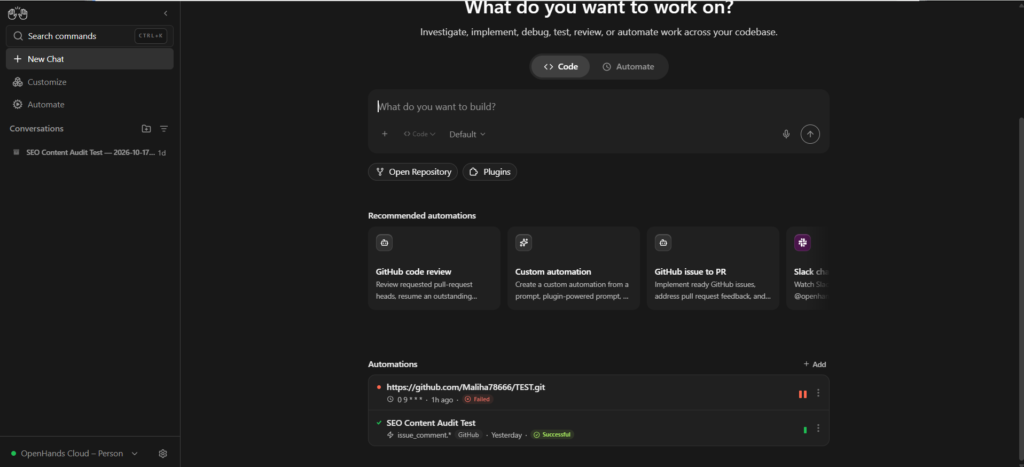
OpenHands works in a loop. Act once, look at the result, decide the next move. It keeps going until the success check passes, the budget runs out, or it stops to ask you something.
In practice, a session looks something like this:
- A ticket, prompt, Slack message, or scheduled trigger kicks things off.
- It explores the repo, reading files, logs, and docs.
- It edits code or runs a shell command.
- It reads the output and test results.
- Then it loops again, opens a PR, or gives up.
Under the hood sits the team’s CodeAct idea: actions get written as runnable code instead of rigid tool calls. That’s flexible. It’s also why clear success criteria matter so much. With a failing test to aim at, the loop has a target. Without one, it’s guessing when to stop. Hold onto that point, because almost every good or bad OpenHands story comes back to it.
Example: the overnight red build (hypothetical)
Picture a small team that sets a scheduled job to watch for failed checks on main. A minor library update renames a function at 2 a.m. OpenHands reproduces the failure, patches three call sites, reruns the suite, and opens a PR before anyone wakes up.
Sounds great. Here’s the trap: a passing suite proves less than you think. An unattended fix can “solve” a red build by loosening an assertion, skipping a test, or changing a function signature that other services depend on. So before letting this run alone, add gates that fail the PR when tests are deleted or skipped, when assertions get weaker, or when lint and type checks complain. A person still reviews the diff in the morning.
The OpenHands Stack in Late 2026
OpenHands is now a small family of products. Agent Canvas is the visual workspace, the CLI covers terminals, IDEs, and CI, OpenHands Cloud hosts it for you, the Software Agent SDK powers it all, and the Agent Control Plane handles enterprise governance.
| Piece | What it does | Who it suits |
|---|---|---|
| Agent Canvas | Browser workspace for sessions, files, terminal output, and automations | Most new users |
| OpenHands CLI | Terminal mode, IDE mode via ACP, headless mode for CI | Shell and IDE users, pipelines |
| OpenHands Cloud | Hosted version with Git, Jira, and Slack hooks | People who’d rather not run servers |
| Software Agent SDK | Python framework behind the whole system | Teams building custom workflows |
| Agent Control Plane | Spending caps, MCP access, secrets, audit logs | Platform and security teams |
Canvas or your editor?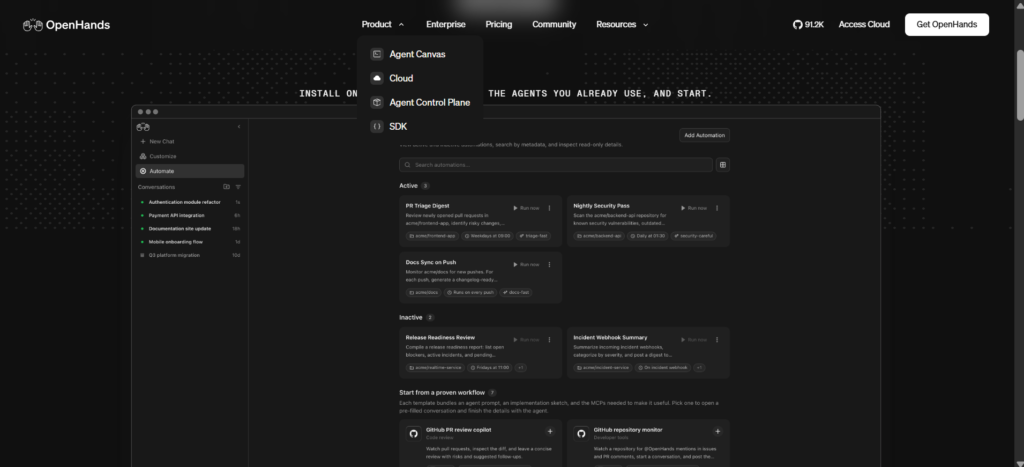
The team calls Canvas the new face of OpenHands, and in mid-2026 it folded Canvas into the main GitHub repo. Still, plenty of senior developers live in a terminal or IDE and won’t move to a browser tab. They don’t have to. The CLI’s acp mode plugs OpenHands into Zed, VS Code, and JetBrains through the Agent Client Protocol.
The protocol works the other way too. Canvas can host Claude Code, Codex, or Gemini CLI as the worker. Why bother, when Claude Code runs fine in a terminal? Mostly for what surrounds it. You get many sessions side by side, cron and event triggers from GitHub, Linear, or Slack, the option to run on a remote VM or cloud sandbox instead of your laptop, and one set of spending and access rules across every tool.
The enterprise layer
The Agent Control Plane, launched in spring 2026, is where admins set budgets, store secrets, and decide which MCP servers each workspace can reach. That MCP piece deserves more attention than it gets. Because OpenHands acts as a Model Context Protocol client, it can call your own tools (an issue tracker, a database, an error monitor) through an MCP server rather than a custom integration. Enterprise plans also list a Large Codebase SDK for bigger repos.
Wiring all of that together takes platform skills many companies don’t have in-house, which is why some bring in outside AI agent development services for the first rollout.
How to Install OpenHands
Forget hunting for a single OpenHands download file. The download button on the official site now sends you to the Canvas setup guide, and from there you choose npm, Docker, or the CLI.
Option 1: npm (easiest)
Install Node.js 22.12 or newer and Python’s uv tool, then run:
npm install -g @openhands/agent-canvas
agent-canvas
It opens at http://localhost:8000. No global install wanted? npx @openhands/agent-canvas does the same job.
Option 2: OpenHands Docker
On a shared server, a container keeps things tidy:
docker pull ghcr.io/openhands/agent-canvas:latestThe run command mounts a projects folder and ~/.openhands for settings. Image paths changed during 2026, so copy the exact flags for your OS from the Agent Canvas setup docs instead of an older tutorial.
Option 3: the CLI
uv tool install openhands --python 3.12
openhands
For pipelines, openhands --headless -t "Write unit tests for auth.py" runs without any UI. One catch: headless mode approves every action automatically, and you can’t switch that off. Only aim it at repos and credentials you’d trust a brand-new contractor with.
First-day checklist
- Add a model key, or point it at a local Ollama endpoint
- Connect GitHub with a token limited to one test repo
- Start tiny, like a single unit test
- Read the whole diff before anything gets pushed
OpenHands Cloud and Pricing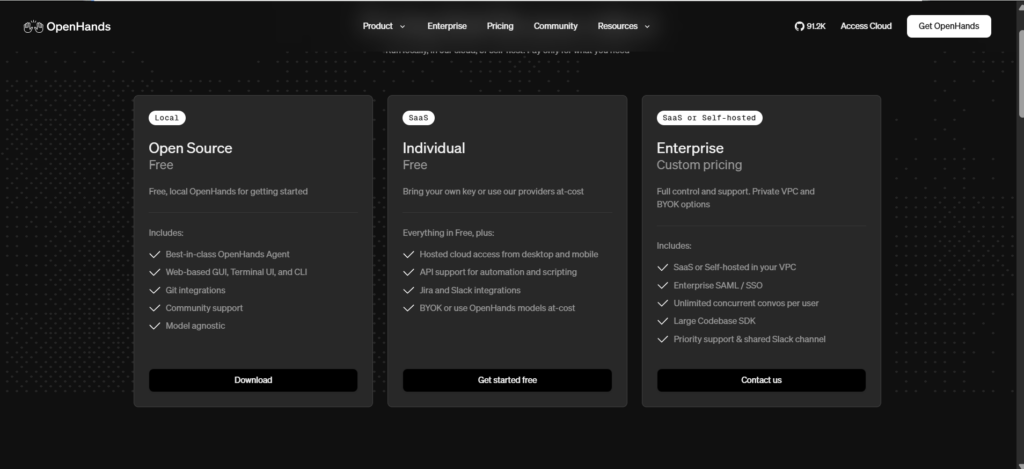
Running OpenHands on your own machine is free. OpenHands Cloud adds a free Individual tier, and Enterprise is quote-only. You pay for model usage separately no matter which you pick. This is what the OpenHands pricing page showed on October 19, 2026:
| Plan | Price | Runs on | What stands out |
|---|---|---|---|
| Open Source | Free | Your machine | One user, unlimited conversations, MIT license, your own model key |
| Individual (Cloud) | Free | OpenHands Cloud | One user, 10 conversations a day, Jira and Slack, Cloud APIs |
| Enterprise | Custom quote | Cloud or your VPC | Unlimited users, SAML/SSO, RBAC, central billing, priority support |
You’ll find older figures floating around, like a $20 “Pro” plan or per-seat prices. They don’t match the current page.
Why cheap models can cost more
The obvious money-saver is to run chores on a budget model. In a looping workflow, that can backfire. A weaker model may misread the repo, edit the same file over and over, and rerun failing tests a dozen times. Fifteen cheap passes easily cost more than two good ones.
A smarter split goes by stage, not by ticket. Let a fast, inexpensive model handle searching and reading, then use a stronger reasoning model for writing the diff and debugging tests. Canvas lets you pick a model per conversation or pin one to an agent profile, and the SDK gives you finer control if you build your own pipeline.
The costs nobody puts on the pricing page
At team scale, tokens are often the smaller line item. Every attempt can spin up a fresh sandbox container, and every pushed branch can kick off your full CI suite. Fifty attempts a day means fifty containers and fifty pipeline runs, many of them on code that never merges. Cap attempts per issue, run a quick local test pass before anything reaches CI, and watch your runner minutes in the first month.
Add hardware if you host models through Ollama, plus review time. Nobody invoices you for review, but you pay it anyway.
Is OpenHands Safe? Sandboxing and Security
OpenHands can run each session inside an isolated runtime, usually a Docker container, so a bad command wrecks a throwaway environment rather than your laptop. How strong that wall is depends on where you run it: a local process, Docker, a remote VM, or OpenHands Cloud.
Isolation limits damage. It doesn’t remove risk. A leaked token, a malicious instruction hidden inside an issue, a vulnerable dependency, or an over-permissioned GitHub app can all cause harm from inside the sandbox.
The 2026 git diff flaw
In March 2026, the project disclosed CVE-2026-33718, a command injection bug in its git diff handler. A logged-in user could send a crafted file path to an API endpoint and run commands in the sandbox through a side door. GitHub, which issued the CVE, scored it 7.6 (High), while NIST’s later analysis in the NVD entry rated it 9.9 (Critical). Versions before 1.5.0 were affected, and 1.5.0 fixed it.
Does that make OpenHands unusually risky? Not really. Anything that executes shell commands will pick up advisories over time. What separates safe teams from unlucky ones is how fast they patch and how little each session can touch.
Habits that help
- Scope Git tokens to the repos a job needs.
- Keep production secrets out of workspaces.
- Limit outbound network access where you can.
- Stay on current releases and follow the repo’s security advisories.
- Require human approval before anything merges.
OpenHands vs OpenCode vs Claude Code
There’s no single winner here. OpenHands leans toward background jobs you can self-host, while OpenCode and Claude Code lean toward live pairing in your terminal. The table reflects default setups; all three can be tuned.
| Factor | OpenHands | OpenCode | Claude Code |
|---|---|---|---|
| License | MIT | MIT | Proprietary |
| Models | Any provider, or local | Many providers, local via Ollama | Claude models |
| Default style | Assign work, review later | Pair live | Pair live |
| Where commands run | Configurable, often a container | Your machine, with prompts | Your machine, with prompts |
| Scheduled or event runs | Built into Canvas | Not a core feature | Through hooks and scripts |
| Runs inside your VPC | Enterprise plan | Locally by design | No |
Which one fits you?
Go with OpenHands when you want tickets handled in the background, need to switch models freely, or must keep code on infrastructure you control.
Pick OpenCode for a lightweight open-source terminal companion. That’s really the heart of most “OpenHands vs OpenCode” searches. One is built to run jobs, the other to sit beside you while you type.
Choose Claude Code if your team already runs on Claude and wants a polished terminal tool from the model’s own maker.
Here’s the part most comparisons get wrong: this often isn’t either-or. Claude Code is a single-vendor worker. OpenHands can act as the harness around it, hosting Claude Code sessions inside sandboxes, scheduling them on cron or GitHub events, and holding them to one budget and access policy. Plenty of teams will end up using both that way.
Comparing another OpenHands alternative, such as Aider, Cline, or SWE-agent? Judge it the same way: identical issues, same repo, then count merged PRs, spend, and review minutes.
Which Tickets Should You Hand Over? A Delegation Scorecard
This scorecard rates a ticket from 0 to 10 on five factors. The total tells you how closely to supervise the run. It never tells you to skip review.
| Factor | 0 points | 1 point | 2 points |
|---|---|---|---|
| Verifiability | Vague spec, no tests | Some tests | A failing test that reproduces the bug |
| Scope | Crosses services | Several loosely linked files | One module |
| Blast radius | Schema, permissions, or payments | Needs a migration | Plain code, easy Git revert |
| Repo context | Undocumented, tribal knowledge | Thin README | Clear docs and structure |
| Frequency | One-off exploration | Occasional | Routine, like dependency bumps |
Reading the total
- 8–10: Fine for background runs. Let it open PRs behind CI gates and a human merge.
- 5–7: Watch it live and step in when the plan wanders.
- 0–4: Keep it human. Write the test or narrow the ticket, then score again.
Take a patch-level library bump that breaks one test in a single package. Verifiability 2, scope 2, blast radius 2, context 1 (there’s a changelog but no internal notes), frequency 2. That’s 9. A billing redesign would be lucky to hit 3.
One rule beats any score: if a job can expose secrets, change permissions, or trigger something outside the repo, a person signs off.
A One-Week OpenHands Trial You Can Run
Benchmarks look impressive, and they’re also misleading in a specific way. On the team’s own OpenHands Index, the strongest models paired with the OpenHands harness scored in the mid-to-high 70s on SWE-bench Verified by mid-2026. That set, though, is 500 hand-checked Python issues that models have seen discussed for years. When researchers built SWE-bench-Live from fresh, uncurated GitHub issues, the same OpenHands setup that solved about 43% of Verified tasks solved only about 19% of the new ones. Real repos behave more like the second number. So treat leaderboards as a rough ceiling, and let your own codebase settle the question.
A fair setup looks like this:
- Pull 10 closed tickets from last quarter that score 6 or more on the scorecard.
- Roll the repo back to the commit before each fix.
- Give OpenHands the original ticket text, one fixed model setup, and a token cap per ticket.
- Log five things per run: solved or not, tokens used, wall-clock time, review minutes, and lines you rewrote.
- Run the same tickets through your current tool or a rival.
The number to watch is cost per accepted change. Add model spend and review time, then divide by the PRs you’d genuinely merge. After a week, you’ll have real data, not vibes.
Limitations and Common Mistakes
OpenHands has a hard time with vague requests, huge repos, and thin test suites. Some failures come from the model or the task itself. A surprising number come from setup choices you control.
Where it falls short
Big monorepos are the classic pain point. The tool spends a lot of tokens just finding its way, and context runs out fast. Pointing it at the right folder helps, and so does a short map file in the repo that lists key modules and conventions.
Then there’s diff fatigue. A 300-line generated PR that passes CI can take longer to review than a teammate’s, because every odd naming choice and side effect needs tracing. Ask for small PRs with one concern each.
A few smaller gaps round it out. UI work needs a designer’s eye that tests can’t measure. Some users mention occasional Cloud hiccups, so keep a retry path. And if you work in a regulated industry, ask sales directly which certifications they hold.
Mistakes that waste time and money
- Writing “clean this up” instead of naming the file, the bug, and the test that proves the fix.
- Handing over an org-wide Git token for a single-repo job.
- Following a 2025 tutorial when paths, packages, and images all changed in 2026.
- Pointing headless mode at an important repo without remembering it auto-approves.
- Merging because the checks went green.
- Picking models by price per token instead of price per finished fix.
Final Verdict on OpenHands
OpenHands earns a spot on your shortlist if you want an open, model-agnostic way to run coding work in the background on your own terms. It’s a poor match if you expect flawless code with no review, or you’d rather never think about runtimes and permissions.
Three things to carry away. The software is free, but tokens, retries, and review time make up the real bill. Canvas is the new hub, though your terminal and IDE still work through the CLI. And a good failing test does more for your results than any model upgrade.
Start small. Install it, connect a test repo, and give it one ticket that already has a failing test. Then run the 10-ticket trial. By next week you’ll know whether it belongs in your workflow.
FAQs
Q. What is OpenHands used for?
Mostly well-scoped engineering chores: fixing GitHub issues, repairing failed CI checks, writing tests, and bumping dependencies. Teams also schedule recurring jobs, like weekly security patches, through Canvas automations.
Q. How much does OpenHands cost?
The open-source version costs nothing. OpenHands Cloud has a free Individual plan capped at 10 conversations a day, and Enterprise is priced by quote. Model tokens are extra unless you run a local model.
Q. Is OpenHands better than OpenCode?
It depends on how you work. OpenHands is stronger for background jobs that end in a pull request. OpenCode feels better for live pairing in the terminal.
Q. Who is the CEO of OpenHands?
Robert Brennan. He co-founded All Hands AI, the company behind OpenHands, with Xingyao Wang and Graham Neubig.
Q. Is OpenHands-AI the same as OpenDevin?
Yes. All three names point to one project. The OpenDevin name was retired in September 2024.
Q. Where do I download OpenHands?
Through the official setup docs or the OpenHands GitHub repo. Most people install Agent Canvas with npm or pull its Docker image.
Q. Do I need Docker to run OpenHands?
No. Canvas and the CLI install without it. Docker is still the usual pick for isolating sessions or running on a server.
Q. Can OpenHands use local models?
Yes. Connect an Ollama or other OpenAI-compatible endpoint to skip API fees. Expect weaker results than top hosted models on complex, multi-file work.
Related: OpenHands vs. Devin vs. Manus: Best AI Agent in 2026
| Disclaimer: This OpenHands review is based on product research and practical testing guidance. Features, pricing, and performance may change; verify details on the official website before deciding. Not affiliated with, sponsored by, or endorsed by OpenHands or All Hands AI. |

Maliha
AI is moving steadily from experimental technology into the products and workflows people rely on every day. Maliha Irfan is a technology writer covering artificial intelligence, automation, and emerging software. Her work focuses on the practical side of AI agents, exploring how these systems are being used, what they can realistically accomplish, and the limitations that matter when businesses and individuals adopt them.
More from Maliha →