Replit Agent Review 2026: Pricing, Free Plan & Real Build App
Is Replit Agent worth using in 2026? This hands-on review tests its AI app-building workflow, free plan, pricing, mobile app support, GitHub integration, and deployment limits. Discover what worked in a real build,


In this article · 24 sections +
- What Is Replit Agent?
- Agent 4: the current version
- How Replit Agent Works: A Real Build, Step by Step
- Walkthrough setup
- The prompt
- What the Agent did
- Key Replit Agent Features in 2026
- Plan mode
- Parallel agents
- Security scanning
- GitHub sync and code ownership
- Is Replit Agent Free? Starter Plan Limits
- Replit Agent Pricing
- Plans at a glance
- How effort-based billing works
- The real cost problem: loops, not prompts
- Free, Power and Max modes
- Can Replit Agent Build Mobile Apps?
- Replit Agent vs Lovable vs Bolt vs Cursor
- Pros and Cons of Replit Agent
- 5 Common Replit Agent Mistakes
- Replit Agent Fit Check
- Conclusion
- Frequently Asked Questions
One paragraph of plain English. Three minutes of waiting. Then a live website with search, filters, and a mobile layout sits on a public URL. That speed is real. So are the questions that follow: what it costs, how long the free version stays online, and whether the result survives real users.
This Replit Agent review answers those questions with a real build, not a feature list. You get the exact prompt, what passed, what the Agent only claimed, and what the walkthrough never covered. After that come the 2026 plans, effort-based billing, mobile support, GitHub sync, and a head-to-head with Lovable, Bolt, and Cursor.
The guide closes with the mistakes that drain credits fastest and a five-question fit check, so you can decide before spending a dollar.
What Is Replit Agent?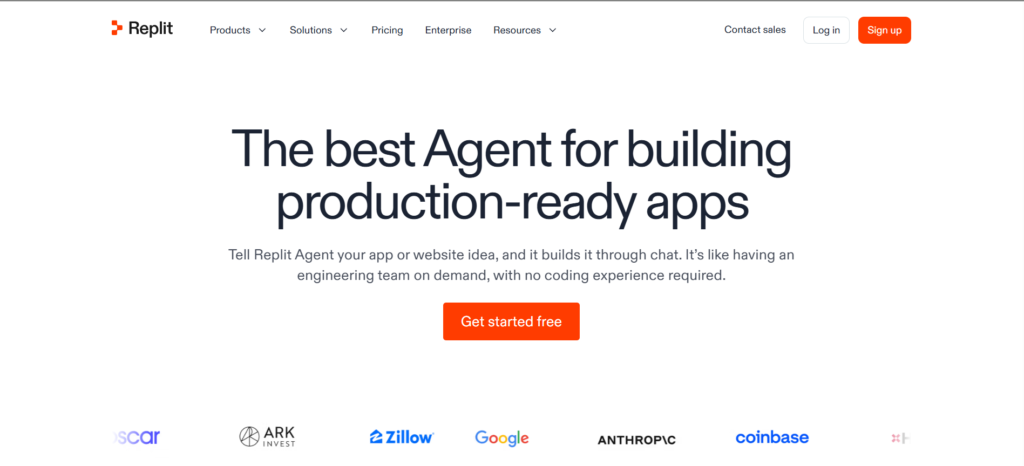
Replit Agent is an AI app builder inside Replit’s cloud workspace that turns plain-English prompts into working, hosted applications. You describe the app in chat. The Agent plans it, writes the code, sets up storage, tests the result, and publishes it to a live URL.
It behaves like an agent, not a helper. GitHub Copilot suggests the next line while you type. Replit Agent takes a goal and runs the whole job on its own. That split mirrors the wider gap between AI tools and AI agents, and it explains why the product feels so different from an autocomplete plugin.
Nothing runs on your machine. Code, database, hosting, and logs all live in one browser tab.
Agent 4: the current version
Agent 4 is Replit’s current builder, launched on March 11, 2026, with a focus on design and parallel work. Replit’s Agent 4 announcement describes three big shifts:
- Design canvas. The Agent sketches several UI options side by side before writing code.
- Parallel agents. Separate agents handle the frontend, backend, and auth at the same time. Sub-agents resolve conflicts when their changes collide.
- More output types. The same chat produces web apps, mobile apps, dashboards, slides, and short animations.
Agent 3 came first and introduced long solo runs with self-testing. As of October 2026, Replit has not released an Agent 5.
How Replit Agent Works: A Real Build, Step by Step
A Replit Agent build follows one loop: prompt, plan, build, self-check, checkpoint, publish. The walkthrough below shows each stage on a real project.
Walkthrough setup
| Detail | Value |
|---|---|
| Date | October 2026 |
| Plan | Starter (free) |
| Agent mode | Free Mode |
| Starting point | Blank project |
| Prompts sent | 1 |
| Follow-up revisions | 0 |
| Agent work time | About 3 minutes |
| Paid usage | None |
The prompt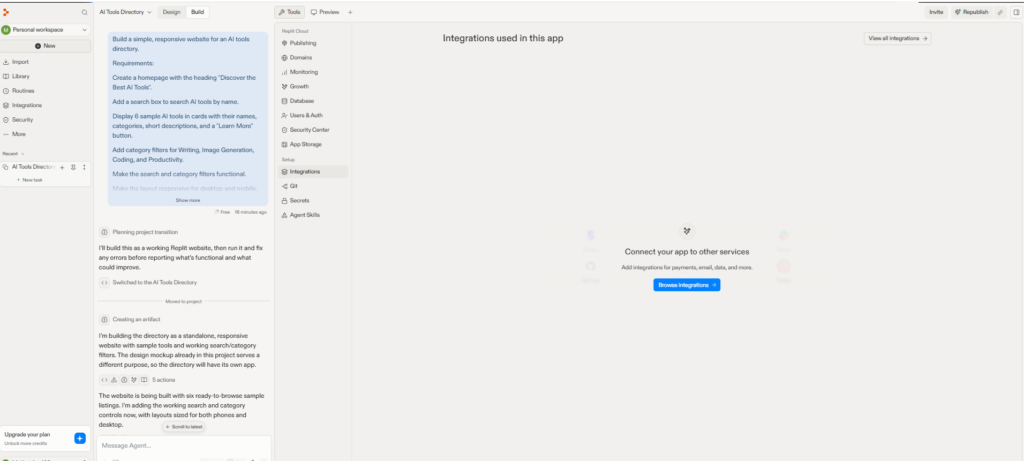
The single prompt asked for a responsive AI tools directory with:
- a homepage headed “Discover the Best AI Tools”
- a search box for tool names
- six sample cards with name, category, short description, and a “Learn More” button
- working filters for Writing, Image Generation, Coding, and Productivity
What the Agent did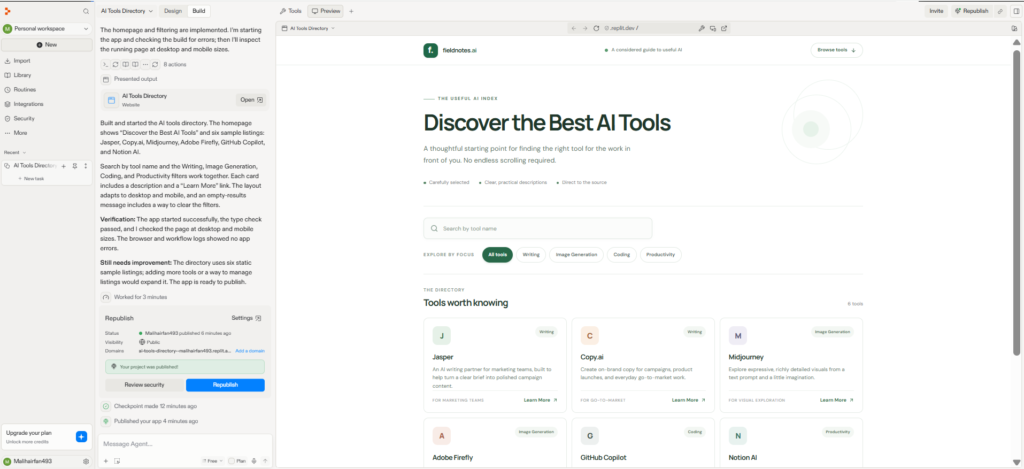
- Stated a plan. It promised to build the site, run it, and fix errors before reporting back.
- Built the site. Six sample tools appeared: Jasper, Copy.ai, Midjourney, Adobe Firefly, GitHub Copilot, and Notion AI.
- Ran its own checks. It reported a passing type check and a review at desktop and mobile widths.
- Flagged its own gap. A “Still needs improvement” note said static listings limit the directory and suggested a way to manage entries.
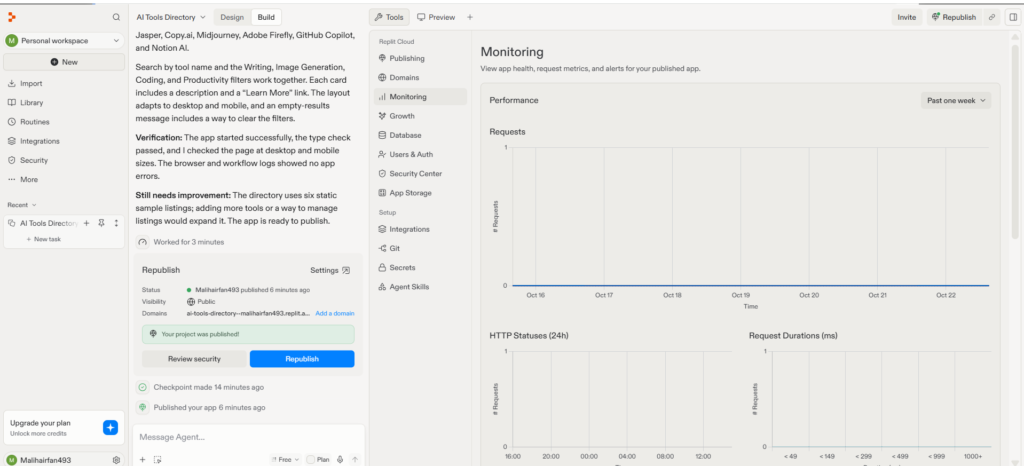
- Saved a checkpoint. You can roll back to this point later.
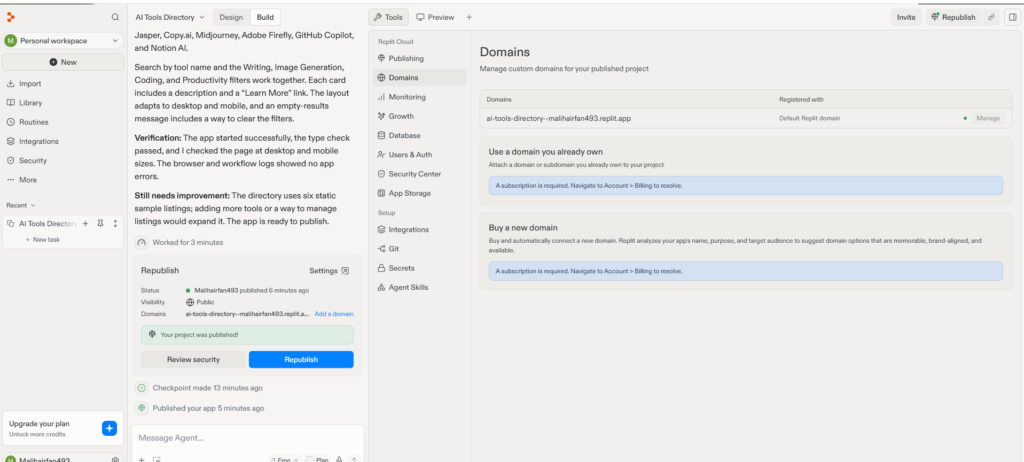
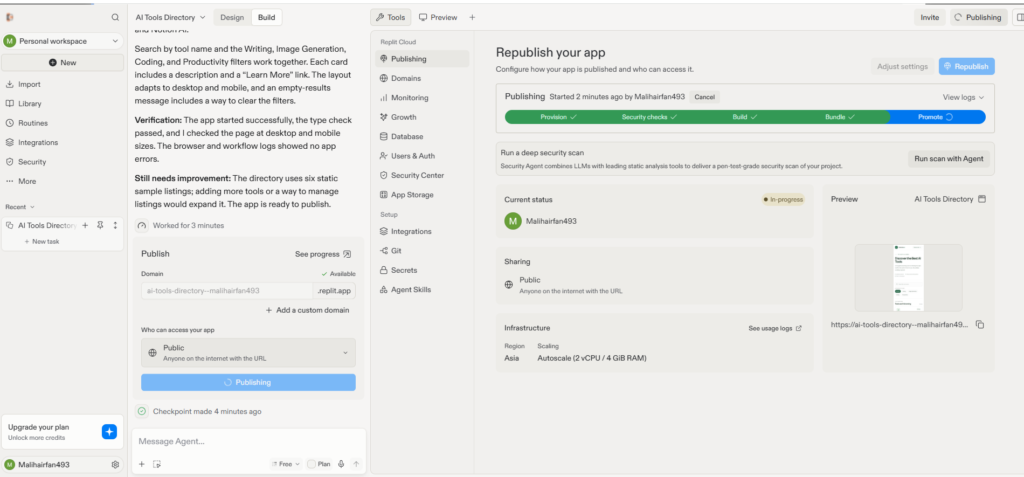
- Published. One click started a five-stage pipeline: Provision, Security checks, Build, Bundle, Promote.
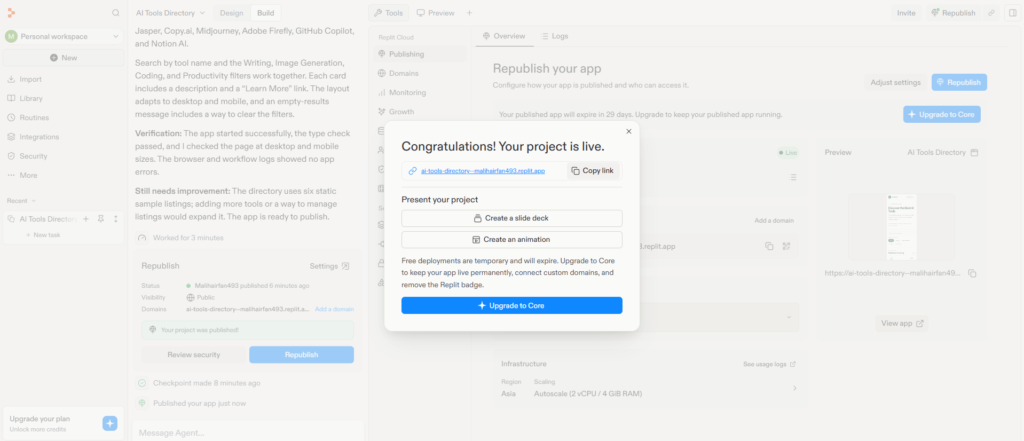
The infrastructure panel for this deployment showed the Asia region and Autoscale at 2 vCPU and 4 GiB RAM. Your settings may differ.
One surprise: the Agent named the site “fieldnotes.ai” and wrote a tagline nobody asked for. Put your brand name in the first prompt to avoid that.
The honest takeaway: this build proves the basic loop works fast for a simple, static site. It says nothing yet about login flows, saved user data, permissions, or production traffic. Treat any app that needs those as a separate test.
Key Replit Agent Features in 2026
Replit Agent bundles planning, design, building, testing, security, and hosting in one workspace. After publishing, the Tools panel holds everything a small app needs.
| Tool | What it does |
|---|---|
| Publishing | Republish, set visibility, read logs |
| Domains | Connect or buy a domain (paid plans) |
| Monitoring | Requests, HTTP statuses, response times |
| Database | Built-in PostgreSQL storage |
| Users & Auth | Sign-in for your app’s users |
| Security Center | Basic checks and Agent-run deep scans |
| Git | Commit, push, and pull to GitHub |
| Secrets | Store API keys and connection strings |
| Integrations | Payments, email, and data services |
Plan mode
Plan mode lets you map scope and tasks with the Agent before it writes any code. Core and Pro include it. A short planning chat costs far less than rebuilding the wrong structure.
Parallel agents
Parallel agents split one project into tasks that run at the same time. Pro lists up to 10 at once. Developers who want this kind of teamwork in their own code, outside a hosted builder, usually reach for multi-agent frameworks like CrewAI instead.
Security scanning
Security Agent reviews your whole codebase for security and privacy flaws. Per Replit’s security scan docs, it pairs model analysis with Semgrep and HoundDog.ai, runs on Replit’s servers, and needs a paid plan. A deep audit can take up to 15 minutes. Replit itself says a scan does not replace a full security review.
GitHub sync and code ownership
Your code stays standard and portable. The Git tool links a project to a GitHub repo, so you can push changes out and pull edits back in. Moving to another host means swapping the Replit-specific parts: the managed database, auth, and stored secrets.
Need an outside database such as Supabase or Neon? Add its connection string to Secrets, then ask the Agent to connect it.
Is Replit Agent Free? Starter Plan Limits
Yes. The Starter plan costs nothing and includes daily Agent credits, but it suits prototypes, not long-term apps. Starter gives you free daily usage, a built-in database, one live project, and one background task at a time.
Three limits shape every free project:
- Deployments expire. The publish screen showed 29 days left on a fresh app, with a prompt to upgrade to keep it running.
- No custom domains. The Domains panel asks for a subscription before you connect or buy one.
- Branding stays. Only Core and above remove the “Made with Replit” badge.
For a weekend prototype, Starter is plenty. For anything public and lasting, plan on Core.
Replit Agent Pricing
Replit Agent pricing has two layers: a monthly plan that includes credits, and effort-based billing that spends those credits per request.
Plans at a glance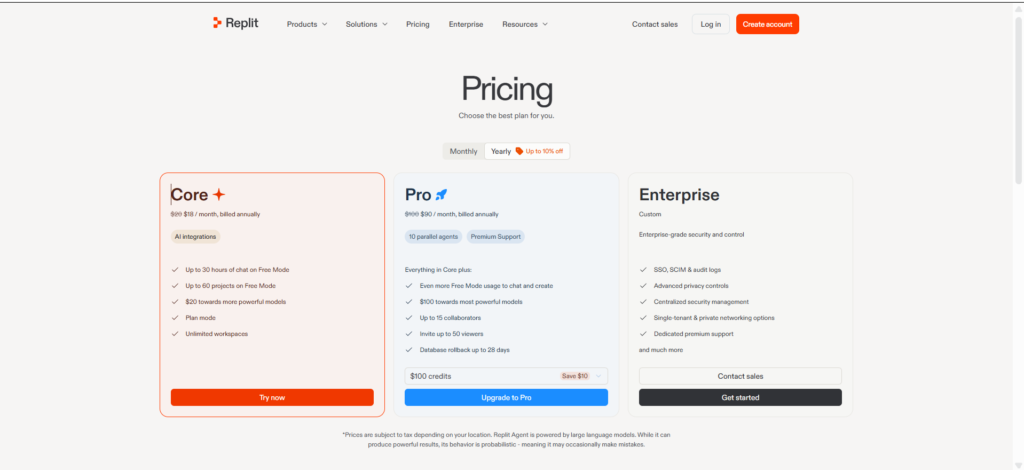
| Plan | Monthly / billed yearly | Best for | Key inclusions |
|---|---|---|---|
| Starter | Free | Testing ideas | Daily credits, built-in database, 1 live project |
| Core | $20 / $18 | Solo builders | Up to 30 hours of Free Mode chat, $20 toward stronger models, Plan mode, unlimited workspaces |
| Pro | $100 / $90 | Small teams | 10 parallel agents, $100 toward top models, 15 collaborators, 28-day database rollback |
| Enterprise | Custom | Organizations | SSO, SCIM, audit logs, private networking |
Prices are from the Replit pricing page as of October 2026. Tax varies by location.
How effort-based billing works
Effort-based billing charges each request by the time and compute the Agent spends on it. Replit’s AI billing docs explain the basics: one checkpoint per request, priced by the work done. Replit dropped its flat $0.25 per checkpoint in June 2025. It now says small edits usually cost less than that, while big features cost more.
Your credits also pay for hosting, storage, and database use. The Agent is only one line on the bill.
The real cost problem: loops, not prompts
Predictability bothers developers more than price. A stubborn bug can send the Agent into a retry loop, and every lap burns compute. Long chat threads add to it, since the Agent rereads more context with each message.
Three habits keep costs steady:
- Stop after two failed tries. Roll back to the last checkpoint instead of asking a third time.
- Shrink the request. “Fix the filter button color on mobile” beats “fix the styling.”
- Open a new thread per feature. Fresh context costs less to process.
Free, Power and Max modes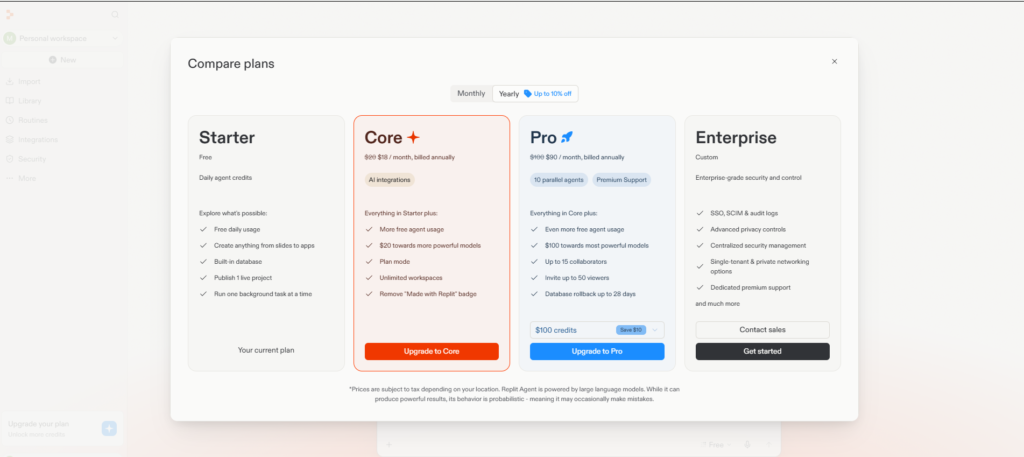
Agent modes trade cost against model strength. Replit’s Free Mode docs confirm the current names: Free Mode costs nothing within your allowance, Power is the mid tier (formerly Economy), and Max is the top tier (formerly Power). The Agent asks before switching a request to a paid mode.
A simple rule: Free Mode for small fixes, Power for new features, Max only for problems Power could not solve.
Can Replit Agent Build Mobile Apps?
Yes. Replit Agent builds iOS and Android apps with React Native and Expo. Pick “Mobile app” on the home screen, describe the idea, and the Agent scaffolds the project. Scan a QR code with Expo Go to run it on your phone.
Replit’s mobile app docs list TestFlight builds and App Store submission inside the Project Editor. Store release still needs your own Apple or Google developer account and a pass through store review. Mobile support arrived in early 2026, so expect web builds to feel smoother for now.
Replit Agent vs Lovable vs Bolt vs Cursor
Replit Agent stands apart by combining a full code editor, a backend runtime, and hosting in one cloud tab.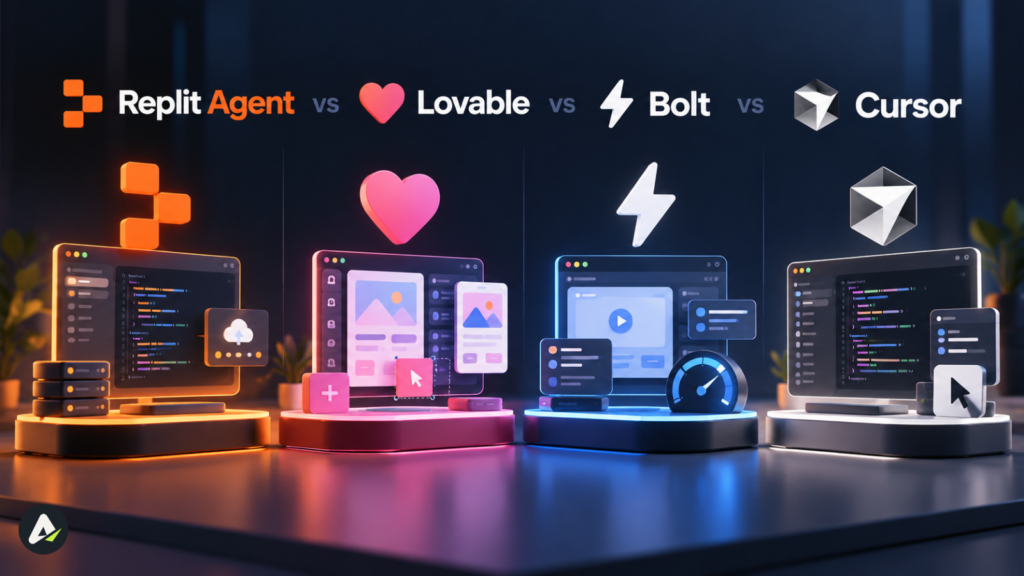
| Factor | Replit Agent | Lovable | Bolt | Cursor |
|---|---|---|---|---|
| Type | Cloud app builder + IDE | Guided app builder | Fast prototyper | Local AI code editor |
| Setup | None | None | None | Install on your machine |
| Hosting | Built in | Built in | Built in | Bring your own |
| Backend control | High | Medium | Lower | Full |
| Mobile apps | Yes (Expo) | Web focus | Web focus | Any stack you code |
| Main trade-off | Variable usage costs | Opinionated stack | Narrower backend | Needs coding skill |
Even Lovable’s own Bolt vs Replit vs Lovable comparison credits Replit with the deepest runtime flexibility, while noting its full IDE adds a learning curve.
Cursor solves a different problem. It runs locally, works on code you already own, and leaves hosting to you. Replit trades some control for zero setup. Teams that want an autonomous engineer working inside existing repos tend to weigh Devin AI’s pricing and limits instead.
Pros and Cons of Replit Agent
Pros
- Prompt to public URL in minutes, with no install
- Database, auth, monitoring, Git, and domains in one place
- Self-checks plus an honest gap report after each task
- Checkpoints make rollbacks easy
- Standard code you can push to GitHub
Cons
- Hard-to-predict costs on long projects
- Free apps go offline after about a month
- Deep security scans need a paid plan
- Native mobile workflows still maturing
- The full IDE can overwhelm first-timers
5 Common Replit Agent Mistakes
- Vague prompts. “Make it better” lets the Agent pick the scope, and you pay for its choice.
- One endless thread. Context grows with every message, and so does cost.
- Skipping Plan mode. Rebuilding the wrong structure costs more than ten minutes of planning.
- Trusting Agent-reported tests alone. Click through the live app yourself, on a real phone.
- Shipping sensitive data unchecked. Payments and personal data need human review. For bigger builds, an experienced AI agent development company can audit the Agent’s output.
Replit Agent Fit Check
Answer five quick questions:
- Do you need a hosted, working app, not just code?
- Is a web app your main target?
- Can you accept a variable monthly bill in return for speed?
- Will you review security before real users arrive?
- Do you want the option to edit code yourself later?
4 or 5 yes: Start on Starter, move to Core once an app needs to stay online.
2 or 3 yes: Run the same prompt in Replit and Lovable, then compare.
0 or 1 yes: You may need automation, not an app. Lindy AI agents automate tasks like email and scheduling without any build step.
Conclusion
Replit Agent turns a clear prompt into a live, monitored app faster than almost any rival in 2026. Its edge comes from keeping design, code, data, and hosting in one place.
Three points matter most. The free plan works for prototypes, not lasting apps. Effort-based billing rewards small, specific requests and punishes retry loops. Agent self-checks help, but your own click-through and a security review still decide whether an app is ready.
Your next move: build one small, real idea on Starter, test the live URL on your phone, and upgrade only when it earns a permanent home.
Frequently Asked Questions
Q. What is Replit Agent used for?
It builds web apps, mobile apps, dashboards, internal tools, slides, and short animations from plain-English prompts. It also sets up the database, sign-in, and hosting.
Q. Is Replit Agent free to use?
Yes, on the Starter plan, within daily Free Mode limits and one live project. The plan limits section above covers the trade-offs.
Q. How much does Replit Agent cost?
Core runs $20 a month and Pro $100 a month, with lower yearly rates. Usage beyond included credits follows effort-based billing.
Q. Can Replit Agent make mobile apps?
Yes. It builds React Native apps with Expo for iOS and Android. Store release needs your own developer account.
Q. What changed from Replit Agent 3 to Agent 4?
Agent 3 added long solo runs and self-testing. Agent 4 added a design canvas, parallel agents, and more output types.
Q. Do I need to download Replit Agent?
No. It runs in the browser at replit.com. Replit also offers phone apps for working on the go.
Q. Can I export Replit Agent code to GitHub?
Yes. The built-in Git tool pushes your project to a GitHub repo and pulls changes back.
Related: Devin AI Review 2026: Pricing, Features & Hidden Limits
| Disclaimer: This Replit Agent review is based on hands-on testing and publicly available information checked on October 22, 2026. Features, pricing, usage limits, and deployment policies may change. The results reflect a simple test project and do not guarantee production performance or security. This article is independent, and I am not affiliated with, endorsed by, or sponsored by Replit. |

Maliha
AI is moving steadily from experimental technology into the products and workflows people rely on every day. Maliha Irfan is a technology writer covering artificial intelligence, automation, and emerging software. Her work focuses on the practical side of AI agents, exploring how these systems are being used, what they can realistically accomplish, and the limitations that matter when businesses and individuals adopt them.
More from Maliha →