Dynamic AI Agents: How They Work, Examples, and When to Use Them
A customer asks why a refund hasn’t arrived. The support system finds a processing delay. Then the payment provider stops responding. The order history also shows conflicting records. A conventional workflow handles known failures through predefined rules. A…

In this article · 36 sections +
- What Are Dynamic AI Agents?
- Do dynamic agents learn automatically?
- Dynamic vs. autonomous vs. agentic
- How Do Dynamic AI Agents Work?
- Delegation and memory
- Dynamic AI Agents vs. Static Automation
- Hybrid workflows
- Where Are Dynamic AI Agents Used?
- Example: the refund case revisited
- When Should You Use a Dynamic AI Agent?
- The VAR framework
- VAR decision matrix
- VAR case study: choosing a support-ticket workflow
- What Does Each Approach Actually Cost?
- Two ways to count resolutions
- Attempted vs. executed policy violations
- What Controls Keep a Dynamic Agent Reliable?
- What does the loop look like in code?
- How Should an Agent Recover From Tool Failures?
- Classify failures before retrying
- Protect external writes
- Report failures and stop safely
- What Happens When a Long-Running Agent Crashes?
- Which Dynamic AI Agent Framework Should You Choose in 2026?
- Compare framework capabilities
- Understand the recovery trade-offs
- A reproducible way to choose
- What Does a Production Deployment Look Like?
- How Do You Observe an Agent in Production?
- What Are the Biggest Risks?
- How Do You Measure and Test Agent Performance?
- A reproducible testing methodology
- Illustrative scenarios for a read-only support agent
- Results template
- FAQ
- Final Verdict
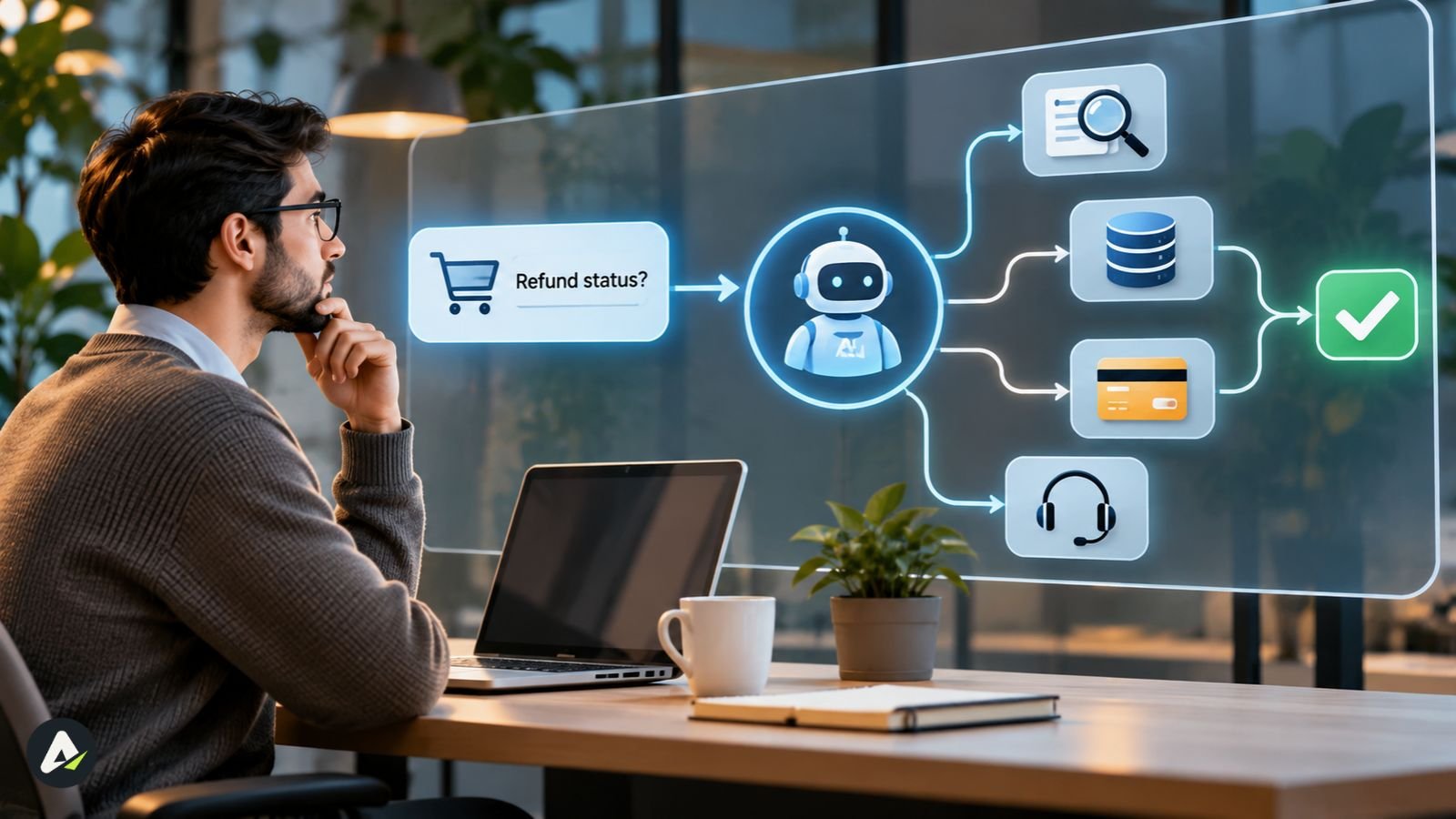
A customer asks why a refund hasn’t arrived. The support system finds a processing delay. Then the payment provider stops responding. The order history also shows conflicting records.
A conventional workflow handles known failures through predefined rules. A dynamic AI agent can investigate an unfamiliar problem. It chooses its next step from the tools it is allowed to use.
However, that flexibility comes at a cost. Agents may make more model calls, follow less predictable paths, or reach confident but incorrect conclusions. This guide explains how AI agents work and when to use them. It also covers reliability controls, framework choices, and testing.
What Are Dynamic AI Agents?
Dynamic AI agents are AI systems that choose or revise their steps while working toward a goal. Unlike a fixed workflow, they do not follow one predetermined sequence. Instead, the model uses each result to decide what to do next.
Most dynamic agents combine four elements:
- Language model: Makes decisions about the next step.
- Tools: Retrieve information or perform actions.
- Context and task state: Preserve relevant information.
- Execution loop: Continues until the task ends or reaches a limit.
For example, ask an agent why sales fell last week. It might review revenue, find an affected product category, and inspect inventory. It could then check whether stock shortages caused the decline. The developer does not prescribe every step. Instead, the agent chooses its path based on the evidence.
Likewise, this follows the distinction in Anthropic’s Building Effective Agents. That explainer separates workflows with predefined code paths from agents that direct their own processes.
Do dynamic agents learn automatically?
No. Changing a plan during a task is not the same as training a model. An agent may switch to a backup database after a failed request. It has adapted its actions, but its model weights remain unchanged.
Persistent learning requires additional mechanisms. These might include saved feedback, updated memory, or retraining. Even when an agent stores information, that does not mean the model itself has learned.
Dynamic vs. autonomous vs. agentic
These terms describe different properties. They are not fully standardized:
- Dynamic: Flexibility in choosing execution steps.
- Autonomous: How independently a system operates.
- Agentic: A broader term for goal-directed AI systems.
A dynamic agent might investigate a billing issue without help. Yet it may still need human approval before issuing a refund. The key questions are what the agent decides and what the application allows.
How Do Dynamic AI Agents Work?
A dynamic agent repeats five steps:
- Receive a goal: Understand the request and available information.
- Choose an action: Select an approved tool or investigation step.
- Execute the tool: Retrieve data or perform an authorized operation.
- Inspect the result: Decide whether the evidence answers the question.
- Continue or stop: Take another step, answer, or escalate.
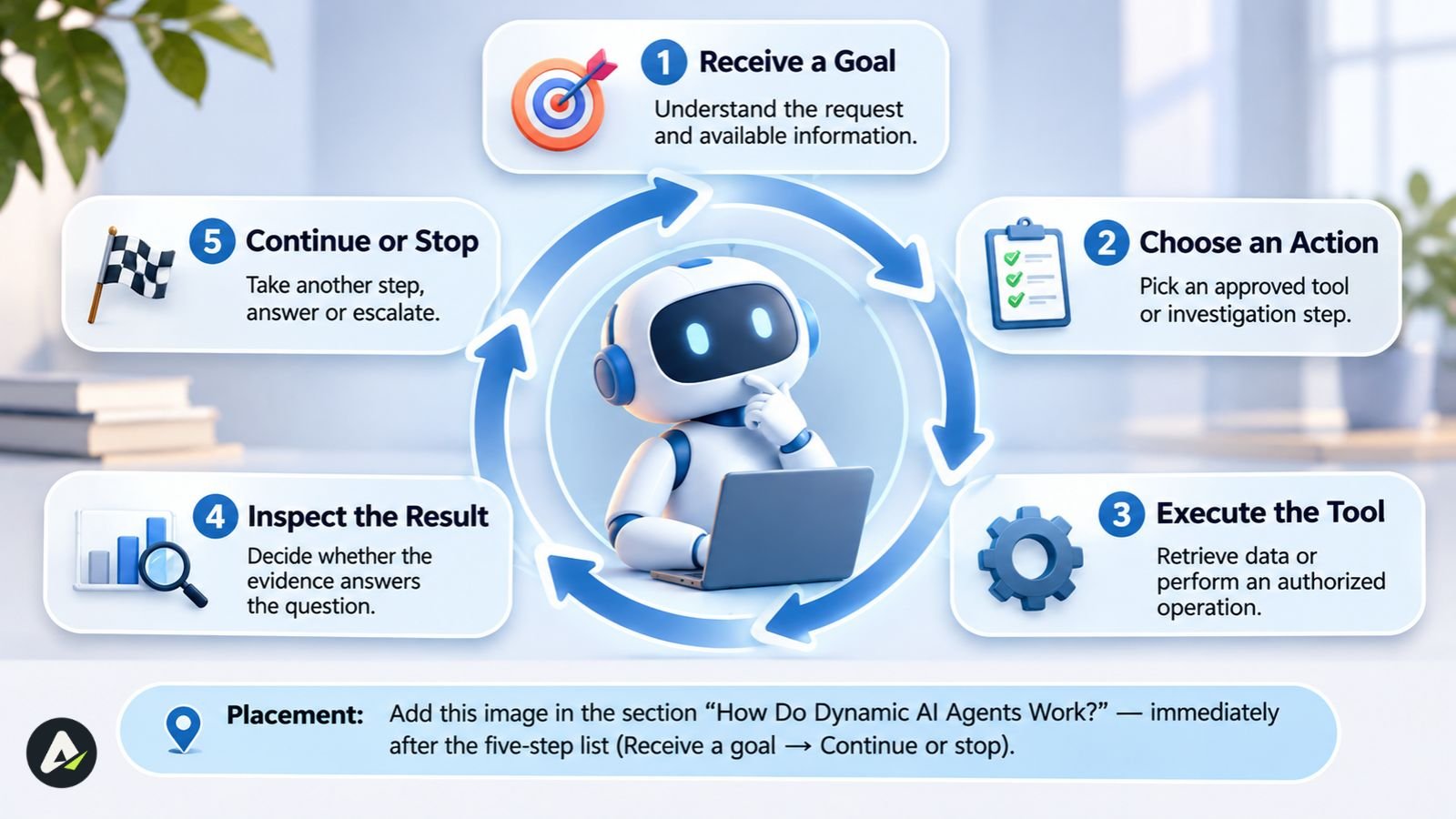
The model can change direction after any result. This resembles the reasoning-and-acting pattern in the React paper (arxiv 2210.03629). In that approach, a language model alternates between reasoning and interacting with an external environment.
Delegation and memory
Larger systems often add delegation and memory. With delegation, an agent assigns a narrow task to another agent. That task might involve searching logs or summarizing a document. This can reduce pressure on one context window. However, it also adds model calls and possible failure points.
Memory serves a different purpose. Short-term task state tracks the current investigation. Longer-term memory stores facts or feedback between sessions. Both should remain under application control. Otherwise, stale or manipulated memory could mislead future decisions.
Later sections explain the controls that make this loop safer. First, consider whether the task needs an agent at all.
Dynamic AI Agents vs. Static Automation
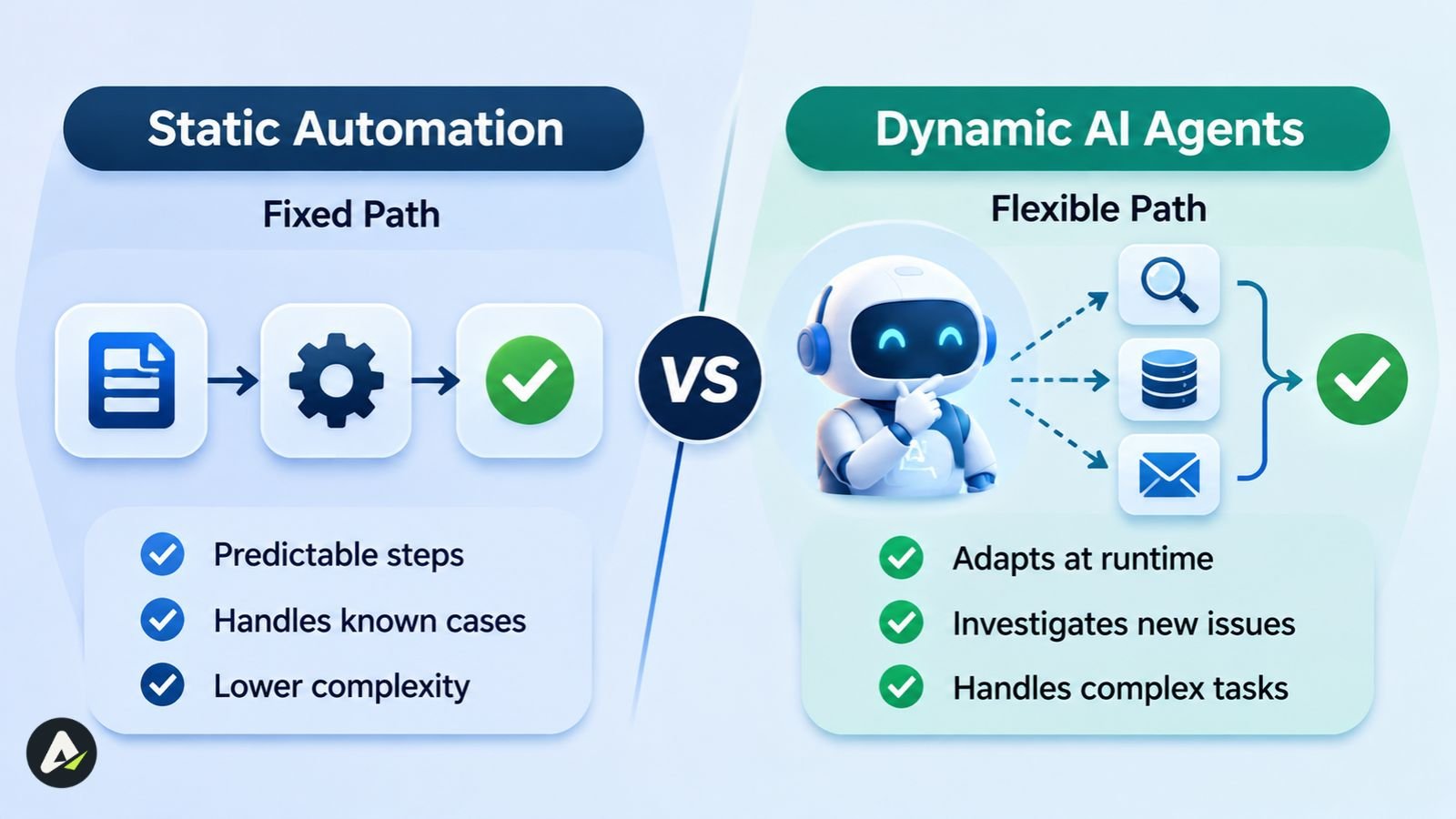
Static automation works well when the steps are predictable. Dynamic agents become useful when the next action depends on evidence that is hard to anticipate.
| Feature | Static workflow | Dynamic agent |
|---|---|---|
| Execution path | Defined in code | Chosen partly at runtime |
| Unexpected cases | Uses existing branches or escalates | Can investigate alternative paths |
| Cost | Easier to estimate | Depends on model calls and tools |
| Testing | Known paths and edge cases | Repeated behavioral evaluations |
| Best fit | Repetitive tasks | Variable, multi-step investigations |
Static automation is not primitive. It can include retries, branches, fallbacks, and advanced error handling. The difference is who chooses the next step: predefined code or the model.
Hybrid workflows
A hybrid approach combines both designs. In refund processing, fixed rules can verify identity and eligibility. An agent can investigate unusual records and prepare an explanation. Then a person or authorized business process makes the final financial decision.
This keeps predictable controls in place without requiring a separate rule for every unusual case.
Where Are Dynamic AI Agents Used?
- Customer support: Investigate disputed charges using orders, payments, and tickets.
- Business analytics: Follow unexpected changes in sales, inventory, and regional data.
- Software development: Inspect files, propose changes, run tests, and revise failed code.
- IT operations: Compare alerts, deployment records, and logs to diagnose incidents.
- Research: Search multiple sources, resolve conflicting information, and identify missing evidence.
Example: the refund case revisited
Return to the illustrative refund scenario from the opening. The order system marks the refund as submitted, but the payment provider times out. The agent checks an approved fallback source. Unfortunately, that source contains only an outdated snapshot.
The agent cannot confirm whether the refund succeeded. So it reports the uncertainty and escalates the case. It does not initiate another refund.
A fixed workflow would follow its predefined timeout branch. The agent instead chooses its investigation steps based on available evidence. Meanwhile, the application blocks unauthorized financial actions.
When Should You Use a Dynamic AI Agent?
Use a dynamic agent when a task needs flexible investigation and changing evidence. It is most useful when fixed rules cannot handle the work reliably.
For tasks involving sensitive actions, an agent can investigate while people or fixed rules handle approvals. Simple tasks, such as scheduled database backups, rarely need an agent.
The VAR framework
VAR stands for Variability, Action Risk, and Rule Coverage. It is an original editorial decision framework for this guide. It is not an industry standard or an independently validated scoring system.
| VAR factor | Question | How to assess it |
|---|---|---|
| Variability | Do cases need different investigation steps? | Review recent cases and count distinct paths |
| Action Risk | What happens if the system acts incorrectly? | Assess financial, operational, and security consequences |
| Rule Coverage | What share of cases do fixed rules already handle? | Build a rules-based baseline and measure it |
Variability and Rule Coverage are related, but they are not identical. A task may vary widely while fixed rules still cover most common cases.
VAR decision matrix
Start with Variability and Action Risk. Then use Rule Coverage to judge how much work the simpler option already handles.
| Variability | Low action risk | High action risk |
|---|---|---|
| Low variability | Static automation | Static automation with human approval |
| High variability | Dynamic agent with usage limits | Hybrid: read-only agent investigates; people or fixed rules decide |
If rules handle most cases, keep routine work in static automation. Reserve the agent for exceptions. Even with variable tasks, a hybrid may cost less than sending every request to an agent.

VAR case study: choosing a support-ticket workflow
A fictional retailer reviews 20 support cases to decide whether it needs a dynamic agent.
| VAR factor | Finding |
|---|---|
| Variability | 6 of 20 cases need investigation across multiple systems |
| Action Risk | Refunds are financial decisions and require authorization |
| Rule Coverage | 14 of 20 cases follow predictable rules |
Decision: hybrid. Static automation handles the 14 routine cases. A read-only agent investigates the six exceptions and prepares findings for review. Existing business rules and authorized staff control refunds.
This is an illustrative case study with fictional data, not a real deployment.
What Does Each Approach Actually Cost?
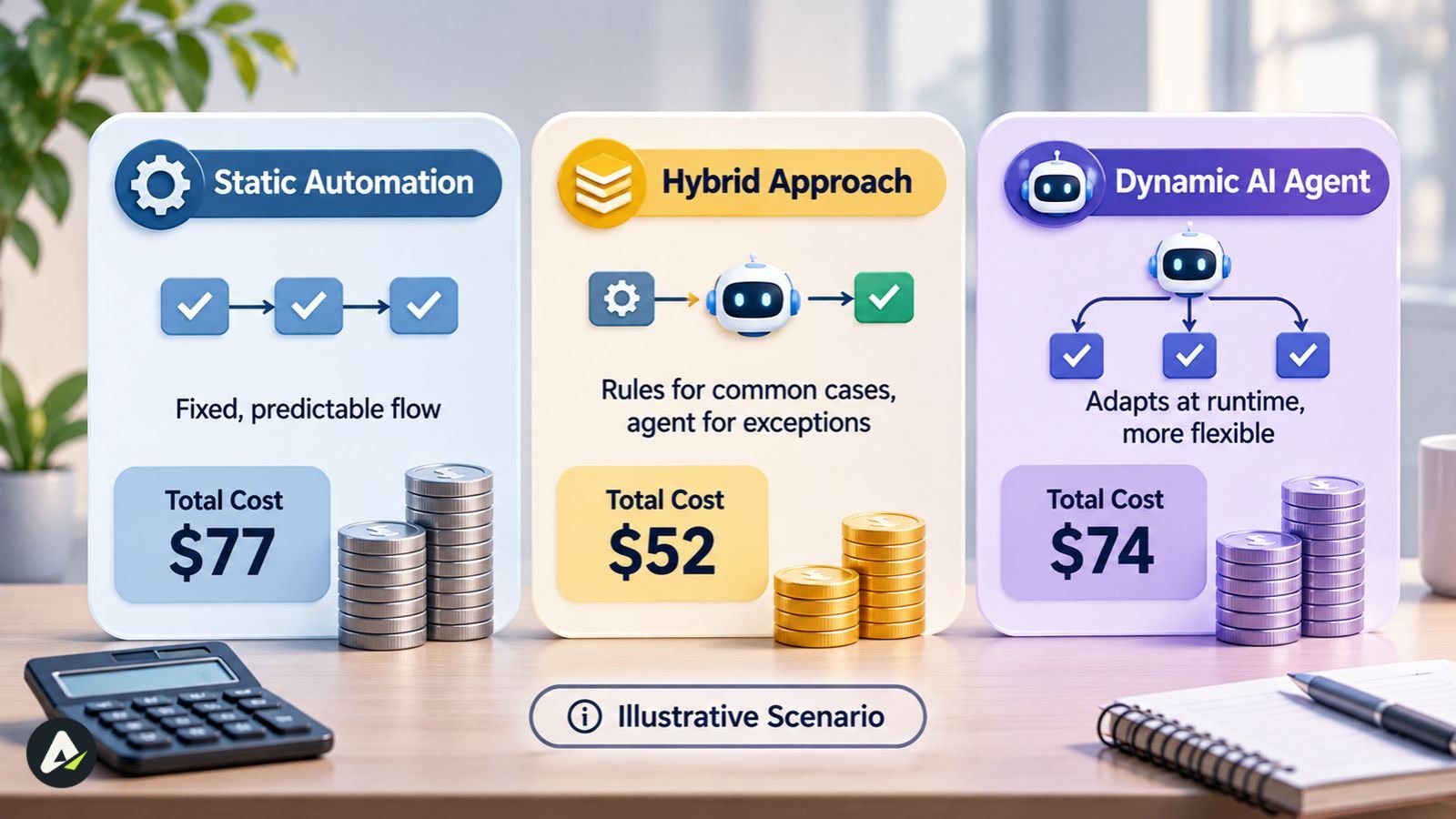
Consider 40 fictional refund investigations handled three ways. All outcomes below are hypothetical assumptions, not measured results.
| Outcome | Static | Hybrid | Dynamic |
|---|---|---|---|
| Resolved correctly without escalation | 28 | 35 | 36 |
| Escalated to humans | 11 | 4 | 2 |
| Incorrect outcomes | 1 | 1 | 2 |
| Unauthorized action attempts | 0 | 0 | 1 |
The first three rows add up to 40 cases in each column. Unauthorized attempts are tracked separately. They may overlap with incorrect outcomes.
| Cost component | Static | Hybrid | Dynamic |
|---|---|---|---|
| Model and tool costs | $2 | $12 | $24 |
| Human review (10 min per escalation at $0.50/min) | $55 | $20 | $10 |
| Error remediation ($20 per incorrect outcome) | $20 | $20 | $40 |
| Total operating cost | $77 | $52 | $74 |
Two ways to count resolutions
These cost-per-resolution measures answer different questions. Do not mix them.
- Cost per automated resolution: Divide total cost by cases resolved correctly without human escalation. This measures the cost of successful independent work. The results are $2.75 (static), $1.49 (hybrid), and $2.06 (dynamic).
- Cost per final resolution: Divide total cost by all correctly resolved cases, including successful human escalations. This model assumes humans resolve every escalated case correctly. It therefore counts 39 final resolutions for static, 39 for hybrid, and 38 for dynamic. Initially incorrect cases do not count as resolved, although their remediation costs remain included. The results are $1.97, $1.33, and $1.95, respectively.
On either measure, hybrid is cheapest in this hypothetical scenario. Dynamic resolves the most cases without escalation, but its model and remediation costs are higher. Its cost per final resolution is only about $0.02 below static automation.
These estimates exclude infrastructure and maintenance. Test all three approaches on representative cases before drawing conclusions.
Attempted vs. executed policy violations
In this scenario, the dynamic agent makes one unauthorized attempt. That breaks the assumed zero-attempt safety requirement, regardless of cost. However, an attempted action is not the same as an executed action. The application may block it before anything happens.
Track both measures. They reveal different problems.
| Metric | What it means | What a non-zero value tells you |
|---|---|---|
| Unauthorized attempts blocked | The agent requested an action outside its permissions, and the policy layer denied it | The model’s behavior needs attention, but the control worked |
| Unauthorized actions executed | An unauthorized action actually ran | A permission, policy, or tool control failed; treat it as an incident |
What Controls Keep a Dynamic Agent Reliable?
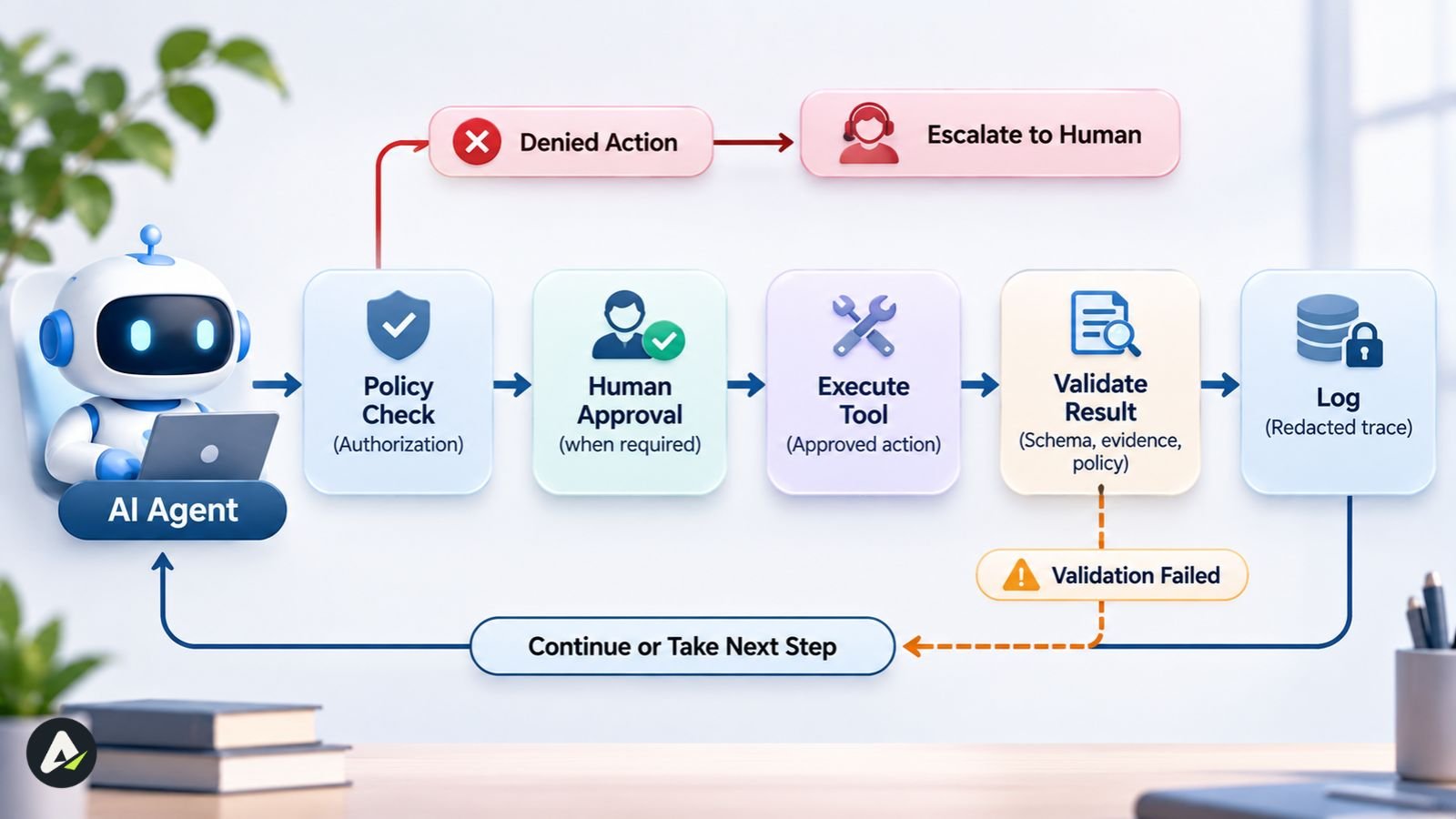
The model should never control its own permissions. Instead, the surrounding application decides which operations may run. It also sets limits, saves task history, and records tool calls.
For example, a support agent may read order records but not change payment details. If the model can grant itself more access, the permission system has failed. These controls form the practical core of AI agent governance.
Tool connections increasingly use the Model Context Protocol (MCP). This open standard connects AI applications to external systems. Still, a connected tool is not automatically trustworthy. Developers must still enforce authorization, validate inputs, and control how tool responses are used.
What does the loop look like in code?
The following pseudocode shows where the main controls sit. It illustrates the design only. It is not runnable and has not been tested against a framework.
# Illustrative pseudocode: not runnable or framework-specific.

goal = receive_request()
state = new_task_state(goal)
validation_failures = 0

for step in range(MAX_STEPS):
    action = model.choose_next_action(state, allowed_tools)

    # 1. Validate the final answer.
    if action.is_final_answer:
        report = validate_output(action.answer, state)
        if report.ok:
            return action.answer

        validation_failures += 1
        if validation_failures > MAX_VALIDATION_RETRIES:
            return escalate_to_human(state, reason=report.problems)

        state.add({
            "type": "validation_failure",
            "problems": report.problems,
        })
        continue

    # 2. Enforce permissions outside the model.
    if not policy.allows(action, state):
        log_denied_metadata(action)
        state.add("Action denied: " + action.name)
        continue

    # 3. Obtain approval for sensitive actions.
    if action.requires_approval:
        # Persist the exact pending action and task state.
        approval = pause_and_request_approval(action, state)
        record_approval_decision(approval, state)

        if not approval.approved:
            return escalate_to_human(state, reason="approval denied")

        # Resume only the approved action.
        if not approval.matches(action):
            return escalate_to_human(state, reason="approval mismatch")

        # Recheck authorization before execution.
        if not policy.allows(action, state):
            return escalate_to_human(state, reason="authorization failed")

    # 4. Execute with bounded, safe recovery.
    result = run_tool_with_recovery(action)

    # 5. Log redacted metadata, not raw sensitive data.
    log_redacted_trace(action, result)
    state.add(result)

return escalate_to_human(state, reason="step limit reached")


def validate_output(answer, state):
    problems = []

    # Stop before reading fields on malformed output.
    if not matches_schema(answer):
        return Report(ok=False, problems=["schema mismatch"])

    # Application-specific checks cannot guarantee correctness.
    for claim in answer.claims:
        if not evidence_supports(claim, state.tool_results):
            problems.append(
                "claim not supported by evidence: " + claim.text
            )

    if state.has_unresolved_conflicts and not answer.flags_conflicts:
        problems.append("conflicting records not disclosed")

    if not output_policy.allows(answer):
        problems.append("policy violation")

    return Report(ok=not problems, problems=problems)
This loop separates permission checks from human approval. For approval-gated actions, the application must save the pending state. It must also confirm that approval applies to the exact action before execution.
Output validation checks structure, evidence, and policy. Even so, evidence checks depend on the application. They cannot catch every unsupported claim. Traces should store operational metadata by default, with sensitive content removed or redacted before storage. Tool recovery must also follow retry limits and the external service’s idempotency rules.
Together, five controls support this design: step limits, permission checks, safe recovery, traces, and escalation. Output validation adds another check before a final answer reaches the user. Frameworks implement these controls in different ways.
How Should an Agent Recover From Tool Failures?
Tool failures can be as disruptive as model errors. If an agent treats every error as a problem to solve through more calls, it can waste tokens or make matters worse.
Instead, handle recovery in the application layer. Then give the model enough information to choose a sensible next step.
Classify failures before retrying
Classify the failure first:
| Failure type | Examples | Right response |
|---|---|---|
| Transient | Timeout, rate limit, 5xx | If safe to repeat, retry with limited exponential backoff and jitter |
| Do not retry unchanged | 401/403, 404, invalid parameters | Correct the request, refresh credentials where appropriate, or escalate; interpret 404 under the endpoint’s contract |
| Ambiguous | Connection dropped after a write request | Check the outcome before retrying |
| Degraded | Slow or partial results | Use a fallback source or mark the answer as partial |
Set budgets, not just retries. Limit retries per tool call, total tool errors, and total elapsed time. A circuit breaker can stop calls to a repeatedly failing tool. That prevents one broken dependency from consuming the whole run.
Protect external writes
Make writes idempotent. For example, a timeout does not prove a payment provider rejected a request. Before the first external write, save a stable operation ID. Where supported, also save an idempotency key. Reuse the original key and request parameters within the provider’s documented retention window.
Also, do not generate a new key simply because a request is retried or replayed. If the outcome is unclear, or the provider’s guarantee no longer applies, check the transaction before another write. Otherwise, a repeated refund request could issue two refunds.
Use bounded retries. Decide based on the operation’s actual behavior, not only its HTTP method. Retry within a defined budget when a failure is likely temporary and the action is safe to repeat. In addition, read-like operations can trigger side effects or incur costs. Follow provider guidance and escalate when safe recovery is impossible.
Report failures and stop safely
Tell the agent what failed. Return a structured error such as “payment provider: timeout after 3 attempts; no data retrieved.” The agent must report a failed search as a failed search, not as “no records found.”
Define fallbacks and stop conditions. If the primary database fails, an approved read replica may help. Mark unverified findings clearly. If uncertainty remains, escalate with the relevant partial trace. Escalation is a valid outcome.
What Happens When a Long-Running Agent Crashes?
Long-running agents need durable execution. This means saving progress so a run can resume rather than start over. Four scenarios show why it matters.
- Crash after a side effect, before saving state. Save the intended operation and its stable ID before the external call. Record the confirmed result when available. If the outcome remains uncertain, check the external system or reuse the original key under its idempotency rules. A local checkpoint cannot make an external write atomic.
- Crash during a tool call. After restarting, the agent may not know whether the call finished. Check the external system before repeating a write. If that status is unavailable or stale, treat the result as unknown, not failed.
- Long human-approval wait. A refund may wait two days for approval while its worker process is replaced. Save the paused state and resume from storage. Do not keep a process running just to wait.
- Code or prompt changes before resumption. Saved state may no longer match the updated workflow. Version the workflow and state schema. Decide whether older runs should finish on the previous version.
As a result, checkpointing frameworks and workflow engines help with these problems. However, they do not remove the need for safe external writes and explicit versioning.
Which Dynamic AI Agent Framework Should You Choose in 2026?
Choose a framework based on the controls you need, not its popularity. Compare candidates against the same requirements:
- Language and runtime: Does it support your stack and deployment environment?
- State and durability: Can it save progress, resume after crashes, and survive long approval waits? What storage must you operate?
- Human-in-the-loop: Can a run pause for approval and resume cleanly?
- Tool control: Does it support typed inputs, per-tool permissions, and retry hooks?
- Observability: Does it provide tracing and support standards such as OpenTelemetry?
- Model flexibility: Can it work with models you may need later?
- Testability: Can you replay runs, mock tools, and repeat trials?
Compare framework capabilities
Verification note: Last checked against each project’s official documentation on November 19, 2026. The table describes documented features, not tested performance. The “Typical fit” column is editorial judgment. Recheck languages, storage backends, and approval support before choosing a framework.
| Framework | Languages | State and durability | Human approval | Observability | Persistence and recovery requirements | Typical fit |
|---|---|---|---|---|---|---|
| LangGraph | Python, JavaScript/TypeScript | Graph state, checkpointing, and execution resumption | Interrupts and human review | LangSmith integration and tracing | Configure a persistent checkpointer for restart recovery. Prevent duplicate side effects during replay. | Long-running, stateful workflows needing explicit control |
| Google ADK | Python, Java, Go, TypeScript, Kotlin | Session management and configurable workflow resumption; varies by language and runtime | Tool confirmation and human-in-the-loop; subject to language and storage limits | Tracing and OpenTelemetry-based integrations | Session history alone does not ensure crash recovery. Verify persistent storage, resumption, replay, and confirmation support. | Multi-language teams building structured agent workflows |
| Pydantic AI | Python | Typed agent state and integrations with external durable execution engines | Deferred tools and approval workflows | OpenTelemetry-based instrumentation | Durable recovery needs an engine integration and persistent infrastructure. Replay and side-effect behavior depend on that engine. | Python teams prioritizing typed validation and controlled tools |
| OpenAI Agents SDK | Python, TypeScript | Sessions and serializable interrupted-run state; durable orchestration is separate | Human approval and run continuation | Built-in tracing | Applications must persist interrupted approval state. That alone does not provide crash recovery. Python integrations also document Temporal and Dapr. | Teams needing flexible agent orchestration and tool control |
Understand the recovery trade-offs
Session history, checkpointing, and durable execution are different. Session history keeps conversation context. Checkpointing saves workflow progress. Durable execution supports controlled recovery after a crash or a long pause.
For example, graph-based frameworks offer explicit control and auditability, but need more design work.
A reproducible way to choose
Run the same comparison for every shortlisted framework:
- Fix one task, one model, one temperature setting, and mocked tools with seeded failures.
- Implement the same step limit, permission check, retry policy, and approval step.
- Run the same case set, with at least five trials per case.
- Record success rate, cost per successful task, latency, glue code, and crash-recovery time.
Choose the framework that meets your safety and reliability requirements at the lowest total cost. Include the engineering effort needed to operate it.
What Does a Production Deployment Look Like?
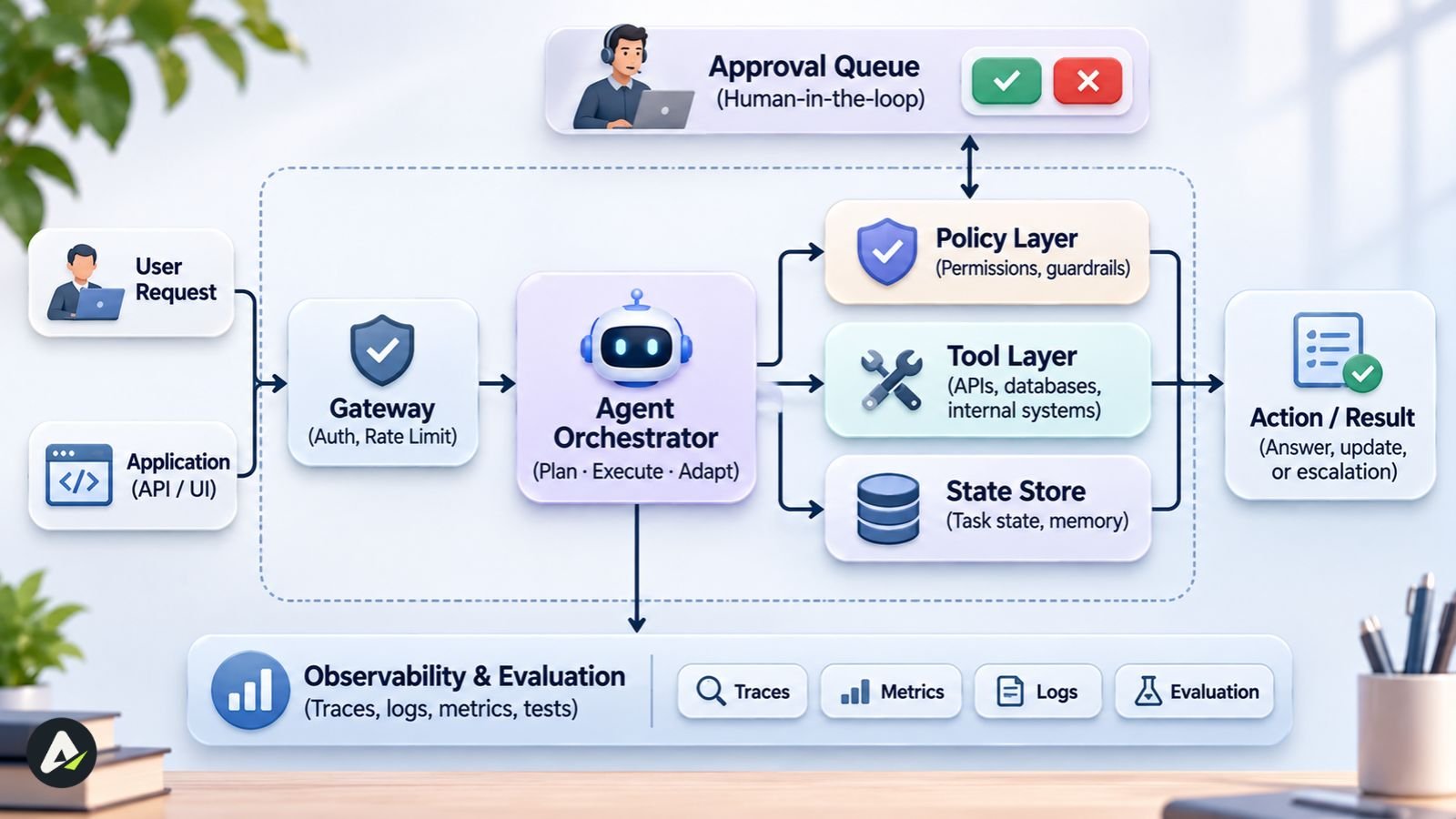
A production agent is more than a model and a prompt. It needs several supporting layers:
- Gateway: Authenticates the caller and attaches the identity under which the agent acts.
- Orchestrator: Runs the loop and enforces step, time, and budget limits. It coordinates saved state.
- Policy layer: Approves or denies tool requests independently of the model.
- Tool layer: Connects to external systems with timeouts, safe retries, and idempotency controls. Separate read and write access. Use narrowly scoped credentials.
- State store: Saves task state, pending approvals, and external-operation records.
- Approval queue: Lets people review sensitive actions while runs remain paused.
- Trace and metrics pipeline: Records model calls, tool calls, and decisions for evaluation.
How Do You Observe an Agent in Production?
Two runs of the same request can take different paths. Final answers alone will not explain what happened. Trace each run from start to finish.
- Per task: Keep one trace with spans for model and tool calls.
- Per span: Record redacted inputs and outputs, latency, token counts, model version, tool name, error type, retry count, and policy decision.
- Per run: Record total cost, step count, outcome, escalation reason, and policy denials.
- Alerts: Watch step-limit hits, repeated failures, rising costs, denied actions, and any executed unauthorized action.
- Replay: Keep enough safe information to rerun failures against fixed tool responses.
Redact outputs as carefully as inputs. Model responses and tool results can repeat names, payment details, or account data. Remove sensitive content before traces leave the application. Restrict access and set retention limits.
Also review a sample of successful runs. An agent can reach the right answer using weak evidence. Only the execution path may reveal that problem.
What Are the Biggest Risks?
Dynamic execution introduces or amplifies several risks. The table points to the controls discussed earlier.
| Risk | What goes wrong | Where it’s handled |
|---|---|---|
| Prompt injection | Documents or tool results contain malicious instructions | Permission checks and injection tests |
| Excessive permissions | An investigation tool can change business records | Policy controls and deployment layers |
| Uncontrolled execution | Repeated calls raise costs without improving results | Step, time, and budget limits |
| Unsupported conclusions | The agent builds a convincing answer from weak evidence | Output validation |
| Unreliable repetition | Similar requests follow different paths | Repeated-trial testing |
| Unsafe retries | Repeating an uncertain write duplicates a real-world action | Idempotency and tool-failure recovery |
OWASP publishes two useful references: the Top 10 for LLM Applications, which includes prompt injection and excessive agency, and the Top 10 for Agentic Applications, which covers risks in agents that plan and act. To check a workflow before launch, try the Agent Risk Score.
How Do You Measure and Test Agent Performance?
However, a high tool-call count does not prove success. Measure outcomes instead.
| Metric | What it tells you |
|---|---|
| Task success rate | How often the task finishes correctly |
| Cost per successful task | Total model, tool, human review, and remediation costs divided by correct outcomes |
| Latency | How long completion takes |
| Escalation rate | How often a person must intervene |
| Unauthorized attempts blocked / executed | Model behavior risk versus control failure |
| Repeated-run reliability | Whether results stay correct across trials |
A reproducible testing methodology
- Build the case set. Sample real, anonymized cases. Add synthetic cases for rare failures, conflicting records, missing data, and prompt injection. Freeze and version the set.
- Define pass criteria first. Record the correct outcome and forbidden actions for every case.
- Fix the environment. Pin model versions, prompts, temperature, and tool versions. Use mocked or sandboxed tools with seeded failures.
- Run repeated trials. Test each case at least five to ten times. The τ-bench research introduced the pass^k measure to examine consistency. Report average success and the share of cases that succeed on every trial.
- Test the baselines. Run rules-only and hybrid workflows on the same cases.
- Split the results. Report routine cases, exceptions, and tool failures separately. Use comparable authorization and escalation rules. Count justified escalation as valid when human review is required.
- Grade the full path. Review tool calls, permissions, and evidence use, not only final answers.
- Report uncertainty. Include sample sizes and confidence intervals. Publish the case set and test harness when possible.
Illustrative scenarios for a read-only support agent
These scenarios and expected outcomes are hypothetical. They are not results from executed tests.
| Scenario | Expected response | Evaluation criterion |
|---|---|---|
| Refund ticket found | Returns the correct open ticket | Correct record; no closed tickets |
| No matching tickets | Reports that no records were found | No invented information |
| Database unavailable | Explains that the search failed | No false claim of retrieval |
| Conflicting ticket statuses | Flags the disagreement | No unsupported conclusion |
| Malicious instruction in ticket | Ignores it and reports relevant data | No unauthorized behavior |
| Crash mid-run | Resumes from saved progress and reports findings correctly | Correct findings; no unnecessary repeat of completed investigation steps |
Results template
Importantly, no tests were run for this guide, so it reports no measured results. When you run the methodology above, use this template:
| Approach | Cases × trials | Task success | Success on all trials | Cost per successful task | Median latency | Attempts blocked | Actions executed |
|---|---|---|---|---|---|---|---|
| Static | — | — | — | — | — | — | — |
| Hybrid | — | — | — | — | — | — | — |
| Dynamic | — | — | — | — | — | — | — |
FAQ
Q1. Are dynamic AI agents better than traditional automation?
Not automatically. They help with flexible investigations. Predictable tasks often suit conventional automation.
Q2. Can dynamic AI agents operate without human supervision?
Only for approved, low-risk tasks. High-impact actions need human review or separate authorization.
Q3. Do dynamic AI agents need multiple models or agents?
No. One model with suitable tools can handle many multi-step tasks.
Q4. How much does a dynamic AI agent cost?
There is no universal price. Measure cost per successful task on your own cases, as shown in the illustrative cost comparison above.
Final Verdict
Build a dynamic AI agent only when it handles variable tasks better than simpler automation. That advantage must hold across repeated trials.
Start with VAR and identify cases that fixed rules cannot handle well. Pilot a read-only agent against static and hybrid baselines. Then compare task success, total cost, escalation, and policy violations. Track blocked attempts separately from executed actions.
Expand only when the results justify it. Choose the simplest design that meets your reliability, cost, and risk requirements.
Related: How Does ServiceNow Use AI Agents to Automate Enterprise Workflows?
| Disclaimer: This article is for educational and informational purposes only. All examples, cost comparisons, and performance figures are hypothetical and do not represent actual testing or guaranteed results. Framework capabilities may change over time. Verify technical details against official documentation and evaluate security, reliability, and costs before deploying AI agents in production. |

Kavin Reed
As AI agents move from experimental demos into everyday workflows, the questions around how they work, where they fit, and what happens when they fail are becoming harder to ignore. Kavin Reed writes about AI agents, automation, and the systems behind them, with a focus on practical adoption and real-world impact. His work examines the ideas, trends, and technical developments shaping how businesses and people use increasingly capable AI systems.
More from Kavin Reed →