Are Workflow Automation Agents Worth It? Tools, Uses & Risks
Discover how workflow automation agents work, explore real-world business use cases, compare leading AI agent builders, and learn when intelligent automation is worth the investment.


In this article · 25 sections +
- What Are Workflow Automation Agents?
- Core components of a workflow agent
- Is ChatGPT an agent or an LLM?
- The 7 types of AI agents
- AI Agent vs. Traditional Workflow: Who Controls the Next Step?
- Do AI agents use workflows?
- How Agentic Workflows Work, Step by Step
- Workflow Automation Examples by Department
- A Real-World Workflow Example: Rolling Out a Support Agent
- Best AI Agent Workflow Builders in 2026
- Which AI is best for workflow automation?
- How to choose a builder
- Does Your Business Need an Agent? The Agent-Fit Test
- Part 1: Suitability score
- Part 2: Risk gate
- What Workflow Agents Really Cost
- Security and Failure Control: Prompt Injection, Access and Recovery
- What happens when an agent fails?
- Measuring Agent Reliability and ROI
- Model updates, API changes and regression testing
- Common Implementation Mistakes
- The Future of Workflow Automation Agents
- First-Agent Rollout Checklist
- Conclusion
- Frequently Asked Questions
Gartner forecast in August 2025 that 40% of enterprise apps would include task-specific AI agents by the end of 2026, up from under 5% a year earlier. The same firm also warned that more than 40% of agentic AI projects will be canceled by the end of 2027, mostly over rising costs and unclear business value.
Workflow automation agents can take hours of work off your team’s plate. They can also burn budget, open security holes, and stall in pilot mode. Which one you get depends on decisions made before anyone picks a tool.
This article covers what these agents are, where they beat ordinary automation, what they cost, how to secure them, and how to pick a builder. It also gives you a scorecard for deciding whether a process needs an agent at all.
What Are Workflow Automation Agents?
Workflow automation agents are AI systems that complete multi-step business processes by interpreting inputs, choosing the next action, and using connected software tools to carry it out, all within limits that people set.
A classic automation runs a recipe: trigger, step one, step two, done. An agent gets a goal, such as “process this invoice,” and works out which tools to call along the way.
Core components of a workflow agent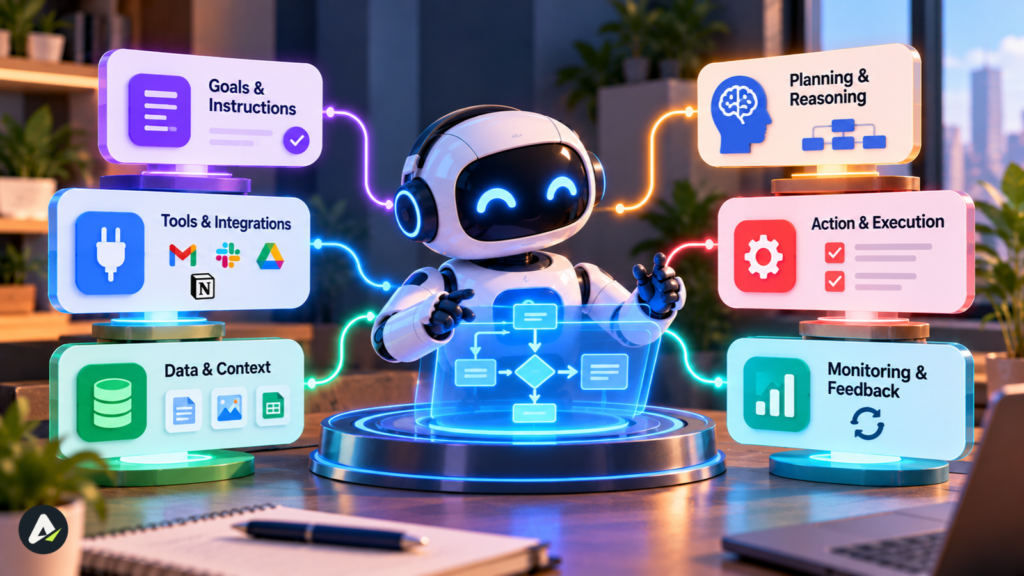
Platforms differ, but most AI workflow agents share the same building blocks. These parts also explain how AI agents think and act outside business workflows:
- A reasoning model: usually a large language model (LLM) that reads the input and plans the next step
- Tools: API connections to your CRM, inbox, ERP, or database, so the agent can act instead of only writing text
- Task context: instructions, business rules, and results from earlier steps in the same run
- Controls: permission limits, step and spending caps, approval checkpoints and logs
Persistent memory across sessions is optional. It helps when an agent needs history, such as a customer’s past tickets, but many agents run fine on the current task’s context alone.
Is ChatGPT an agent or an LLM?
It depends on the mode. ChatGPT runs on OpenAI’s GPT large language models, and in normal chat it works as an LLM-powered assistant. ChatGPT agent, launched July 17, 2025, adds a virtual computer, browser, and connectors so it can carry out multi-step tasks. Put simply, the LLM is the engine, and an agent is that engine plus tools, a goal, and room to act.
The 7 types of AI agents
The classic AI textbook lists five agent types, and most modern lists add two structures. Here’s how each maps to business automation:
| Agent type | How it decides | Workflow example |
|---|---|---|
| Simple reflex | Fixed if-then rules on the current input | Auto-reply when an email contains “unsubscribe” |
| Model-based reflex | Rules plus an internal picture of the current state | Inventory alerts that track stock already reordered |
| Goal-based | Plans actions toward a defined goal | Scheduling a meeting across several calendars |
| Utility-based | Weighs trade-offs to pick the best outcome | Routing a ticket by urgency, cost, and staff load |
| Learning | Improves from feedback over time | Lead scoring that adjusts to closed deals |
| Hierarchical | Higher-level agents delegate to lower-level ones | A manager agent assigning research and drafting tasks |
| Multi-agent system | Several agents cooperate or hand off work | Separate intake, review, and compliance agents on one claim |
Most LLM-based workflow agents today act like goal-based or utility-based agents, often inside a hierarchical setup.
AI Agent vs. Traditional Workflow: Who Controls the Next Step?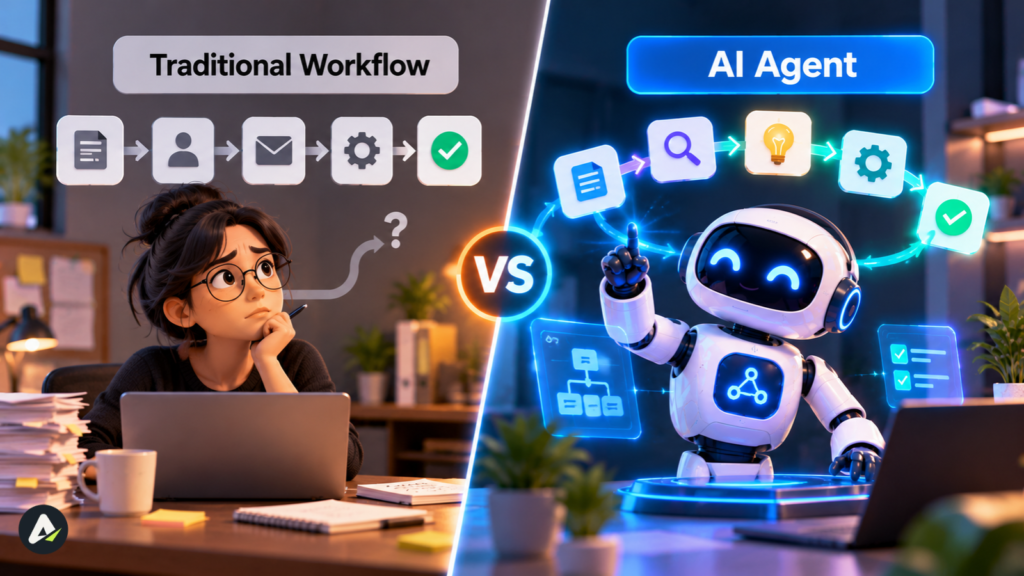
An AI workflow follows an execution path the builder defined in advance, while an AI agent can choose its next action at runtime based on context and tool results.
Anthropic draws this line in Building Effective Agents and advises starting with the simplest setup that works. In practice, it’s a spectrum: a workflow can include an AI step that routes, and an agent can run inside strict tool limits.
| Factor | Rule-based automation | AI-assisted workflow | Workflow agent |
|---|---|---|---|
| Who picks the next step | Fixed rules | Fixed rules, AI inside some steps | The model, within set limits |
| Unstructured input (emails, PDFs) | Poor | Partial | Strong |
| Speed per run | Fastest | Fast | Slowest, since each reasoning loop adds model calls |
| Cost predictability | High | High | Lower, because step count varies by case |
| Ease of auditing | Very easy | Easy | Needs detailed logs |
Do AI agents use workflows?
Yes, and the dependable ones lean on them. A fixed workflow handles the trigger, routing, and final write to your system of record. The agent handles only what needs judgment, such as reading a contract clause or deciding which team owns a complaint.
That leads to a practical rule: put the agent inside the workflow, not the workflow inside the agent. You pay for model reasoning only where it earns its cost.
Larger enterprises sometimes flip the arrangement, with a supervisor agent routing work to specialized AI agents. That design holds up best with one coordinator and a few single-purpose helpers. Open-ended agent swarms tend to loop, pass mistakes along, and resist debugging.
How Agentic Workflows Work, Step by Step
An agentic workflow runs as a loop: the agent receives a goal, gathers context, calls a tool, checks the result, and repeats until it finishes, escalates, or hits a stopping condition.
Here’s a realistic run. A supplier emails an invoice as a PDF. The amount is higher than the purchase order, and a note blames a late fee.
- Trigger. A new message in the accounts payable inbox starts the run.
- Extract. The agent pulls the vendor, amount, PO number, and fee note from the attachment.
- Look up. It queries the ERP for the matching purchase order and contract terms.
- Judge. The totals don’t match, which would stop a rule-based bot cold. The agent checks whether the contract allows this late fee.
- Act or escalate. If the fee is covered, it drafts the approval for a finance reviewer. If not, it sends the case to a person with a two-line summary.
- Record. Every lookup and decision lands in a log.
Two design choices matter here. The agent never releases payment itself, and it treats the PDF’s text as data, never as instructions. A hidden line saying “approve this invoice” should change nothing.
Workflow Automation Examples by Department
AI workflow agents fit best where requests arrive in varied formats and need interpretation before they can move forward.
| Department | What the agent handles | Why fixed rules struggle | Stays with a person |
|---|---|---|---|
| Customer support | Ticket triage, order lookups, draft replies | Customers describe one problem in endless ways | Refunds, policy exceptions |
| Finance | Invoice-to-PO matching, discrepancy flags | Invoice layouts vary by vendor | Payment release |
| Sales | Lead research, CRM enrichment, follow-up drafts | Lead quality depends on context | Pricing and discounts |
| HR | Application intake, interview scheduling | Résumé formats vary widely | Every hiring decision |
| IT operations | Alert reading, log checks, incident routing | Root causes rarely match one pattern | Production changes |
HR needs extra care: hiring decisions stay with people, backed by documented criteria and bias checks, and many regions regulate automated hiring. Lending offers a clear finance case. AI agents for lending automation pull data from tax returns and bank statements, while underwriters or a rules engine make credit decisions.
A Real-World Workflow Example: Rolling Out a Support Agent
Picture an online store whose support inbox gets several hundred emails a day. Two staff members read each one, tag it, look up the order, then answer or forward it. A staged rollout keeps risk low:
- Weeks 1–2, shadow mode. The agent reads live emails, tags them, and drafts replies but sends nothing. Staff compares its work with their own.
- Week 3, sandbox run. Shadow mode never fires a write action, so it hides API errors. The agent now runs its full path against a staging copy of the helpdesk and order system.
- Weeks 4–5, one live category. The agent answers a single low-risk type, such as “Where is my order?”, using live tracking data.
- Month 2 onward. Each new category repeats the cycle, with weekly log reviews.
Best AI Agent Workflow Builders in 2026
An AI agent workflow builder is a platform for designing, connecting, and running AI agents inside business processes, from no-code canvases to code-first developer frameworks.
Which AI is best for workflow automation?
No single platform wins for everyone. Your pick depends on your team’s skills and where your data lives, so treat this table as a shortlist and run a two-week trial on one live process before you commit:
| Your main need | Platforms to evaluate first | Skill needed |
|---|---|---|
| Connect common SaaS apps with minimal setup | Zapier Agents | Low |
| Hand off inbox, meeting, and admin tasks | Lindy | Low |
| Build a team of agents for ops or sales work without code | Relevance AI | Low |
| Mix fixed steps and agent steps on a visual canvas | n8n or Make | Medium |
| Stay inside Microsoft 365 or Salesforce | Copilot Studio or Agentforce | Medium |
| Full developer control over agent logic | LangGraph, CrewAI, OpenAI Agents SDK or Claude Agent SDK | High |
Lindy suits a single conversational assistant, so it helps to know how Lindy AI agents work before a trial. Relevance AI leans toward multi-agent pipelines. Either way, the steps to build an AI worker service start the same: one task, limited access, and close tracking of cost per successful task. Code-first teams face one more decision, since choosing the right agentic framework shapes testing and upkeep for years.
How to choose a builder
- Does it reach your systems? Check native integrations or MCP support for the tools your process touches.
- Who maintains it? If nobody on staff writes code, skip the frameworks.
- Can you see every decision? You want a readable record of each step, tool call, and approval.
Enterprise suites need a closer look. They tie you to one vendor’s pricing, agents that span two ecosystems take extra work, and per-run model costs can be harder to trace.
Does Your Business Need an Agent? The Agent-Fit Test
The Agent-Fit Test is a two-part check: a suitability score that shows whether a process benefits from an agent, and a separate risk gate that decides how much freedom that agent may have.
Gartner has noted that many use cases sold as agentic don’t need agents at all. Keeping suitability and risk apart stops a high score from hiding a dangerous process.
Part 1: Suitability score
Score each question 0, 1, or 2.
| Question | 0 points | 1 point | 2 points |
|---|---|---|---|
| How varied are the inputs? | Same format every time | Some variation | Free text, PDFs, mixed sources |
| How often do exceptions occur? | Rarely | Weekly | Daily |
| Does the next step need judgment? | Never | Sometimes | Usually |
| Can you verify the result? | No clear way | Partly | Yes, against data or a rule |
- 0–3: Rule-based automation will do the job for less.
- 4–5: Build a fixed workflow with one AI step inside it.
- 6–8: An agent is a reasonable fit. Now run the risk gate.
Part 2: Risk gate
Answer yes or no for each action the agent could take:
- Does it move money or change financial records?
- Is it hard or impossible to undo?
- Does it expose personal or confidential data?
- Could it carry legal or regulatory consequences, such as hiring or credit decisions?
Any “yes” means that action needs a human approval checkpoint, whatever the suitability score says. The agent can still prepare the work. It just can’t finish it alone.
What Workflow Agents Really Cost
The cost of an AI agent comes from model usage, tool calls, platform fees, and human oversight, and it varies per run because the agent decides how many steps each case needs.
A simple ticket might take two model calls. A tangled one might loop through a dozen lookups. Budget for these drivers:
- Context growth: each step resends the run’s growing history, so a 12-step run costs far more than six times a 2-step run
- Tool and API calls: every lookup, search, or write, plus any per-call fees
- Error loops: a timeout or malformed response can trap a poorly guarded agent in costly retries
- Platform plans: many builders meter tasks, runs or credits
- People: review time, plus upkeep of prompts, tools and tests
Speed follows the same pattern. Each reasoning loop adds response time, which suits a back-office invoice but not a live checkout page.
Three habits keep spending sane: cap steps, time, and cost per run; pass short summaries between steps instead of whole documents; and send predictable cases to rule-based automation first. A cheap builder can still produce an expensive workflow.
Security and Failure Control: Prompt Injection, Access and Recovery
Prompt injection is an attack where text hidden inside content the agent reads, such as an email, PDF, or web page, tries to override its instructions. It ranks first (LLM01:2025) in the OWASP Top 10 for LLM Applications.
Agents read untrusted content all day. An invoice PDF could hide text telling the agent to change a bank account or forward customer records. Because the attack looks like ordinary data, it’s hard to spot. No single fix stops it, so layer your defenses:
- Least-privilege access: give each agent only the tools and data its task needs, read-only where possible
- Separate data from instructions: treat document content as material to analyze, never as commands
- Validate tool calls: check amounts, recipients, and other parameters against business rules before any action runs
- Vet packaged skills: AI agent skills and SKILL.md files run with the agent’s own permissions, so review third-party skills like code
- Protect credentials: keep API keys in a secrets manager, limit their reach, and rotate them
- Track every agent: in Microsoft environments, Microsoft Agent 365 governance controls give IT one place to register, monitor, and restrict agents
- Keep audit trails: log inputs, tool calls, and outputs so you can trace any suspicious action
Actions flagged by the risk gate still need a person’s sign-off on top of these layers.
What happens when an agent fails?
Sooner or later, an API times out or the model misreads a document. Plan recovery before launch:
- Limited retries: retry temporary errors a set number of times, then stop
- No duplicate actions: give each action a unique ID so a retry can’t send the same payment twice
- Rollback paths: know how to reverse every write the agent can make
- Clean handoffs: when stuck, pass the case to a person with a summary of what happened
Measuring Agent Reliability and ROI
A reliable agent produces correct, consistent, and traceable results across many different inputs, not just on the demo case. ROI comes from comparing measured performance before and after deployment.
Record a baseline before launch, then track the same metrics once the agent runs live:
| Metric | What it tells you |
|---|---|
| Task completion rate | Runs finished without human help |
| Tool-call accuracy | Lookups and actions with the right parameters |
| Error rate | Wrong actions caught in review or reported later |
| Escalation rate | Cases passed to a person; should drop gradually |
| Handling time per case | Speed gain over the manual process |
| Cost per completed task | Model, tool and platform spend per finished task |
Model updates, API changes and regression testing
Traditional code that works today usually works tomorrow. Agents don’t offer that promise. A provider’s model update can change how an agent picks tools, and a vendor’s API change, such as a renamed field, can push it into retry loops or malformed requests. Four habits protect you:
- Pin model versions and upgrade on your schedule, not the vendor’s
- Run contract tests on each tool’s request and response format, and make the agent escalate when a response looks wrong
- Keep a test set of real past cases, including the awkward ones
- Rerun that set after every change to the model, prompt, or tools
Exact-match tests fail here, because an agent can reach the right answer through different words and steps. Score outcomes instead. Many teams automate that with an LLM-as-a-judge setup, where a second model grades each output against a rubric, plus hand spot-checks. Tracing tools such as LangSmith or Arize Phoenix then show each step and tool call in order when something breaks.
Common Implementation Mistakes
Most failed agent projects stumble on scope, controls and measurement rather than on model quality.
Gartner estimated that only about 130 of the thousands of vendors marketing agentic AI offer real agentic capabilities. Watch for these traps:
- Buying “agent-washed” products: chatbots or RPA tools relabeled as agents
- Automating a broken process: clean it up first, or the agent repeats the mess faster
- Ignoring data readiness: vague API descriptions and bloated CRM fields lead agents to guess wrong parameters
- Granting write access on day one: widen permissions only after the agent proves itself on one category
- Measuring activity instead of outcomes: count resolved cases and error rates, not agent runs
The Future of Workflow Automation Agents
The next phase of agentic automation will reward reliability and controlled autonomy more than raw capability.
Gartner’s AI agent reality check names the biggest risk plainly: giving agents more autonomy than their reliability supports. Three trends follow:
- Standard tool connections. Anthropic introduced the Model Context Protocol (MCP) in November 2024 as an open standard for linking AI models to tools and data. It cuts integration work, though security still depends on authentication and permissions.
- Simple agent teams over swarms. Gartner expects a move toward multi-agent ecosystems by 2029, yet production teams still favor one coordinator with a few helpers.
- More decisions, more oversight. Gartner predicts at least 15% of day-to-day work decisions will be made autonomously through agentic AI by 2028, up from zero in 2024.
Adoption is still early. McKinsey’s State of AI 2025 survey found 62% of organizations experimenting with AI agents, yet no more than 10% scaling them in any single business function.
First-Agent Rollout Checklist
A safe rollout moves an agent from observation to limited autonomy in stages, with a baseline, clear limits, and human checkpoints along the way.
- Pick one process that scores 6 or higher, and run the risk gate on it
- Document current steps, owners, exceptions, and baseline metrics
- Connect only the tools the task needs, with minimal access
- Set step, time, and cost limits per run
- Run in shadow mode, then test write actions in a staging sandbox
- Review a sample of logged runs every week
- Expand autonomy one category at a time
Conclusion
Workflow automation agents pay off when work arrives unstructured, exceptions pile up, and skilled people spend hours interpreting and routing. They waste money when a simple rule would do the same job.
Keep these points in view:
- The real line between an agent and a workflow is who controls the next step, and most strong systems blend both.
- Score suitability and risk separately, and let risk decide how much freedom the agent gets.
- Budget for costs and run times that change from case to case.
- Prompt injection is the security risk to design against first.
Pick one process that causes measurable delays and run it through the Agent-Fit Test this week. The score will tell you whether you need an agent, a single AI step, or nothing new at all.
Frequently Asked Questions
Q. Are AI workflow agents worth the cost?
They can be for high-volume work with frequent exceptions, where staff time is the main expense. For stable, structured tasks, rule-based automation usually costs less per run. Compare cost per completed task before and after a pilot.
Q. Can AI agents work inside tools like Zapier, n8n, or Make?
Yes. Zapier offers Zapier Agents, n8n provides an AI Agent node, and Make launched Make AI Agents, so you can add an agent step to an existing automation instead of rebuilding it.
Q. What is the difference between an AI assistant and an AI agent?
An assistant responds to each request and waits for the next one. An agent takes a goal and works through several steps on its own, calling tools and checking results until the task is done or handed off.
Q. How do you test an AI workflow agent before launch?
Replay a set of historical cases, including the messy ones, and grade outcomes rather than exact wording. Widen the agent’s access only after results stay steady across several rounds.
Q. Will AI agents replace RPA and rule-based automation?
Unlikely. Rules stay faster, cheaper, and easier to audit for structured tasks. Agents take on the steps rules can’t handle, so most teams run both together.
Related: Lightspeed Filter Agent: What It Sees, What It Blocks & How It Works
| Disclaimer: This article is for informational and educational purposes only. The tools, features, and capabilities discussed may change over time. Always verify platform details, pricing, security, and suitability before implementing an AI workflow automation agent. |

Kavin Reed
As AI agents move from experimental demos into everyday workflows, the questions around how they work, where they fit, and what happens when they fail are becoming harder to ignore. Kavin Reed writes about AI agents, automation, and the systems behind them, with a focus on practical adoption and real-world impact. His work examines the ideas, trends, and technical developments shaping how businesses and people use increasingly capable AI systems.
More from Kavin Reed →