Is Zapier AI Agent Free? Pricing, Limits & Review (2026)
Is Zapier AI Agent worth using in 2026? Explore its pricing, free-plan limits, AI by Zapier migration, setup process, and key drawbacks before automating your workflows.

In this article · 38 sections +
- Zapier AI agent at a glance (October 2026)
- What Is a Zapier AI Agent?
- The four parts of every agent
- Agent or Zap? Match the tool to the risk
- The 2026 Shift: Zapier Agents Become AI by Zapier
- What changes for builders
- Is Zapier Agents shutting down?
- Before you migrate an agent
- The trade-off few reviews mention
- Key Features of the Zapier AI Agent Builder
- Prompt assistant and templates
- Triggers, tools and live data
- Testing, versions and oversight
- How to Build a Zapier AI Agent: Step-by-Step Tutorial
- The same build in AI by Zapier
- Zapier AI Agents Pricing: Is Zapier AI Agent Free?
- Agents plans (October 2026)
- Platform plans for AI by Zapier
- How Zapier Agent Activities and Tasks Add Up
- One workflow, two meters
- How the task formula works
- Own API key or Zapier’s tiers?
- What the numbers reveal
- Zapier Agents vs. AI by Zapier vs. Zaps vs. Chatbots vs. MCP
- Which option fits your job?
- Zapier vs. Other AI Agent Builders
- Zapier AI Agent Examples That Work in Practice
- Lead enrichment for sales
- Inbox triage and reply drafts
- Customer support routing
- Meeting prep and follow-up
- Content research
- Zapier AI Agent Pros and Cons
- Is a Zapier AI Agent Safe for Business Data?
- The 5-Question Agent Fit Test
- Common Zapier AI Agent Mistakes to Avoid
- Final Verdict
- Frequently Asked Questions
Zapier sells its AI agents as teammates that never sleep. In practice, new users hit three questions fast. What exactly is an “activity”? Why did the free quota shrink during testing? And will this agent still exist next quarter?
That last question matters more than ever. On October 6, 2026, Zapier announced that its standalone Agents product is moving into AI by Zapier, an AI step inside the regular Zap editor. Agents still runs today on its own free tier. The builder, the billing, and the long-term home, however, are all changing.
- This Zapier AI agent review covers:
- What the agent does well, and where it falls short
- 2026 pricing for Agents, the core Platform, and Chatbots
- A step-by-step build using the real builder screens
- Cost math for activities versus tasks
- A fit test, common mistakes, and practical use cases
- Every price and limit here comes from Zapier’s pricing page or help center, current as of late October 2026.
Zapier AI agent at a glance (October 2026)
| Question | Short answer |
|---|---|
| What is it? | An AI assistant that follows plain-language instructions and acts across 9,000+ apps connected to Zapier |
| Is there a free plan? | Yes. Agents Free gives 400 activities a month, with no paid Zapier plan needed |
| What does Pro cost? | $400 a year ($33.33 a month) or $50 billed monthly, for 1,500 activities |
| How does billing work? | Standalone Agents counts activities; AI by Zapier counts tasks, multiplied by model tier |
| What changed in 2026? | Zapier is folding Agents into AI by Zapier, a step inside the Zap editor (announced October 6, 2026) |
| Is Agents shutting down? | No date set; Zapier promises email notice first |
| Best use | Research, triage, sorting and first drafts |
| Weak spot | Variable output and costs that rise with every tool call |
What Is a Zapier AI Agent?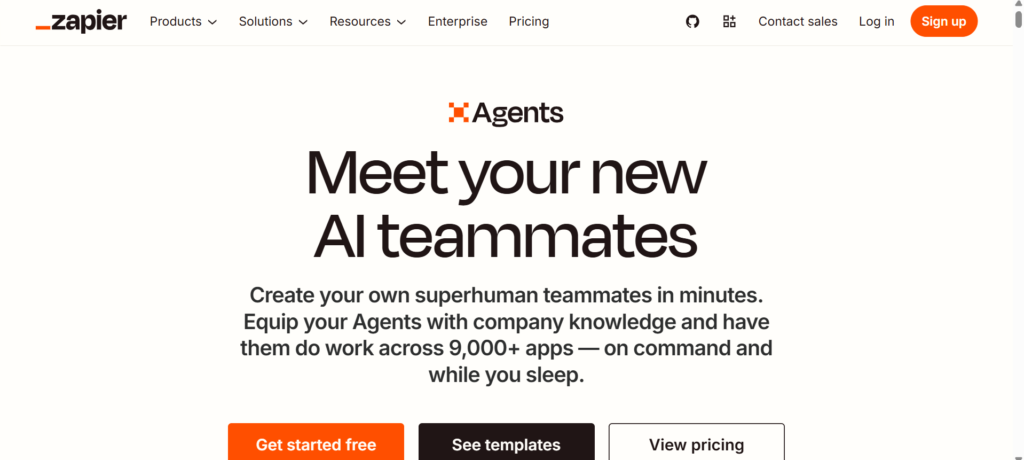
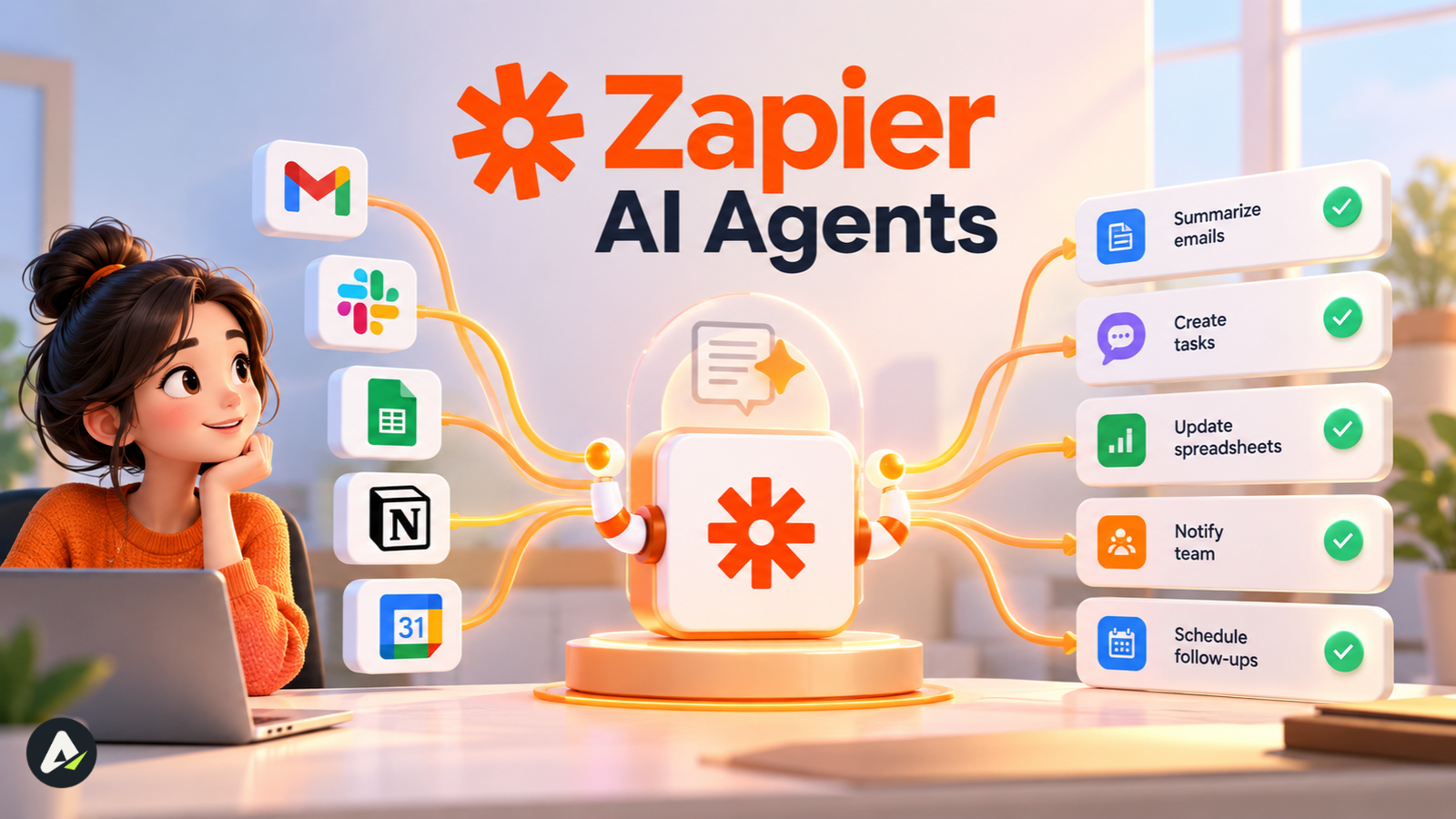
A Zapier AI agent is an AI assistant that follows plain-language instructions, reads your business data, and takes actions in apps connected to Zapier. It runs on command, on a schedule, or when an app event fires. Zapier pitches these agents as “AI teammates” that work across 9,000+ apps.
A classic Zap follows fixed rules: when X happens, do Y. An agent gets a goal instead. The AI then picks which tools to call, and in what order, based on what it finds.
The four parts of every agent
- Instructions: a prompt that sets the job, tone, and limits
- Trigger: the event that starts a run, such as a schedule, a Gmail label, or a chat message
- Tools: the actions it may take, like drafting an email or adding a Trello card
- Knowledge sources: live data it can search, such as a Google Doc, Notion page, or Zapier Table
Web search and browsing round out the toolkit for lead research and news pulls.
Agent or Zap? Match the tool to the risk
Zapier’s own Agents guide offers a rule of thumb. Pick Zaps when you need precision. Pick agents when roughly 80% accuracy works, and speed matters more.
Treat that number as a starting point, not a standard. Even a 95% hit rate fails a workflow that emails clients or edits financial records. A better split keeps critical actions in fixed Zap steps and hands AI the judgment calls: summaries, labels, and replies.
Zapier suits teams that want results without code, while developers often reach for code-first agentic AI frameworks.
The 2026 Shift: Zapier Agents Become AI by Zapier
AI by Zapier is now the home for Zapier’s agent features. It works as a single AI step in the Zap editor, with tool calling, reasoning, and autonomous action, billed in standard tasks. Zapier announced the change to Zapier Agents is now AI by Zapier on October 6, 2026.
The reason is simple. Agents lived on a separate site, agents.zapier.com, cut off from Zap triggers, filters, paths, and run history. Moving agents into Zaps closes that gap.
What changes for builders
Zapier’s migration guide lists five practical shifts:
- Billing: tasks replace activities, so the separate Agents subscription goes away
- Model tiers: Standard (1x tasks), Advanced (3x) and Premium (5x), plus your own API key at 1x
- Per-tool approvals: you pause before risky actions instead of flipping one on/off switch
- Runaway protection: a run pauses for review past its task limit, 75 by default and up to 500
- One history: agent runs show up in Zap history beside your other automations
Is Zapier Agents shutting down?
Not yet. As of late October 2026, Zapier has set no shutdown date and promises email notice first. Still, platforms change quickly. OpenAI’s AgentKit wind-down this year shows why builders should keep an exit plan for any agent tool.
Before you migrate an agent
Zapier converts each agent into a Zap with a native trigger and one AI by Zapier step. That step holds your original prompt and tools. Walk through these six points first:
- Knowledge sources: HubSpot, Asana, Zendesk, Zoom, and Jira don’t work in AI by Zapier yet. Zapier plans support for Q4 2026.
- Approvals: migrated tools run without pausing by default. Switch on approval for sends and deletes.
- Chat agents: on-demand agents need a webhook trigger instead.
- Agent-to-agent calls: the child agent needs a Sub-Zap trigger.
- Test costs: full-Zap tests currently use tasks, just like live runs.
- Duplicates: turn off the original agent once the Zap goes live, or both will fire.
The trade-off few reviews mention
Moving agents into Zaps adds guardrails, yet it also boxes them in. An agent now runs as one step inside a set pipeline, and every handoff routes through Zap plumbing. That structure cuts surprises in business work, but it limits free-form, multi-agent collaboration.
Approvals carry a similar catch. Approve every tool, and your “autonomous” agent turns into a prompt that waits on you all day. Zapier’s migration guide suggests a sensible split: leave approvals off for reads and turn them on for writes.
Key Features of the Zapier AI Agent Builder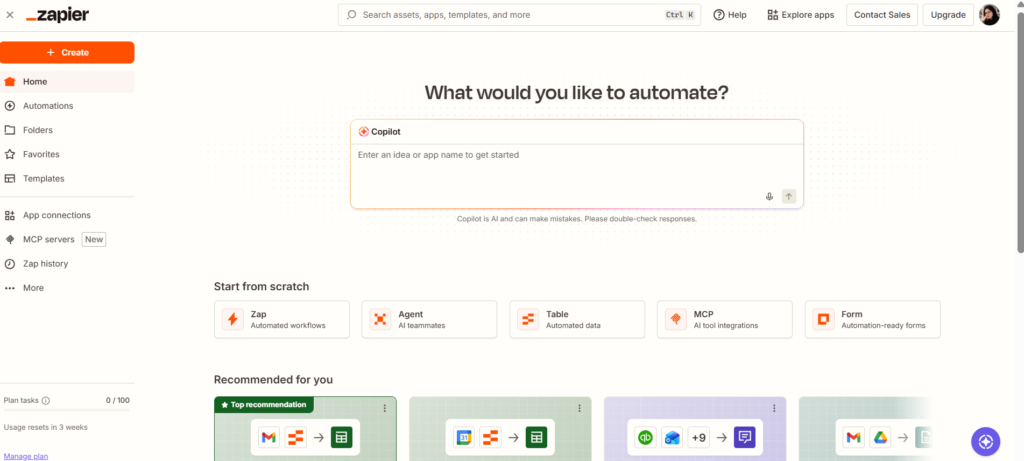
The Zapier AI agent builder is a no-code workspace. You describe a job in plain English, and a prompt assistant converts it into instructions, triggers, and tools.
Prompt assistant and templates
The “New agent” window asks one question: What would you like this agent to do? Type a goal and click Create agent. The screen shows “Generating instructions…” while the assistant drafts a full prompt. Want full control? Click Skip this step and write your own.
Templates fill the left panel, grouped by team. The Sales group alone holds 11, from call follow-ups to lead-gen research. Zapier’s blog puts the full library at nearly 100 templates.
Triggers, tools and live data
- Triggers: on demand, on a schedule, from a Zap, or from an app event like Gmail: New Label
- Actions in connected apps: draft replies, update CRM fields, post to Slack
- Live data sources: Google Drive, Box, Notion, Asana, Airtable, and Zapier Tables
- Web browsing: search the web and read pages during research
- Agent-to-agent calling: one agent hands work to another
Testing, versions and oversight
An Agent Preview panel and a Test agent button appear beside your instructions, so you can watch a dry run first. The top bar holds a version label (v1), a Publish menu, and a Share button.
Sharing comes in Viewer, Editor, and Owner levels. The All activity log records each run, and a Needs action queue flags runs that wait on you. Pods group related agents, and a built-in Copilot, marked AI beta, helps refine prompts. A Chrome extension brings your agents into any browser tab.
How to Build a Zapier AI Agent: Step-by-Step Tutorial
Six steps take you from a blank screen to a live agent. The example below builds an email management agent.
- Open the builder. On the Zapier dashboard, click Create, then choose Agent under Start from scratch. The same row offers Zap, Table, MCP, and Form.
- Describe the job. Write one clear goal, such as: When I label an email “Client”, summarize it, draft a reply, and flag any deadline. Click Create agent.
- Review the instructions. The assistant writes numbered steps. Strong drafts include guardrails, such as “avoid inventing commitments, deadlines, or facts not confirmed by the user.” Each reply carries a DRAFT – Pending Your Approval label. Tighten anything vague.
- Set the trigger. Click Edit trigger and pick an event like Gmail: New Label. Connect your account when prompted.
- Add tools and knowledge. Insert only the actions the job needs, such as Gmail’s Create Draft. Attach an FAQ doc when replies need company facts.
- Test, then publish. Open Agent Preview, click Test agent, and read the full run. Fix the prompt, test again, then hit Publish.
Tip: Free-plan tests draw from your monthly activity allowance. Refine the prompt in Agent Preview before you run repeated tests.
The same build in AI by Zapier
Inside a Zap, the flow feels familiar. Add a trigger, add an AI by Zapier step, and paste your instructions into the Prompt field. Pick a model tier and add tools. Then turn on Require approval before running for anything that sends or deletes data.
Zapier AI Agents Pricing: Is Zapier AI Agent Free?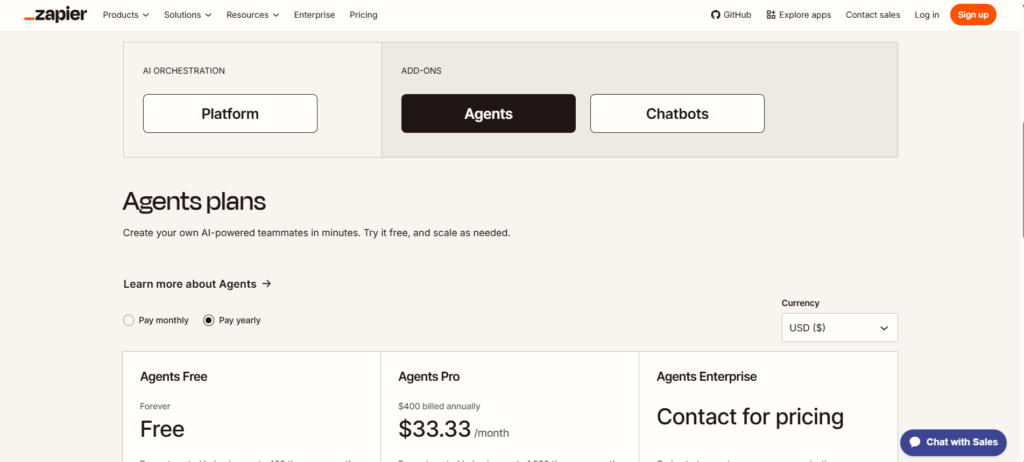
Yes. Standalone Agents keeps a forever-free tier, and paid plans scale by activity count. It bills as an add-on, apart from Zap tasks, so no paid Zapier plan is required.
Agents plans (October 2026)
| Plan | Price | Activities per month | Activities per run | Tests use quota? | Agent sharing |
|---|---|---|---|---|---|
| Agents Free | $0 | 400 | 10 | Yes | No |
| Agents Pro | $33.33/mo billed yearly ($400/yr); $50 billed monthly | 1,500 | 40 | No | No |
| Agents Enterprise | Custom | Custom | 40 | No | Yes |
A few Agent rules matter more than the sticker price:
- Shared pools: Team and Enterprise accounts share one activity pool across all users
- Monthly reset: your quota resets on your billing date, not the 1st
- Usage alerts: Zapier emails you at 80% and 100% of your activity limit
- Hard stop: at the limit, agents stop running, searching, and receiving triggers until the reset or an upgrade
Platform plans for AI by Zapier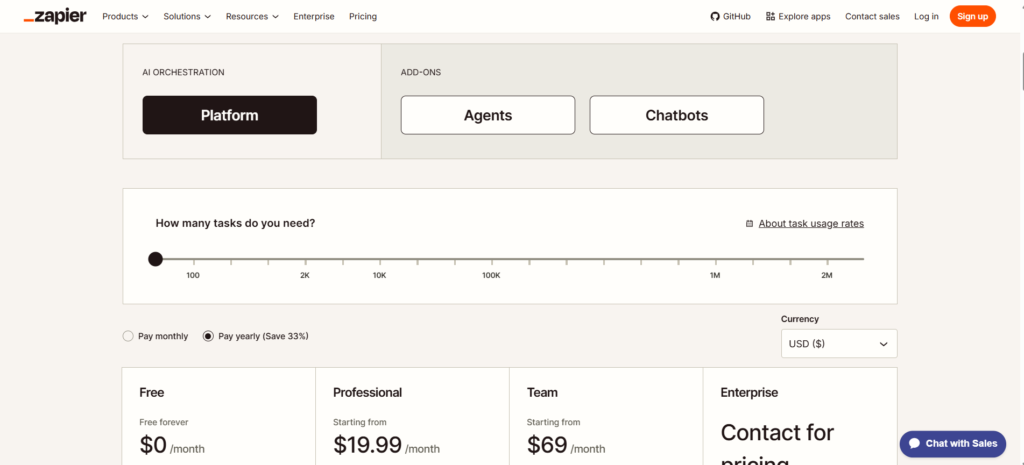
AI by Zapier draws on your Platform plan instead. The Free plan includes 100 tasks a month. Professional starts at $19.99 a month with 750 tasks, and Team starts at $69 a month, both billed yearly. Tool calling inside AI by Zapier needs Professional, Team, or Enterprise.
How Zapier Agent Activities and Tasks Add Up
An activity is any billable action an agent takes. That covers using a trigger, running an action, searching a knowledge source, searching or browsing the web, and receiving a Chrome extension message. One run often spends several, so the allowance runs down sooner than the number suggests.
One workflow, two meters
Zapier’s help center uses a simple example. An agent scans your inbox each morning for a keyword, summarizes each match, adds a Trello task per email, and posts one Slack message. One matching email costs 4 activities. Two cost 7.
The table runs that two-email job for 30 days under both systems. The AI by Zapier rows are estimates based on Zapier’s model tier rates. They assume a schedule trigger and four tool calls per run: one Gmail search, two Trello cards, and one Slack post.
| Setup | Units per run | Units per 30 days | Plan fit |
|---|---|---|---|
| Agents (activities) | 7 activities | 210 activities | Agents Free (400) |
| AI by Zapier, own API key (1x) | 1 + 4 = 5 tasks | 150 tasks | Professional, plus your AI provider’s bill |
| AI by Zapier, Advanced (3x) | 3 + 12 = 15 tasks | 450 tasks | Professional (750 tasks) |
| AI by Zapier, Premium (5x) | 5 + 20 = 25 tasks | 750 tasks | Professional, right at the 750 cap |
How the task formula works
Zapier charges the AI step once at the tier’s multiplier, then charges every tool call at that same rate:
\text{Tasks per run} = \text{multiplier} \times (1 + \text{tool calls})The trigger itself costs nothing, since Zap triggers never use tasks. The “1” covers the AI step’s own run. Standard (1x) can’t call tools, so tool-using steps start at Advanced or your own key.
Own API key or Zapier’s tiers?
Your own key drops Zapier’s charge to 1x, but the real savings depend on prompt size.
- Own key wins for short prompts and lean tool calls, where token bills stay small.
- Zapier’s tiers win when runs pull large knowledge sources or loop through many tools. Each loop resends context, so your provider’s token bill climbs. Zapier’s tiers, by contrast, fold model use into a set task price.
- Rule of thumb: run one week on Advanced, then compare that task cost with one week of token spend on your own key.
What the numbers reveal
- Tier choice drives cost. Premium uses 67% more tasks than Advanced for the same job.
- Each tool call multiplies. One extra Slack post adds a full multiplier, not one task.
Zapier Agents vs. AI by Zapier vs. Zaps vs. Chatbots vs. MCP
Zapier now offers five ways to put AI to work, each built for a different job.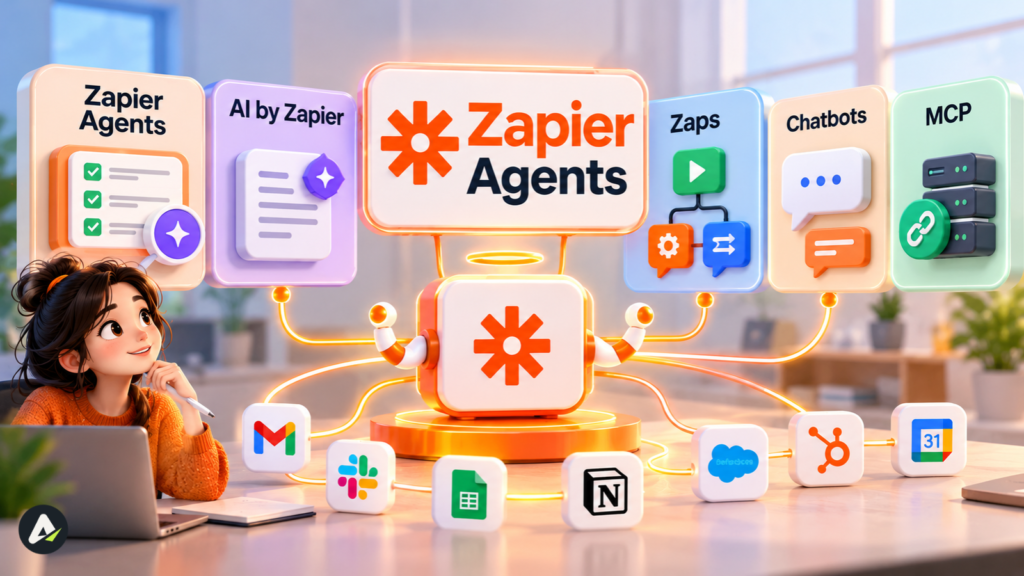
| Option | Best for | Billing unit | Human control | Status in late 2026 |
|---|---|---|---|---|
| Zapier Agents | Standalone AI teammates you chat with or schedule | Activities (add-on) | All-or-nothing approval | Moving into AI by Zapier |
| AI by Zapier | Agentic steps inside a Zap with filters and paths | Tasks, multiplied by model tier | Approval per tool | Zapier’s main path forward |
| Classic Zaps | Exact, repeatable rule-based workflows | Tasks | Fully deterministic | Core product |
| Chatbots | Customer-facing Q&A on your site | Chatbot plans (add-on) | Knowledge-limited answers | Separate add-on |
| Zapier MCP | Letting ChatGPT, Claude, or Cursor act in your apps | Tasks (2 per tool call) | Set in the AI client | Included on Free, Pro and Team plans |
Which option fits your job?
- AI by Zapier: new builds that live inside existing workflows
- Agents: quick personal experiments on the free tier
- Classic Zaps: jobs where one wrong action costs money or trust
- MCP: teams that already work inside an AI chat tool
Zapier vs. Other AI Agent Builders
Zapier isn’t the only route to a working agent. The best fit depends on your team’s skills and how much control you need.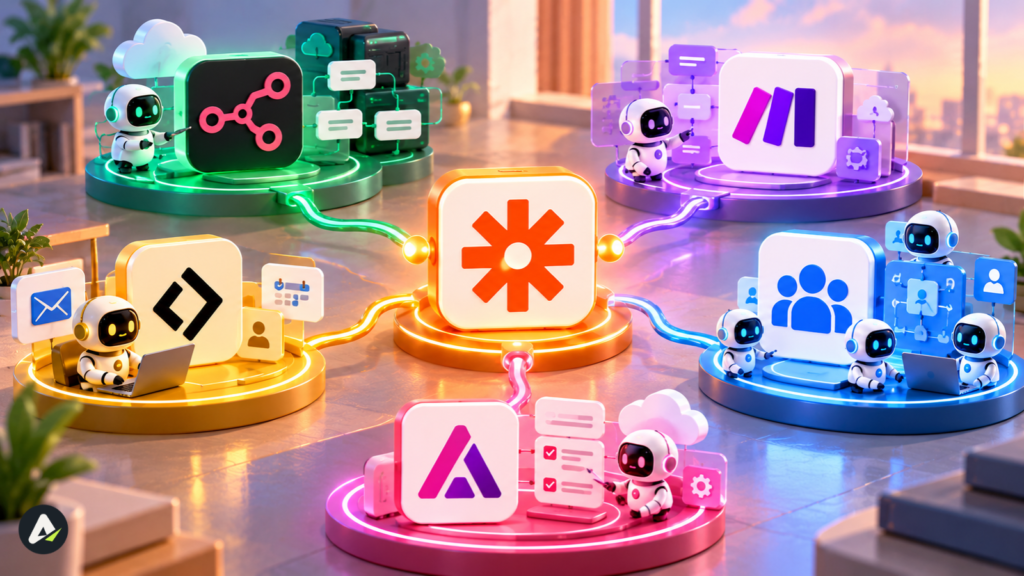
| Platform | Pick it when | Watch for |
|---|---|---|
| Zapier | You want wide app coverage with no code | Task multipliers and migration work |
| n8n | You want self-hosting and technical flexibility | Hosting, upkeep and credential management |
| Make | You prefer visual, multi-branch scenario design | Credit usage and debugging effort |
| Lindy | You want assistant-style agents for inbox and meeting work | Plan limits and integration depth |
Lindy’s assistant-style AI agents focus on one person’s delegated work, such as inbox and calendar tasks. CrewAI’s role-based agent teams let developers script multi-agent systems in Python. Zapier sits between them, handing deep app integrations to non-technical operators. Other no-code builders like AgentMan round out the shortlist.
Zapier AI Agent Examples That Work in Practice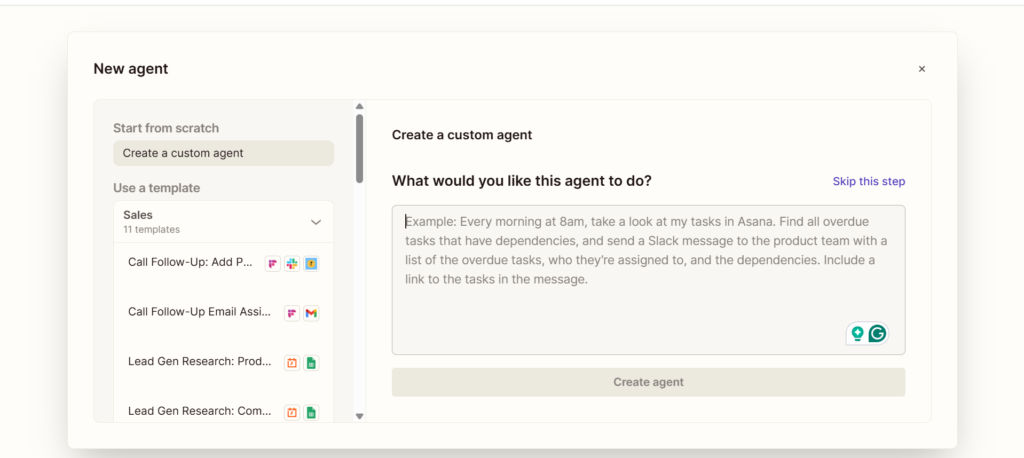
Start with agents that read information and prepare drafts, not ones that change records or send messages. You review the output first, then hand over more permissions. Each example below mirrors a Zapier template and follows the logic of specialized single-purpose AI agents: one job, done well.
Lead enrichment for sales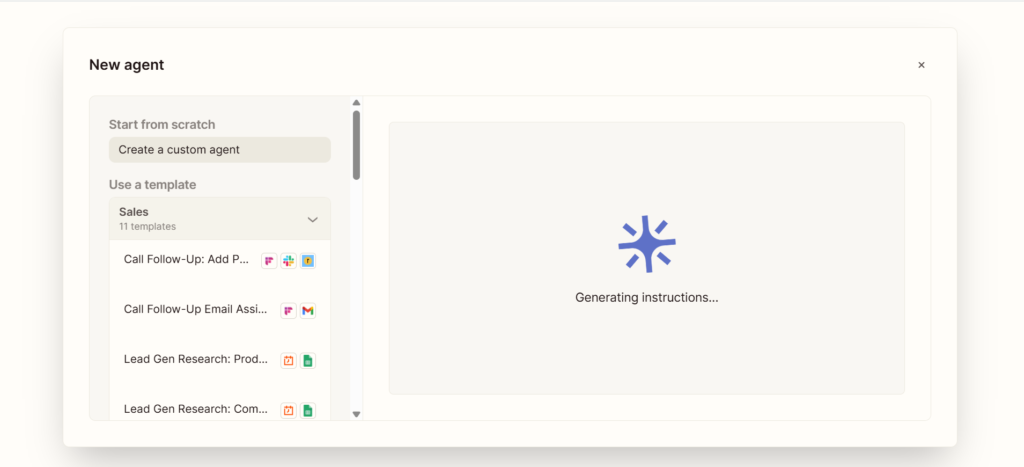
A new lead lands from a form or Facebook Lead Ads. The agent searches the web for company details, adds them to HubSpot, and drafts tailored outreach. Reps edit a draft instead of researching from zero.
Inbox triage and reply drafts
A Gmail: New Label trigger fires. The agent summarizes the thread, answers the questions it can verify, and saves a reply as a draft. Urgent requests become Trello tasks.
Customer support routing
The agent reads new Zendesk tickets, searches a help-doc knowledge source, and routes each ticket to the right team. Billing issues go one way, bugs another.
Meeting prep and follow-up
Before each Google Calendar event, the agent builds an agenda from past notes. Afterward, it pulls action items and posts them to Slack with owners attached.
Content research
On a weekly schedule, the agent searches the web for fresh articles on a topic. It logs titles, links, and summaries into a Zapier Table for an editor to scan.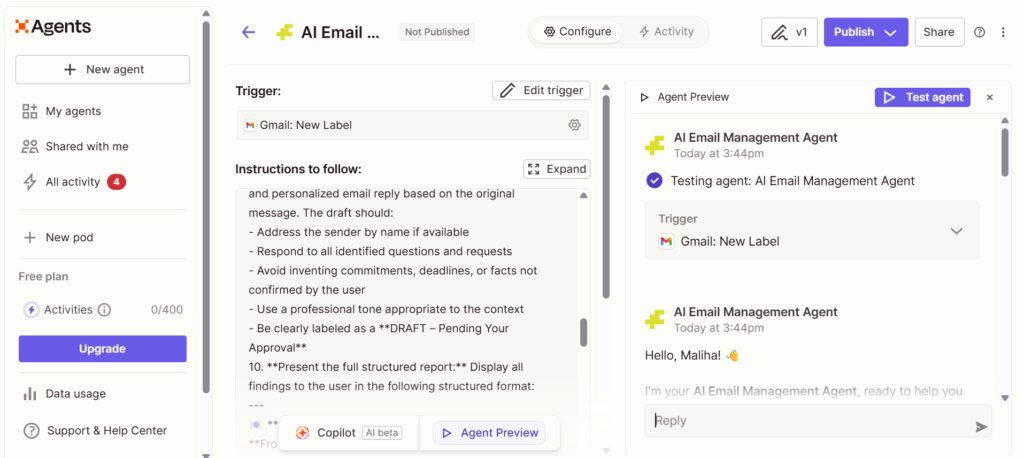
Mini case study: the overdue-task digest. The builder’s own placeholder prompt describes an ideal first agent. Every morning at 8 a.m., it finds overdue Asana tasks with dependencies. Then it sends the product team a Slack list with assignees and links. It reads data, writes one message, and poses little risk.
Zapier AI Agent Pros and Cons
Zapier wins on app reach and quick setup. It loses ground on cost predictability while the 2026 migration plays out.
| Pros | Cons |
|---|---|
| Deep integration catalog across sales, support, and ops tools | Activities and tasks run on separate meters during the transition |
| Prompt assistant writes solid first-draft instructions | Free-plan tests eat the monthly quota |
| Free tier needs no paid Zapier plan and no card | Pro’s 1,500 activities drain quickly on research-heavy runs |
| Per-tool approvals in AI by Zapier add real safety | Standalone Agents is moving into Zaps, so builders face rework |
| Activity logs and a Needs action queue support oversight | Some knowledge sources (HubSpot, Jira, Zendesk) lack AI by Zapier support so far |
| Templates cover sales, support, ops, and marketing | Output varies run to run, unlike a fixed Zap |
Is a Zapier AI Agent Safe for Business Data?
Zapier offers logs, guardrails, and training opt-outs, but each one needs setup. Its legal page on AI features lays out the rules:
- Model training: Enterprise content stays out of model training by default. Other customers can opt out through a form on the same page.
- AI providers: OpenAI, Anthropic, and Google act as Zapier subprocessors, and Zapier bars them from training their own models on customer content.
- Usage data: Zapier still uses usage information, such as how workflows are configured, to run and improve its products.
- Guardrails: AI Guardrails by Zapier flags PII, prompt injection, toxic language and negative sentiment. Builders switch it on per workflow.
- Admin controls: in AI by Zapier, admins can block tool calling, restrict models and require approval before AI Zaps go live.
- Audit trail: the activity log shows each action an agent took with your data.
Handling health, legal, or financial records? Start on Enterprise, or route requests through your own AI provider account, whose data agreement then applies.
The 5-Question Agent Fit Test
Use these five questions to decide whether a job needs an AI agent, an AI step inside a Zap or a plain Zap.
- Does the task need judgment? Reading, summarizing, sorting or researching suits AI. Copying a field from A to B suits a Zap.
- What does a mistake cost? Internal drafts tolerate errors. Client emails, payments and record changes need fixed steps or per-tool approval.
- How many tool calls per run? Count them. Six calls on Premium push one run to 35 tasks.
- Does it need live data? Web research and knowledge-source lookups add activities or tool calls to every run.
- How often will it run? Multiply runs by tasks per run. Prompt-only jobs fit Standard at 1x, while tool-heavy jobs need Advanced, Premium, or your own key.
Three or more answers pointing to AI means an agent fits. Two or fewer means a classic Zap will cost less and break less.
Common Zapier AI Agent Mistakes to Avoid
Most failed agents share a few flaws: vague goals, careless scheduling, and thin testing. Watch for these four traps.
- One giant prompt. Multi-goal instructions widen the room for error. Split big jobs into small agents that call each other.
- Tight polling schedules. An agent that wakes every 15 minutes to find nothing still spends a trigger activity each time.
- Ignoring the run log. Read a week of runs before you widen any agent’s permissions.
- Clean test data only. Feed the agent messy emails, missing details, and odd formats, not just tidy examples.
Final Verdict
A Zapier AI agent earns its place when your business already runs on connected apps and needs a hand with judgment-heavy chores. Its edge is reach and ease. Its weak spots are usage math, variable output, and a product in transition.
- The free tier lets you test agents without a paid Zapier plan.
- Non-Enterprise users must opt out of AI training themselves.
- AI by Zapier is the long-term home, so build new agents there.
- Narrow, read-first jobs make the safest starting point.
Your next step: pick one repetitive task and run it through the fit test. Build it as an AI by Zapier step with approvals on. Track task use for a week, then decide whether to scale.
Frequently Asked Questions
Q. Is Zapier AI agent free?
Yes. Agents Free costs $0 forever and includes 400 activities a month, with a limit of 10 activities per run.
Q. How much do Zapier AI agents cost?
Agents Pro costs $400 a year, shown as $33.33 a month, or $50 billed monthly, for 1,500 activities. Agents Enterprise uses custom pricing with agent sharing. AI by Zapier instead uses tasks from your Platform plan, which starts at $19.99 a month billed yearly.
Q. What counts as an activity in Zapier Agents?
Each trigger use, action, knowledge-source lookup, web search, web browsing request, and Chrome extension message counts as one activity. Zapier’s sample runs use between three and seven.
Q. Is Zapier Agents being discontinued?
Not yet. Each agent card on agents.zapier.com now shows a Migrate your Zap link, and a banner can move every published agent at once. The original agent keeps running until you turn it off.
Q. What is the difference between a Zap and a Zapier AI agent?
A Zap spends one task per action and behaves the same on every run. An agent reasons and calls tools, so one run uses more units and its output can vary from run to run.
Q. What are the top AI agent builders besides Zapier?
Popular no-code and low-code picks include n8n, Make, and Lindy, with CrewAI for developers.
Q. Can Zapier connect AI agents to ChatGPT or Claude?
Yes. Zapier MCP lets AI tools such as ChatGPT, Claude, and Cursor run more than 30,000 actions across 9,000+ apps, with each MCP tool call counting as two tasks.
Q. Does Zapier use my data to train AI models?
Not for Enterprise accounts, which Zapier opts out automatically. Other customers can opt out through a form on Zapier’s legal page. Zapier also bars its AI providers, including OpenAI, Anthropic and Google, from training on customer content. Zapier also bars its AI providers, including OpenAI, Anthropic, and Google, from training on customer content.
Related: FancyAI Agents Review: 7 Things You Should Know Before Using Them
| Disclaimer: This article is for informational and educational purposes only. The review reflects independent research and testing, and we are not affiliated with or endorsed by Zapier. Features, pricing, and limits may change, so verify details on the official website. |

Maliha
AI is moving steadily from experimental technology into the products and workflows people rely on every day. Maliha Irfan is a technology writer covering artificial intelligence, automation, and emerging software. Her work focuses on the practical side of AI agents, exploring how these systems are being used, what they can realistically accomplish, and the limitations that matter when businesses and individuals adopt them.
More from Maliha →