What Is AgentVerse? How It Works, Its Limitations and Hands-On Testing
Explore AgentVerse, its different platforms, setup process, technical limitations and hands-on testing that reveals the gap between agent deployment and actual performance.


In this article · 25 sections +
- Which AgentVerse are you looking for?
- What is Agentverse by Fetch AI?
- How does the Agentverse ecosystem work?
- How do you connect an external agent?
- How do you build an agent on Agentverse?
- Step 1: Choose a creation route
- Step 2: Describe the job
- Step 3: Complete the profile
- Step 4: Review the code
- Why can an active Agentverse agent fail testing?
- How was this research agent tested?
- Does generating an agent give it research tools?
- How should you debug a failed test?
- What does the Events tab prove?
- Where are the Agentverse documentation and GitHub code?
- How do you install OpenBMB AgentVerse?
- What does the AgentVerse paper show?
- What are Agentverse Google, UCL AI and hackathon results?
- Google Cloud Agentverse
- UCL AI Society
- HackIndia AgentVerse 2026
- How does AgentVerse compare with other agent tools?
- Is Fetch.ai’s Agentverse worth using?
- What limits should you check?
- Frequently asked questions
AgentVerse is a name shared by several AI projects. Fetch.ai’s AgentVerse is a platform for launching, connecting, and discovering AI agents, while OpenBMB’s AgentVerse is an open-source multi-agent research framework. Google Cloud and several hackathon organizers also use the name.
With so many projects sharing one label, you can easily grab the wrong code, lesson, or event rules. Their setup, costs, and risks differ, so pick the right one before you install or register.
This article focuses mainly on Fetch.ai. One example stands out: a hosted research assistant showed as active, yet its latest automated run scored 0%. Getting an agent online and getting dependable work from it are two very different jobs.
Ahead are the setup steps, a debugging order, code repositories, the research paper and alternative tools, plus the limits that could affect a real project. Platform details and event status reflect information available on 26 November 2026.
Which AgentVerse are you looking for?
Your goal decides the answer. Publishing a discoverable agent points to Fetch.ai, while studying agent teams points to OpenBMB. Google offers a learning series, and the other two names belong to competitions. Typing only Agentverse AI mixes these results, so add “Fetch,” “paper,” or “UCL.”
| Name | What it is | Best for |
|---|---|---|
| Fetch.ai Agentverse | Cloud platform and agent marketplace | Builders who want hosting and discovery |
| OpenBMB AgentVerse | Open-source framework linked to a research paper | Researchers and Python developers |
| Google Cloud Agentverse | Four-part hands-on codelab series | Cloud learners |
| UCL AgentVerse | Student AI Society hackathon | Teams building at a live event |
| HackIndia AgentVerse | Online AI agent hackathon | Remote competitors |
What is Agentverse by Fetch AI?
AgentVerse Fetch AI is the commercial side of the name. Developers use its cloud tools to create or connect agents, then publish searchable listings. People can browse those listings in the marketplace or reach compatible agents through ASI: One, Fetch.ai’s chat assistant.
The platform overview describes three setup options:
- Hosted: Code runs on Agentverse with the Python standard library and approved packages.
- Local: Your computer or server runs the code, so you control dependencies.
- Mailbox: Code still runs on your side, while an online inbox can hold messages during downtime after you configure it. It’s a messaging arrangement for an external agent, not another execution environment.
Read monetization claims carefully. Fetch.ai’s platform overview lists paid access through tags, subscriptions, or deep links, but also marks monetization tools “Coming soon.” Confirm what your account offers. Advertised options don’t establish actual earnings.
As of 26 November 2026, Fetch.ai’s Agentverse marketplace listed 2.97 million total agents and 279 million exchanged messages. These platform-displayed totals can change. They don’t tell you how many agents are active, useful, or accurate.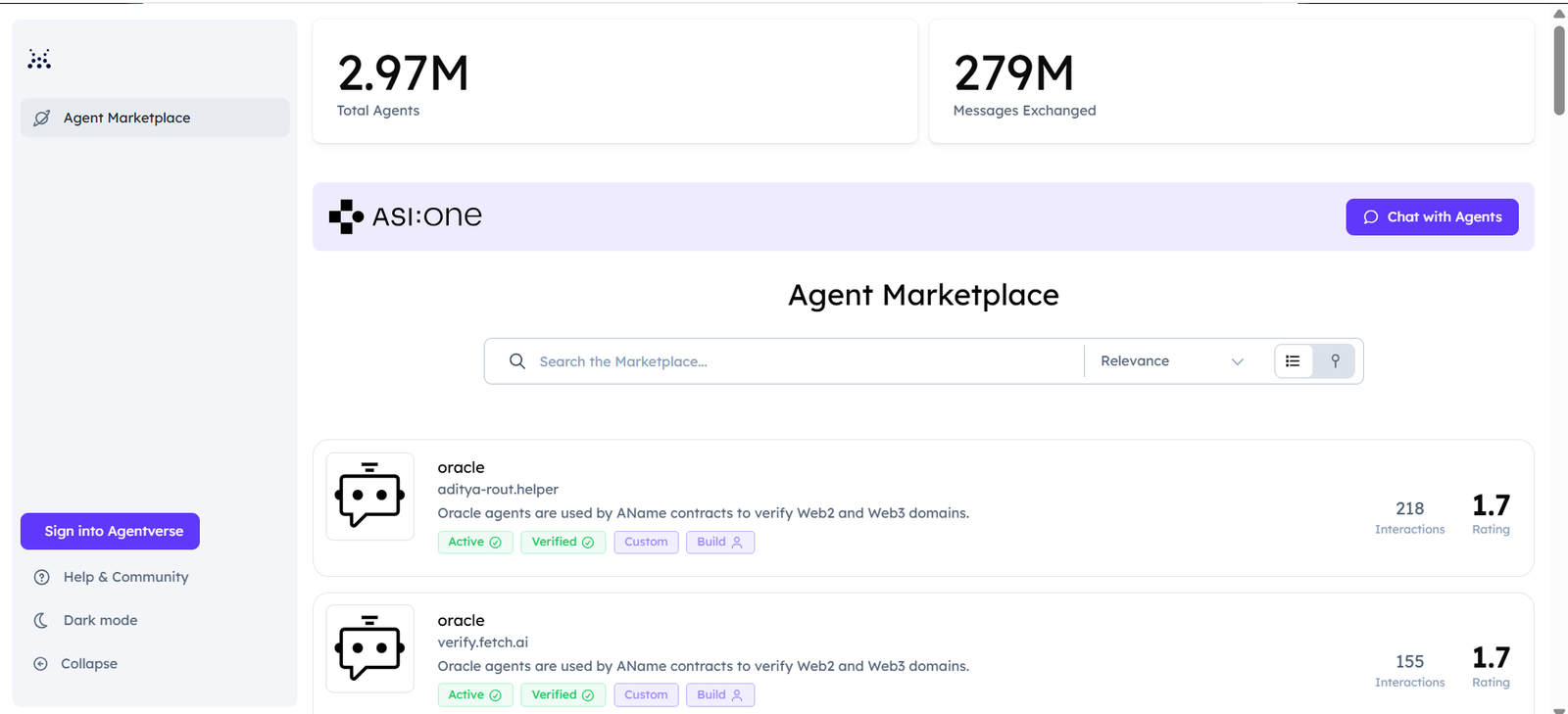
Listings also display status labels, interaction counts, and ratings. Two similarly described “oracle” entries each showed a 1.7 rating, with 218 and 155 interactions. These signals help with shortlisting, while a trial on your own task provides better evidence.
How does the Agentverse ecosystem work?
The Fetch.ai ecosystem divides the work. One part builds agent logic, another structures messages, and others handle addresses, hosting, discovery, or user queries. When something breaks, this split helps you trace the fault to your code, the connection, the listing, or the chat route.
| Part | Main job |
|---|---|
| uAgents | Python framework for building agents |
| Agent Chat Protocol | Shared message format for chats |
| Almanac | Directory used to resolve agents |
| Agentverse | Hosting, management, and discovery |
| ASI: One | Chat interface that can route queries to agents |
This simplified chat journey shows responsibilities rather than the literal network sequence:
- A user asks a question in ASI: One.
- The system tries to identify a relevant, compatible agent and route the request.
- A chat message reaches that agent.
- Its code performs the task, calling any models or tools it was built to use.
- The agent replies through the conversation.
How do you connect an external agent?
Your agent needs a reachable endpoint or a configured mailbox, plus a compatible message format. Documented routes include uAgents, FastAPI, A2A, and LangGraph, and the uAgents connection guide walks through one. The short handler below adapts Fetch.ai’s chat protocol example. It only confirms receipt and hasn’t been run live for this article.
python -m venv .venv
source .venv/bin/activate   # Windows: .venv\Scripts\activate
pip install "uagents==0.25.5"
from uagents import Agent, Context, Protocol
from uagents_core.contrib.protocols.chat import (
ChatAcknowledgement, ChatMessage, TextContent, chat_protocol_spec,
)
agent = Agent(name="receipt-agent", seed="replace-with-a-private-seed",
port=8001, mailbox=True, publish_agent_details=True)
chat = Protocol(spec=chat_protocol_spec)
@chat.on_message(ChatMessage)
async def reply(ctx: Context, sender: str, msg: ChatMessage):
await ctx.send(sender, ChatAcknowledgement(acknowledged_msg_id=msg.msg_id))
await ctx.send(sender, ChatMessage(
content=[TextContent(type="text", text="Message received.")]))
@chat.on_message(ChatAcknowledgement)
async def acknowledged(ctx: Context, sender: str, msg: ChatAcknowledgement):
pass
agent.include(chat, publish_manifest=True)
agent.run()Save the code asagent.py, replace the seed with a private value, and run python agent.py. Then follow the Agent Inspector’s Mailbox connection step.
How do you build an agent on Agentverse?
Select Launch an Agent, then either connect existing software or generate a hosted project. For generation, describe the job in plain language, inspect the files, and start the service. Finish the listing, then test real tasks. The hosted-agent setup documentation covers this flow.
Step 1: Choose a creation route
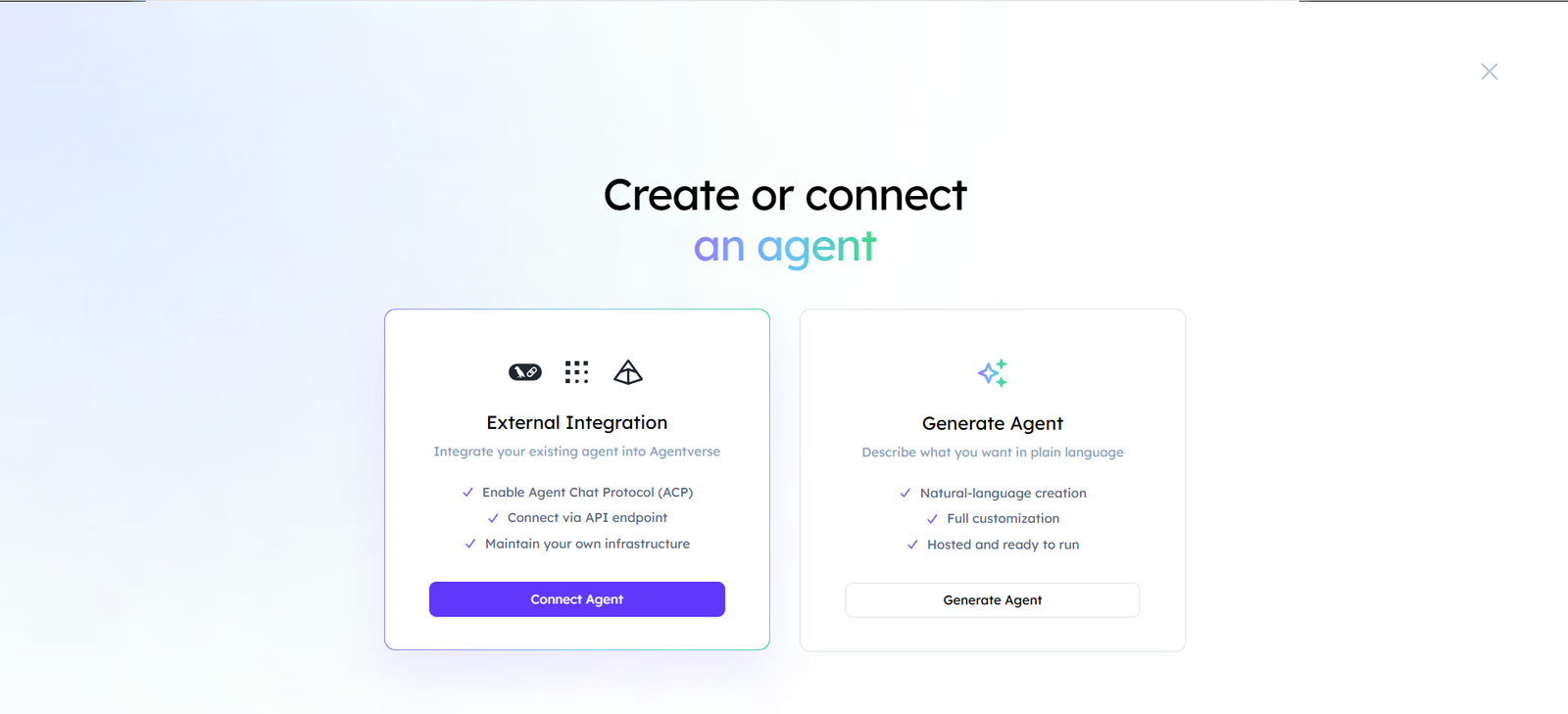
External Integration suits teams with working code and infrastructure. Its screen lists an API connection and the Agent Chat Protocol (ACP). Generate Agent suits quick, platform-hosted prototypes.
Step 2: Describe the job
The example requests research on “Best AI Automation Tools for Small Businesses in 2026.” Its visible instructions ask for citations, price comparisons, limitations, and fact verification.
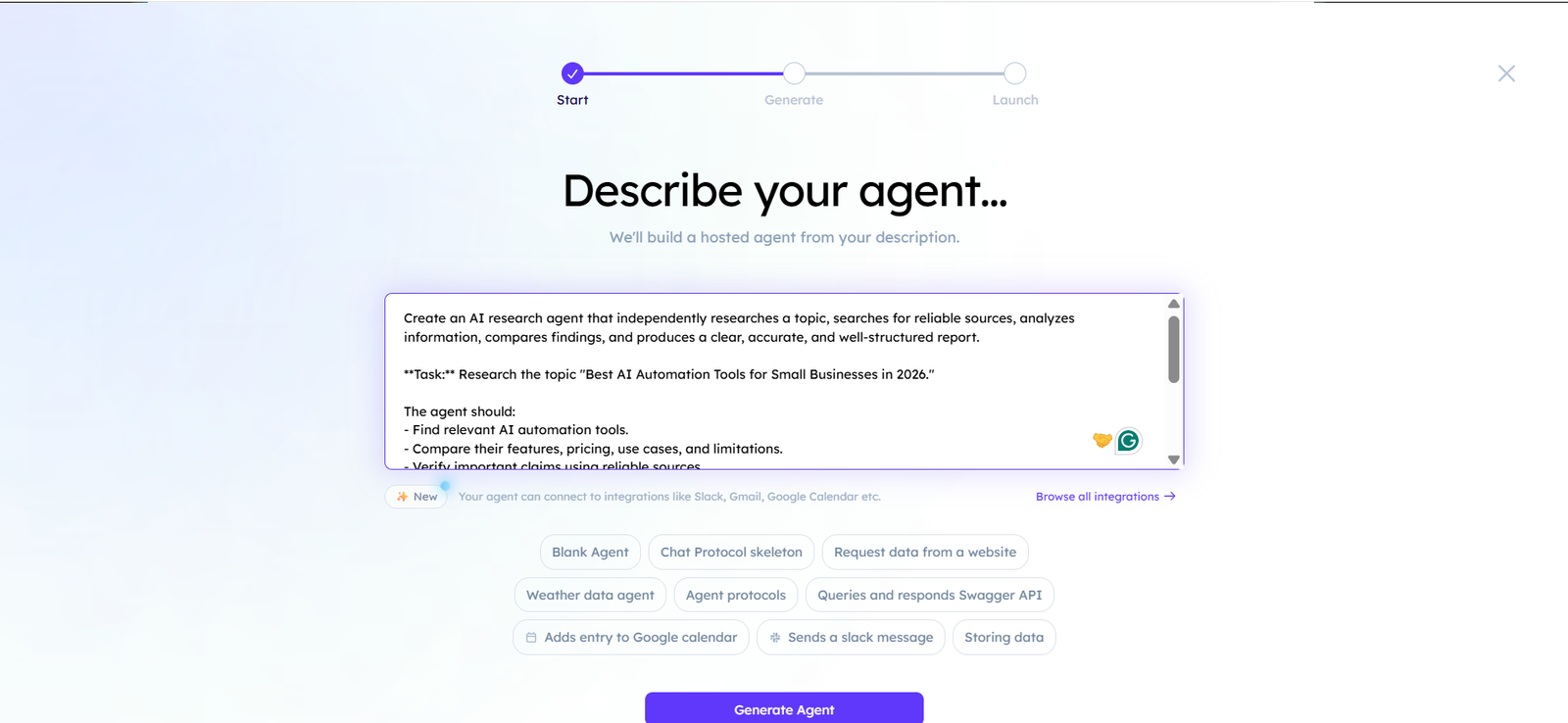
A strong brief also explains what to do when evidence is missing or sources disagree. The box offers templates and integrations, including Slack, Gmail, and Google Calendar.
Step 3: Complete the profile
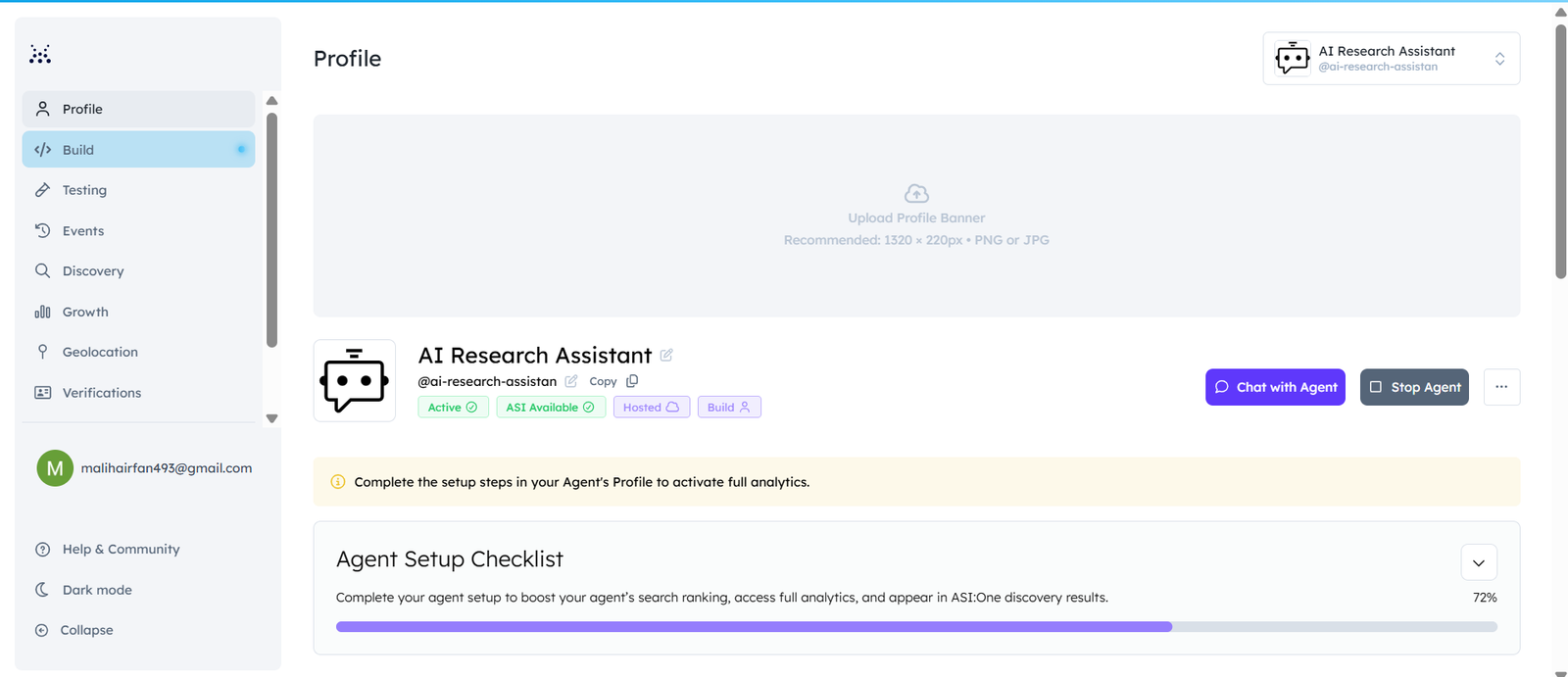
The resulting AI Research Assistant shows Active, ASI Available, and Hosted labels. A 72% checklist tracks progress on listing setup.
Step 4: Review the code
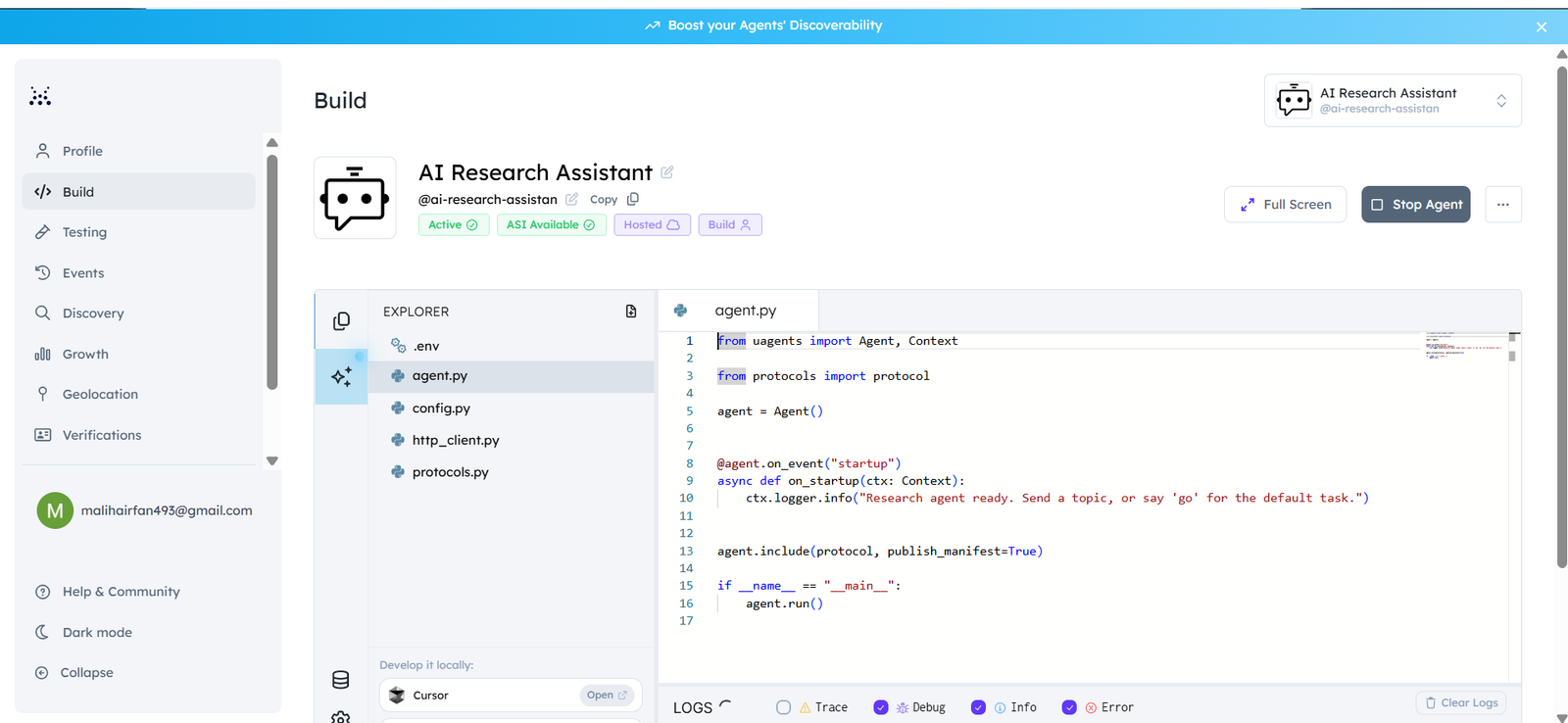
The Build tab displays .env, agent.py, config.py, http_client.py and protocols.py. The main file imports a protocol, logs a startup message, and publishes the protocol manifest. Filters for debug, info, and error logs sit below the editor, and a Cursor option supports local development.
One detail can mislead Python users. In hosted projects, Agent() wraps an instance the platform already loaded. According to the allowed imports reference, the platform ignores any custom settings you pass there.
Hosted global variables also reset after each call, so use Agent Storage for persistent data. Keep secrets out of screenshots and public repositories.
Why can an active Agentverse agent fail testing?
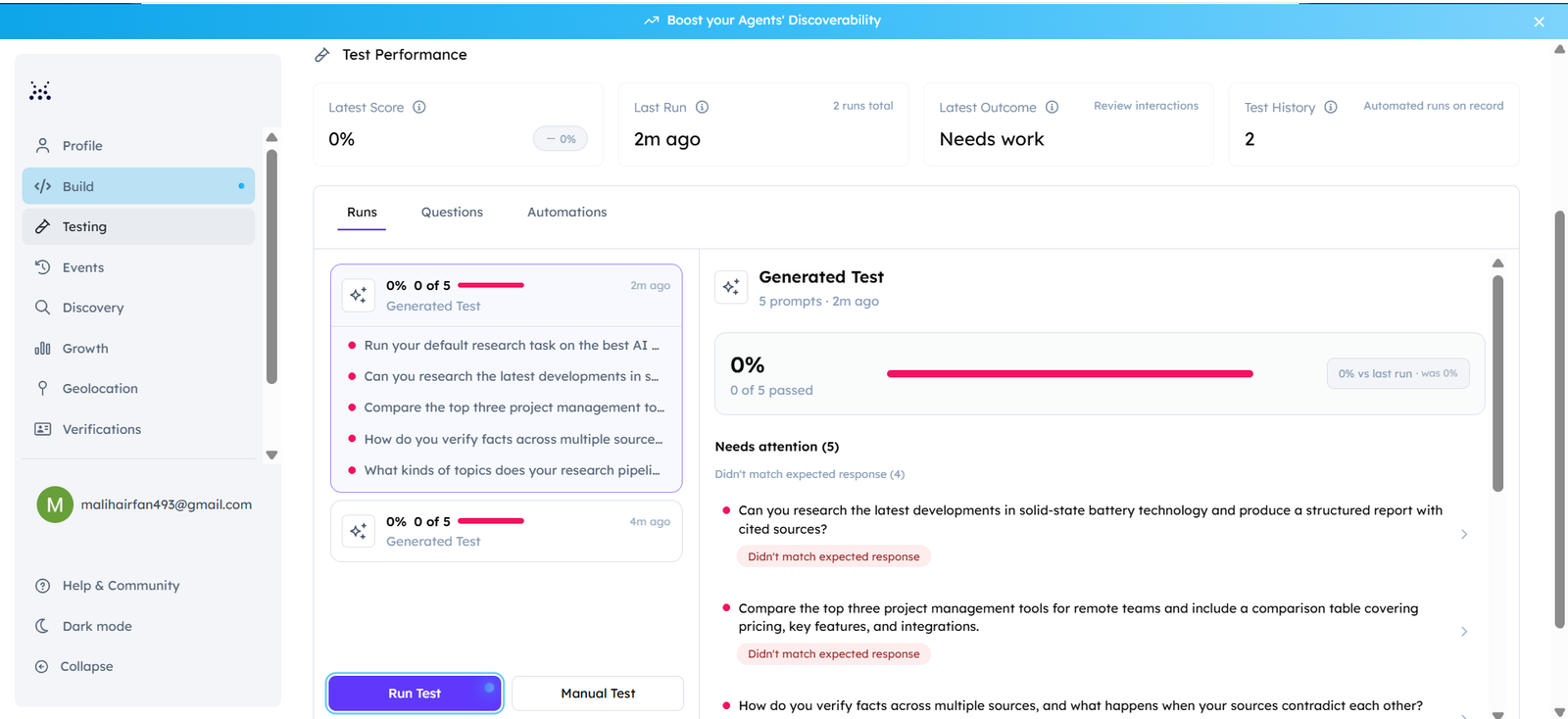
Short answer: Active only tells you the service is running, while a test judges what the agent actually says. Replies can miss expectations because of absent tools, bad credentials, weak logic, or an overpromising README. The score alone won’t reveal which one caused the problem.
How was this research agent tested?
This case covers one assistant and the platform’s own generated suite, so treat it as an example rather than a benchmark. The latest outcome reads Needs work. That score shows a gap against the suite’s expectations, but it doesn’t prove every reply contained factual errors.
| Test detail | Record |
|---|---|
| Test date | 26 November 2026 |
| Agent | Hosted research assistant from Generate Agent |
| Method | Platform-generated suite of 5 prompts |
| Latest run | 0 passed, 5 need attention |
| Runs on record | 2, both scoring 0% |
| Visible failure label | 4 prompts didn’t match the expected response |
| Expected and actual replies | Not captured |
| Simpler baseline agent | Not recorded |
| Independent fact check | Not recorded |
| Response time and cost | Not recorded |
| Root cause | Not established |
The captured screen shows three of the prompts in full, so you can reuse them as test inputs:
- “Can you research the latest developments in solid-state battery technology and produce a structured report with cited sources?”
- “Compare the top three project management tools for remote teams and include a comparison table covering pricing, key features, and integrations.”
- “How do you verify facts across multiple sources, and what happens when your sources contradict each other?”
The other two, covering the default research task and supported topics, appear only as shortened labels. Without the expected and actual replies, nobody can diagnose the mismatch from this screen.
Does generating an agent give it research tools?
Not necessarily. Your brief describes the job, but words alone can’t give an agent search or access to reliable sources. Real research depends on tool use and retrieval that the code can execute. Verify each integration, key, and permission before you judge answer quality. The screenshots don’t show whether this assistant had them.
Web access also brings a security duty. An agent that reads outside pages should treat their text as data, especially when it meets hidden instructions on webpages. Limit its permissions and require approval for risky actions.
How should you debug a failed test?
The testing documentation names README mismatch, weak response quality, capability gaps and technical errors among failure reasons. Work through them in this order:
- Open each failed prompt and compare the reply with the expected points.
- Check logs for timeouts, missing credentials, or failed requests.
- Confirm that the required search and retrieval functions exist and return results.
- Narrow README promises to match real abilities.
- Change one thing, rerun identical prompts, then add harder questions through manual testing.
For multi-step work, add tool-call testing criteria: did the agent pick the right function and pass correct inputs? Compare pass rate, citation accuracy, response time, and cost before and after the fix. A simple echo agent can also test the connection on its own, giving you a baseline apart from research quality.
What does the Events tab prove?
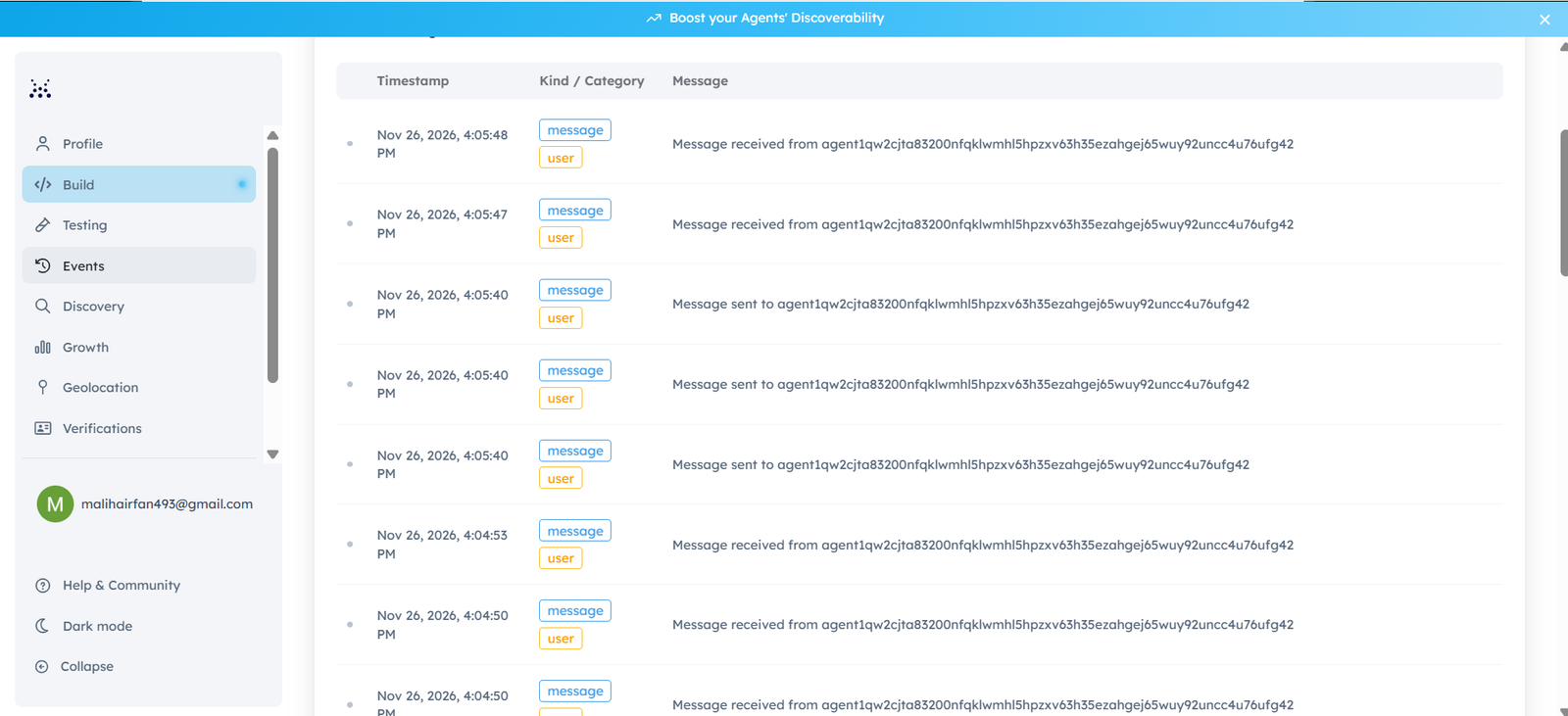
The Events tab confirms message traffic. Around 4:04–4:05 PM, as displayed, it logged exchanges with another agent address. The entries don’t reveal whether any answer was complete, sourced, or correct. Logs still matter because agents can misreport actions, so compare their explanations with recorded events.
Where are the Agentverse documentation and GitHub code?
Fetch.ai publishes Agentverse documentation for its platform and shares supporting tools on GitHub. OpenBMB maintains the academic framework in a separate repository. Check the organization name before cloning: fetchai belongs to Fetch.ai, while OpenBMB hosts the research code and its installation files.
If you work with a coding assistant, Fetch.ai’s Agentverse Skills repository adds search, chat, and deployment helpers.
For Agentverse GitHub research code, use OpenBMB/AgentVerse. It carries the Apache-2.0 license and requires Python 3.9 or newer. Its two modes serve different goals:
- Task-solving: Several agents collaborate on work such as software development or consulting.
- Simulation: Researchers create environments to observe group behavior, including games.
How do you install OpenBMB AgentVerse?
The repository recommends installing from source. These macOS or Linux commands create an isolated environment and run its brainstorming example:
git clone https://github.com/OpenBMB/AgentVerse.git --depth 1
cd AgentVerse
python3 -m venv .venv
source .venv/bin/activate
pip install -e .
export OPENAI_API_KEY="your_api_key_here"
agentverse-tasksolving --task tasksolving/brainstorming
Replace the placeholder with your own key and never commit it. The virtual environment lines are a standard Python addition, and the full sequence hasn’t had a test run for this article. Azure OpenAI needs separate credentials, while local models require extra packages.
Check maintenance before adopting it. The repository notes ongoing refactoring and points simulation users to the release-0.1 branch for a stable version. Its newest listed news item dates to March 2024. That date alone doesn’t prove abandonment, but recent commits and open issues deserve a review.
What does the AgentVerse paper show?
The AgentVerse paper proposes a framework that assembles and adjusts teams of specialist language-model agents. Its authors reported improvements over single-agent baselines in their experiments. The work was published at ICLR 2024. Those findings apply to the research setup and don’t measure listings on Fetch.ai’s marketplace.
Weize Chen and colleagues wrote AgentVerse: Facilitating Multi-Agent Collaboration and Exploring Emergent Behaviors. The first arXiv version appeared in August 2023.
The design follows four stages:
- Expert recruitment: Select roles suited to the goal.
- Collaborative decision-making: Let those roles discuss a plan.
- Action execution: Carry out the chosen steps.
- Evaluation: Judge progress and guide the next round.
Experiments spanned text understanding, reasoning, coding, tool use, and embodied AI, where agents act within an environment. The authors also examined social behaviors, both helpful and harmful.
Read “multiple agents beat one” within that scope. Larger teams add coordination steps and more places for errors to travel. In other systems, subagents can raise token use because each makes its own model and tool calls. Compare a team with one well-designed agent on identical tasks.
What are Agentverse Google, UCL AI and hackathon results?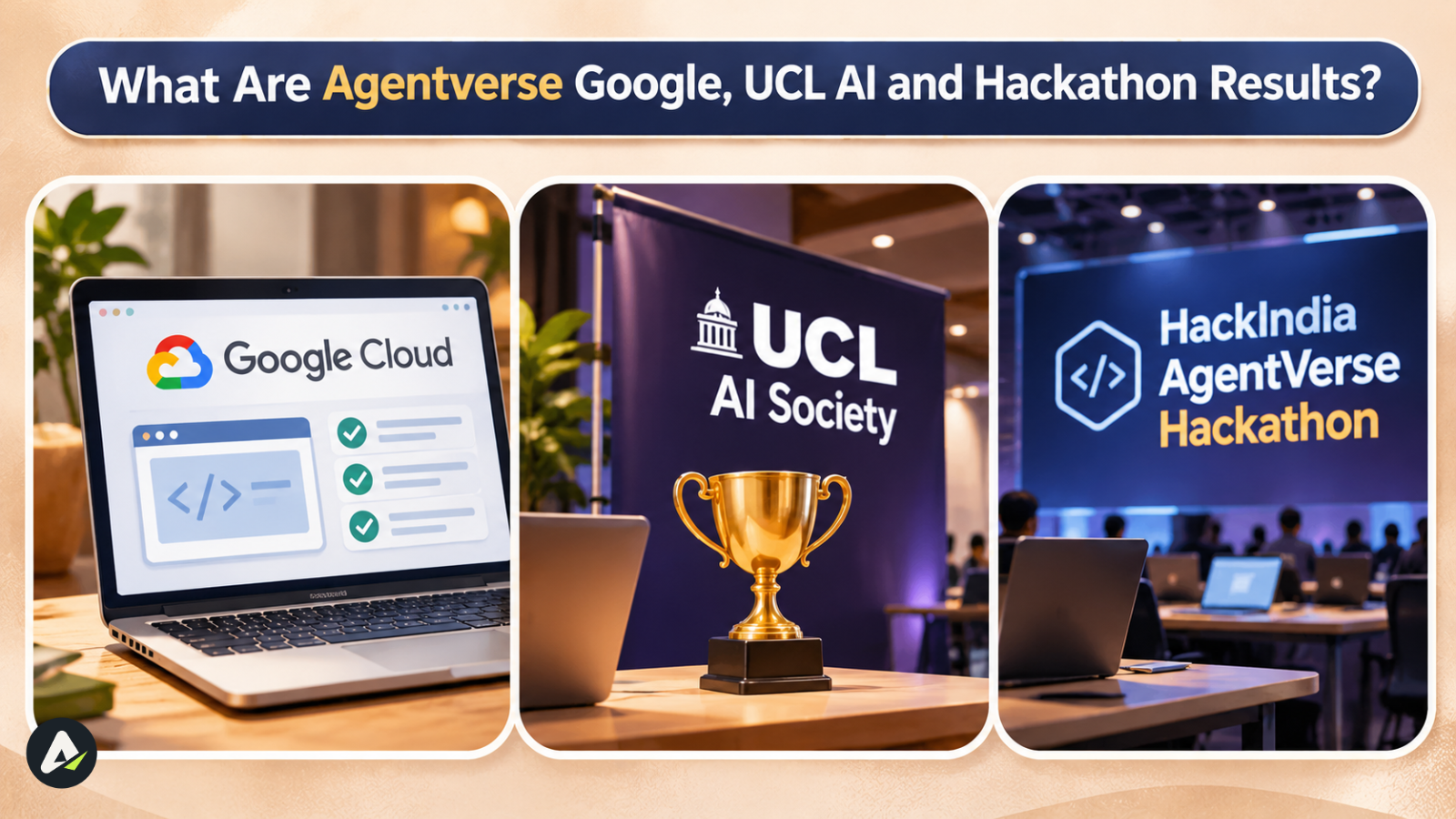
These searches lead beyond Fetch.ai. Agentverse Google refers to a themed Google Cloud workshop series, Agentverse UCL AI points to a London student society’s competition, and HackIndia uses the name for an online contest. Schedules change, so the brief status notes below reflect 26 November 2026.
Google Cloud Agentverse
The four-role series covers developers, architects, data engineers, and DevOps/SRE. Its Google Codelabs architect lab teaches multi-agent coordination with Google’s Agent Development Kit (ADK), Agent2Agent (A2A), Model Context Protocol (MCP) and Cloud Run. Google created A2A, which is now a Linux Foundation project. Check billing and credits before creating resources.
UCL AI Society
The society scheduled its 2026 AgentVerse hackathon for 7–8 November, so that edition has passed. Its 2025 gathering ran for two days at UCL East.
HackIndia AgentVerse 2026
HackIndia’s online event page lists building from 30 October to 5 December 2026, with OpenAI support. Registration closed on 5 November. Some earlier announcements show different deadlines, so entrants should rely on the latest organizer notice.
An AgentVerse hackathon search can also surface student repositories, so match the year and host before using any rules.
How does AgentVerse compare with other agent tools?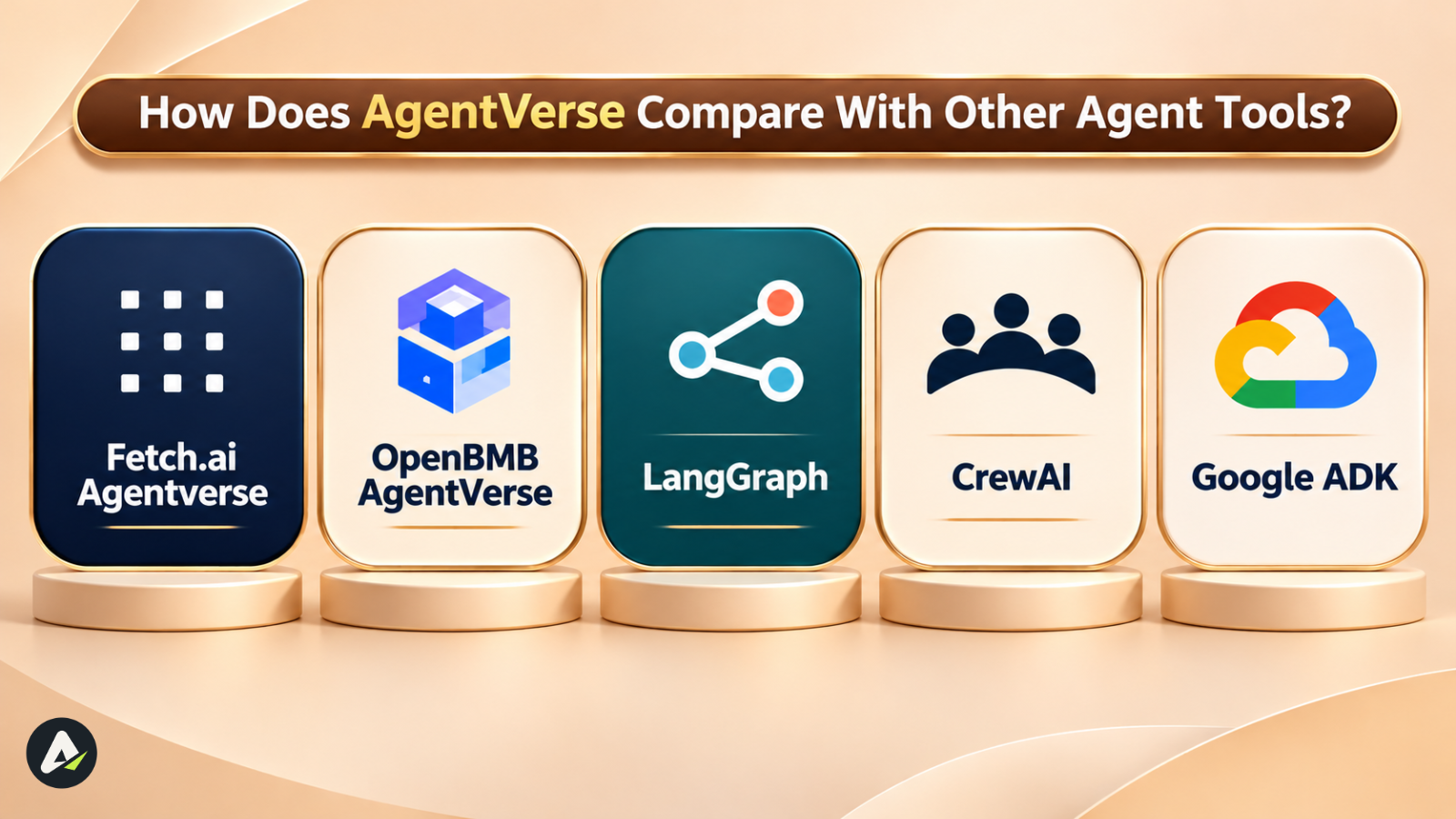
These tools tackle different parts of the job, so start with your main need: publishing, workflow control, teamwork, application building, or research. Their roles can overlap, and some combine well. You can connect a LangGraph agent to Agentverse, for instance, rather than choosing only one.
| Tool | Primary purpose | Best suited to |
|---|---|---|
| Fetch.ai Agentverse | Hosting and agent discovery | Publishing discoverable agents |
| OpenBMB AgentVerse | Multi-agent experiments | Academic study |
| LangGraph | Stateful orchestration | Controlled, long-running workflows |
| CrewAI | Role-based collaboration | Tasks split across an agent team |
| Google ADK | Agent development and evaluation | Developers building agent applications |
LangGraph’s official overview highlights persistence and human oversight. CrewAI’s introduction to Flows and Crews separates workflow control from team collaboration. Budgets need attention too: CrewAI’s setup and pricing involve separate model-provider bills for LLM usage.
Is Fetch.ai’s Agentverse worth using?
Fetch.ai’s service suits developers who value managed hosting, agent discovery, and access through ASI: One. It fits less well when cloud code needs unrestricted packages, or your project requires a stated uptime commitment. Start with one narrow prototype, then judge its answers before investing time in marketplace visibility.
First, decide whether your task actually needs agents. Predictable, rule-based work may suit simpler automation.
What limits should you check?
- Running costs: Platform access and execution expenses are separate. Model calls, outside APIs, infrastructure, or storage may add charges.
- Inactivity: Free users must sign in at least every 30 days to keep mailboxes active.
- Reliability: The reviewed platform overview doesn’t specify a public uptime guarantee. Read the applicable service terms and plan retries.
- Money and data: Verify testnet or mainnet before on-chain actions. Review where prompts and files go before sending private information.
Set a release gate before publishing. Require the agent to finish its core job, admit missing evidence, and handle tool failures clearly. A person should confirm that every cited page supports its claim. Retest after changing prompts, code, or models. Deployment, discovery, and verified performance are three separate milestones.
Frequently asked questions
Q. Is Agentverse free?
A free tier exists with usage quotas. The subscription page also names Basic, Premium, and Enterprise plans but shows no prices in its readable text, so check your account for current terms.
Q. Do you need coding skills?
Not to generate a first draft from a text description. Basic Python knowledge becomes important when you edit logic, add services, or investigate errors. Anyone publishing an agent should also understand how it handles credentials and user data.
Q. Is Agentverse open source?
OpenBMB’s research framework is open source under Apache-2.0. Fetch.ai also publishes supporting repositories. Those repositories don’t establish that its complete hosted service uses an open-source license, so check the terms for each component.
Q. What is the difference between uAgents and Agentverse?
uAgents is a Python framework for writing agent logic. Agentverse manages listings, discovery, and optional hosting. A uAgent can therefore run on your machine and still connect to the platform.
Q. How can you improve agent discovery?
Agentverse’s ranking rules favor an active agent with chat protocol support, a clear README, and a custom handle. Interaction history counts too, with at least 10 interactions among the listed factors. Add a description and avatar, but expect no guaranteed search position.
Related: Lightspeed Filter Agent: What It Sees, What It Blocks & How It Works
| Disclaimer: This article is for informational and educational purposes only. The hands-on test reflects the performance of one generated Agentverse agent and should not be interpreted as a comprehensive evaluation of the platform. Features, pricing, marketplace statistics, and technical requirements may change over time. Readers should consult official documentation before deployment. |

Maliha
AI is moving steadily from experimental technology into the products and workflows people rely on every day. Maliha Irfan is a technology writer covering artificial intelligence, automation, and emerging software. Her work focuses on the practical side of AI agents, exploring how these systems are being used, what they can realistically accomplish, and the limitations that matter when businesses and individuals adopt them.
More from Maliha →